
8 Bay NAS Case
5.0Editor score
8 hot-swap 3.5 inch HDD bays
Dual chamber design for airflow
Supports Micro-ATX motherboards
Building a reliable network attached storage system requires the right foundation. An ATX NAS computer case provides the necessary space and airflow for multiple hard drives and critical components.
We evaluated ten top-rated cases based on drive capacity cooling efficiency and build quality. Our analysis covers everything from compact micro tower designs to full tower enterprise solutions.
Each pick highlights unique strengths for different storage needs and budgets. Remember that pricing fluctuates so always verify current deals before making your final purchase decision.
5.0Editor score

4.7Editor score
4.6Editor score
As an Amazon Associate we earn from qualifying purchases.
This table provides a side-by-side comparison of the top ten ATX NAS cases. Review the drive capacity motherboard compatibility and cooling features to find the perfect match for your build.


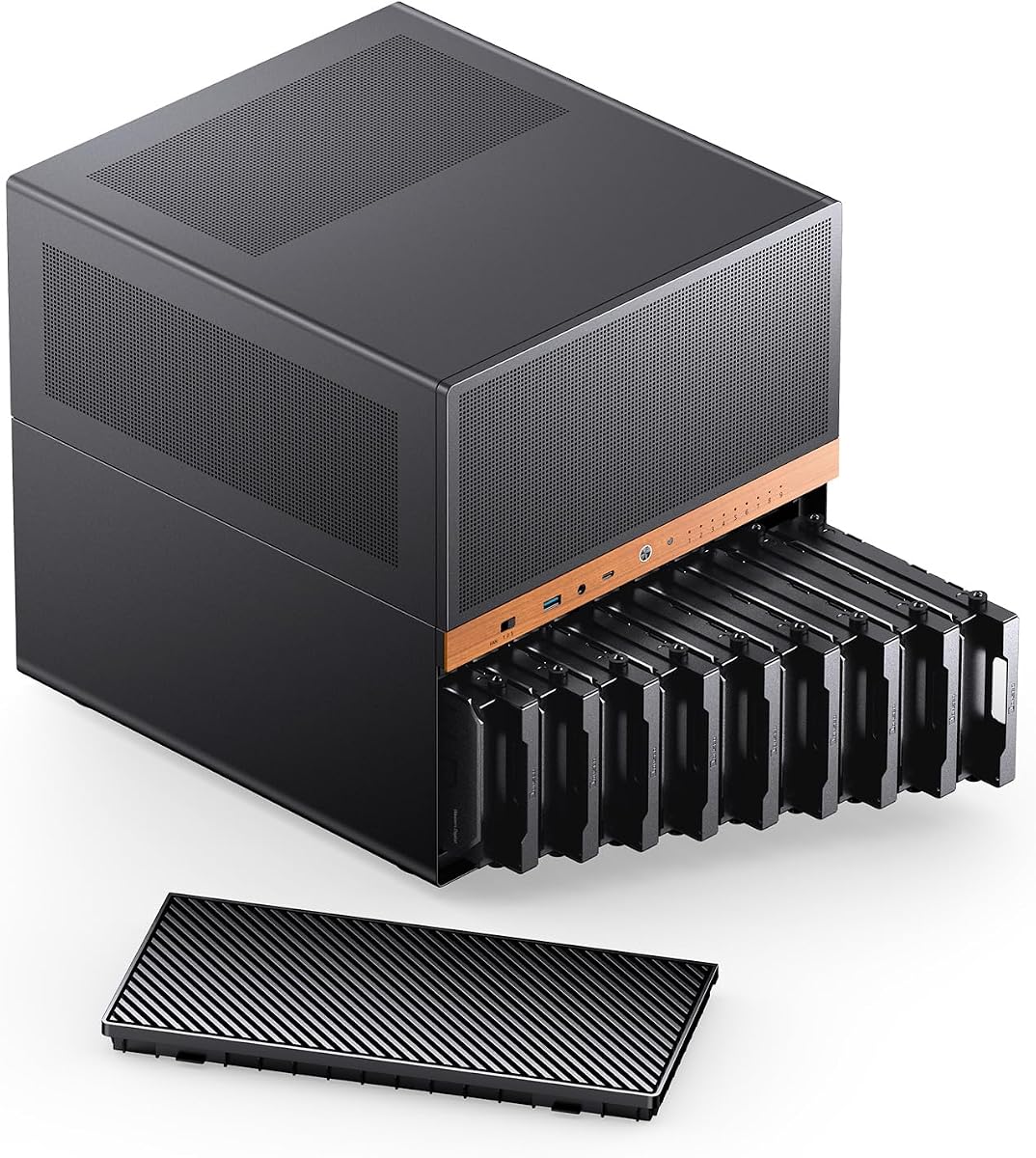
The JONSBO N5 stands out as the top choice for serious home server enthusiasts. With a high rating and robust specifications it offers an unmatched combination of storage density and build quality.
We may earn a commission when you buy through this link, at no additional cost to you.
Its 12 plus 4 drive bay configuration allows for extensive data storage. The solid wood veneer front panel adds a premium touch to any home office setup.
The large size and premium materials contribute to the higher cost. However the build quality and cooling performance justify the investment for long-term reliability.
Ideal for users needing high capacity and professional aesthetics. This case is recommended for those building a dedicated NAS or home media server.
Supports up to 12 3.5 inch hot-swap HDDs and 4 2.5 inch SSDs for maximum flexibility.
Features North American black walnut veneer for a sophisticated look that blends into home decor.
We may earn a commission when you buy through this link, at no additional cost to you.
This 8 Bay NAS Case delivers exceptional value with its perfect user rating. It provides a practical solution for users needing substantial storage without a high price tag.
We may earn a commission when you buy through this link, at no additional cost to you.
The dual-chamber design isolates storage from heat-generating components. Hot-swappable bays make maintenance easy while magnetic front panels simplify access.
The smaller size means less total drive capacity compared to full towers. This trade-off is acceptable for users focused on compact and affordable solutions.
Perfect for budget-conscious builders or those new to NAS projects. It offers reliability and essential features without unnecessary premium costs.
Dual chamber design separates drives from CPU and GPU to ensure optimal operating temperatures.
Includes HDD handles screws and cable ties for immediate setup without buying extra parts.
We may earn a commission when you buy through this link, at no additional cost to you.
The JONSBO N6 combines premium materials with advanced cooling features. It targets users who want a balance between storage capacity and desktop-friendly dimensions.
We may earn a commission when you buy through this link, at no additional cost to you.
Its nine drive bay configuration offers significant space for media files. The built-in cooling for the drive bay helps maintain hard drive longevity.
The high price may deter casual builders. However the flexibility of power supply positions and the premium wood finish justify the cost for enthusiasts.
Recommended for advanced users seeking a high-end personal server. It provides the best blend of aesthetics and performance in its class.
Supports both ATX and SFX power supplies with three installation positions for custom build layouts.
Features dedicated fans within the drive bay to prevent overheating during heavy data loads.
We may earn a commission when you buy through this link, at no additional cost to you.
The DARKROCK Classico Storage Master prioritizes airflow and drive capacity. It is designed for systems that require extensive storage alongside high-performance components.
We may earn a commission when you buy through this link, at no additional cost to you.
Its mesh front and side panels ensure unrestricted airflow. The vertical GPU mount helps reduce sag and improves thermal management for graphics cards.
Documentation on specific internal layouts is less detailed. Users may need to verify exact drive cage dimensions before purchase.
A strong candidate for those prioritizing cooling and storage density. It offers a compelling mix of features for mid-range NAS builds.
Mesh panels on front and side allow maximum air intake for efficient component cooling.
Includes a vertical mounting option for GPUs to prevent sagging and improve clearance.
We may earn a commission when you buy through this link, at no additional cost to you.
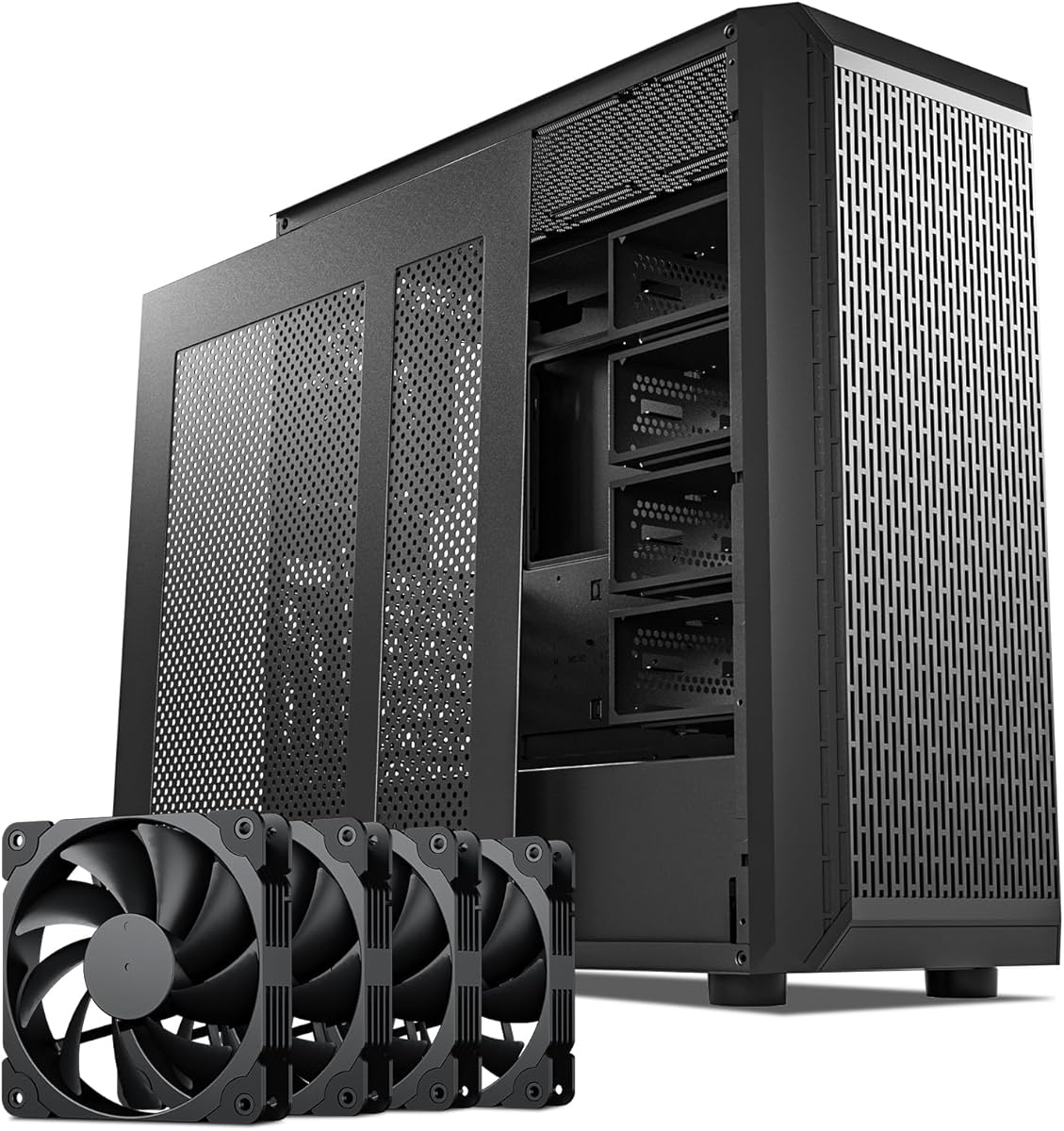
The Rosewill Helium NAS Duo offers a mid tower design for standard ATX builds. It includes four PWM fans to ensure adequate cooling for storage drives.
We may earn a commission when you buy through this link, at no additional cost to you.
Its compatibility with 360mm AIO coolers makes it versatile for CPU cooling. The inclusion of USB 3.2 Type-C adds modern connectivity options.
The lower rating suggests potential issues with build quality or design. Buyers should review user feedback carefully before committing.
Suitable for users prioritizing standard tower form factors. It offers a balanced feature set but requires due diligence regarding quality.
Equipped with four 140mm PWM fans to maintain steady airflow throughout the chassis.
Features a front panel USB 3.2 Type-C port for fast data transfers.
We may earn a commission when you buy through this link, at no additional cost to you.
The KM7B Full Tower offers impressive expansion options for enterprise-grade home labs. Its drive bay count exceeds many competitors in the mid-range segment.
We may earn a commission when you buy through this link, at no additional cost to you.
Support for E-ATX motherboards and multiple PCIE slots allows for complex networking setups. The magnetic front panel simplifies access to internal components.
The lack of available ratings makes it harder to gauge reliability. Buyers might prefer cases with more verified user feedback.
An intriguing option for those needing extreme expansion capacity. It is best suited for technical users comfortable with less documented hardware.
Offers 13 HDD bays and 7 plus 3 PCIE slots for extensive storage and network expansion.
Magnetic front panel allows for quick and quiet access to internal components.
We may earn a commission when you buy through this link, at no additional cost to you.
The Generic ZhenLoong Full Tower is built for maximum storage density. It supports up to fifteen hot-swappable drives and redundant power supplies for reliability.
We may earn a commission when you buy through this link, at no additional cost to you.
Its compatibility with EEB motherboards caters to enterprise-class builds. Eight full-height PCIE slots allow for multiple network or RAID cards.
Shipping times are significantly longer than standard domestic options. This delay might be inconvenient for urgent project needs.
Best for users planning large-scale enterprise storage systems. It offers top-tier specs for those willing to wait for delivery.
Supports redundant power supplies and EEB motherboards for professional-grade stability.
Includes 8 full-height PCIE slots and 15 SATA3 backplane connections for extensive expansion.
We may earn a commission when you buy through this link, at no additional cost to you.
Silverstone delivers a premium build with the SST-TJ04B-E. It features a thick aluminum front panel and a built-in drive cooler to protect sensitive storage media.
We may earn a commission when you buy through this link, at no additional cost to you.
The positive pressure design reduces dust accumulation. This helps keep the system clean and reduces the need for frequent maintenance.
The high price reflects its legacy status and build materials. Modern cases may offer more features for a lower cost.
Recommended for traditionalists seeking durability and quiet operation. It remains a solid choice for high-end storage towers.
Features a built-in hard drive cooler to maintain optimal temperatures for sensitive media.
Uses a 7mm thick aluminum front panel for a robust and classic aesthetic.
We may earn a commission when you buy through this link, at no additional cost to you.
The JONSBO N4 is a compact micro ATX solution with an elegant walnut wood finish. It offers eight drive bays with four hot-swappable slots.
We may earn a commission when you buy through this link, at no additional cost to you.
Its small size makes it ideal for living rooms or small offices. The USB 3.2 Type-C port ensures modern connectivity for external devices.
The smaller chassis restricts GPU and PSU options. Users must verify component lengths before building.
A great choice for aesthetic-conscious users needing moderate storage. It balances style and functionality in a small package.
Features a slim micro ATX chassis with a North American walnut wood panel.
Includes a front USB 3.2 Gen 2 Type-C port for high-speed data transfer.
We may earn a commission when you buy through this link, at no additional cost to you.
The Silverstone CS382 offers enterprise features for home use. It supports both SAS and SATA drives and includes LED indicators for drive status.
We may earn a commission when you buy through this link, at no additional cost to you.
Hot-swappable trays allow easy drive replacement without powering down. This is essential for 24-7 NAS operations.
The drive capacity is limited to eight hot-swappable bays. It may not suit users needing massive storage density.
Recommended for those needing professional-grade reliability. It is a robust choice for critical data storage tasks.
Supports high-performance SAS-12G drives with LED status indicators for easy monitoring.
Hot-swappable drive trays allow for easy maintenance without shutting down the system.
We may earn a commission when you buy through this link, at no additional cost to you.
Selecting the right case involves balancing drive capacity with build quality and airflow. Here are the key factors to consider.
The primary purpose of a NAS case is to hold multiple hard drives. Evaluate how many 3.5 inch HDDs and 2.5 inch SSDs you need now and in the future. Some cases offer 15 or more bays for enterprise scale setups while others focus on eight to ten drives for home users. Ensure hot-swappable bays are included if you plan to replace drives frequently.
Prioritize a case that matches your current needs and allows for modest future expansion.
Check which motherboard form factors the case supports. Standard ATX is common but some larger cases support E-ATX or CEB boards for advanced networking. Smaller cases often limit you to Micro-ATX or Mini-ITX boards. Ensure the internal spacing accommodates your chosen motherboard and any expansion cards like network adapters or RAID controllers.
Confirm the case supports your intended motherboard size to avoid fit issues.
The power supply placement and size constraints are critical. Some cases allow standard ATX units while others require smaller SFX or FLEX units. Redundant power support is rare but available in high-end models. Consider the total power requirement of your drives and CPU when choosing a compatible PSU size.
Verify that the case supports your preferred power supply type and size.
Hard drives generate significant heat which can reduce lifespan. Look for mesh panels or dedicated ventilation to ensure air moves freely. Many cases include pre-installed fans to maintain consistent airflow. Ensure there are fan mounts for adding more airflow if you plan to use high-performance components.
Choose a design with open front panels and dedicated fan mounts to keep drives cool.
The chassis material affects durability and noise dampening. Steel frames provide strength while aluminum panels offer a premium look. Thicker gauge steel reduces vibration which is vital for hard drive longevity. Check if the front panel is magnetic or screw-mounted for ease of access and durability.
Opt for thick steel frames and quality materials to ensure long-term reliability.
NAS builds often require multiple expansion cards for networking or storage controllers. Check the case supports full-height PCIE slots. Some cases offer more slots than others allowing for future upgrades. Ensure the slot count matches your planned network and RAID controller needs.
Ensure sufficient full-height PCIE slots are available for your expansion needs.
Modern NAS cases should offer convenient front access. Look for USB 3.2 Type-C ports for fast data transfers. Additional USB 3.0 ports are useful for connecting external drives or peripherals. Audio ports may be included if you plan to use the system for media purposes.
Verify the presence of modern USB Type-C and sufficient USB 3.0 ports.
The external size determines where you can place the unit. Full towers offer maximum capacity but consume desk space. Mid or mini towers fit better on shelves or under desks. Measure your intended location to ensure the chosen case fits comfortably without obstructing airflow.
Measure your available space to select a form factor that fits your environment.
Install hard drives securely using the provided hot-swap cages or screws. Ensure all drive cables are connected to the SATA backplane or motherboard. Route power cables neatly to maintain optimal airflow within the chassis. Test each drive individually before enabling RAID configurations.
Regularly clean dust from fans and filters using compressed air. Keep the case in a cool well-ventilated area to prevent overheating. Monitor drive health regularly using system software to detect early signs of failure. Replace any worn fans promptly to maintain consistent airflow.
Back up critical data to external drives or cloud services independently. Use surge protectors to guard against power fluctuations. Check drive temperatures during heavy loads to ensure the cooling system works efficiently. Maintain a log of maintenance tasks and drive replacements for future reference.
Most NAS cases start with four to eight 3.5 inch drive bays. For home users this provides enough space for a basic RAID array. Enterprise or advanced users may need fifteen or more bays for large storage pools. Always verify hot-swap support if you need flexible drive management.
Yes but standard cases lack dedicated drive cages and cooling for multiple hard drives. NAS cases feature better airflow to keep drives at safe temperatures. They often include backplanes for easier cable management. Using a dedicated NAS case extends the lifespan of your storage media.
Hot-swap bays allow you to replace failed drives without shutting down the server. This is essential for 24-7 NAS operations where downtime must be minimized. For occasional home use standard bays may suffice. Hot-swap adds convenience and reduces downtime during maintenance.
Most NAS cases support one or two GPUs depending on length and clearance. Dedicated NAS builds often do not require GPUs for basic storage. Some advanced models like the N5 support up to four GPUs for AI tasks. Verify specific clearance details before installing a graphics card.
High-end cases like the ZhenLoong support EEB motherboards for enterprise expansion. Most consumer cases support ATX Micro-ATX or Mini-ITX boards. If you need maximum PCIE slots ensure the case explicitly supports larger form factors. Check compatibility lists carefully before purchasing.
Most cases do not include power supplies unless explicitly stated. You will need to purchase a separate ATX or SFX power unit. Redundant power support is rare but available in premium models. Verify the maximum supported PSU size before buying.
Mesh panels allow maximum air intake to cool internal components efficiently. This reduces drive temperatures and prolongs hardware lifespan. Mesh designs also improve airflow for high-end CPU and GPU cooling. They are preferred for builds with high thermal loads.
Some ATX cases support SFX supplies with adapters. Cases designed for flexibility allow both ATX and SFX units. Check the case documentation for supported PSU dimensions. Using a smaller PSU may require a dedicated mounting bracket.
The JONSBO N5 stands out for its massive drive capacity and premium design. Budget builders will appreciate the value and efficiency of the 8 Bay NAS Case. Enthusiasts seeking a polished look will prefer the JONSBO N6 with its wood finish.
Prioritize airflow and hot-swap capability for reliable long-term operation. Ensure the case supports your motherboard and power supply requirements. A well-chosen case protects your hardware and simplifies maintenance.
Prices vary widely so check current listings before purchasing. Verify all specs to ensure the case meets your specific storage needs. With the right case your NAS build will deliver years of reliable service.