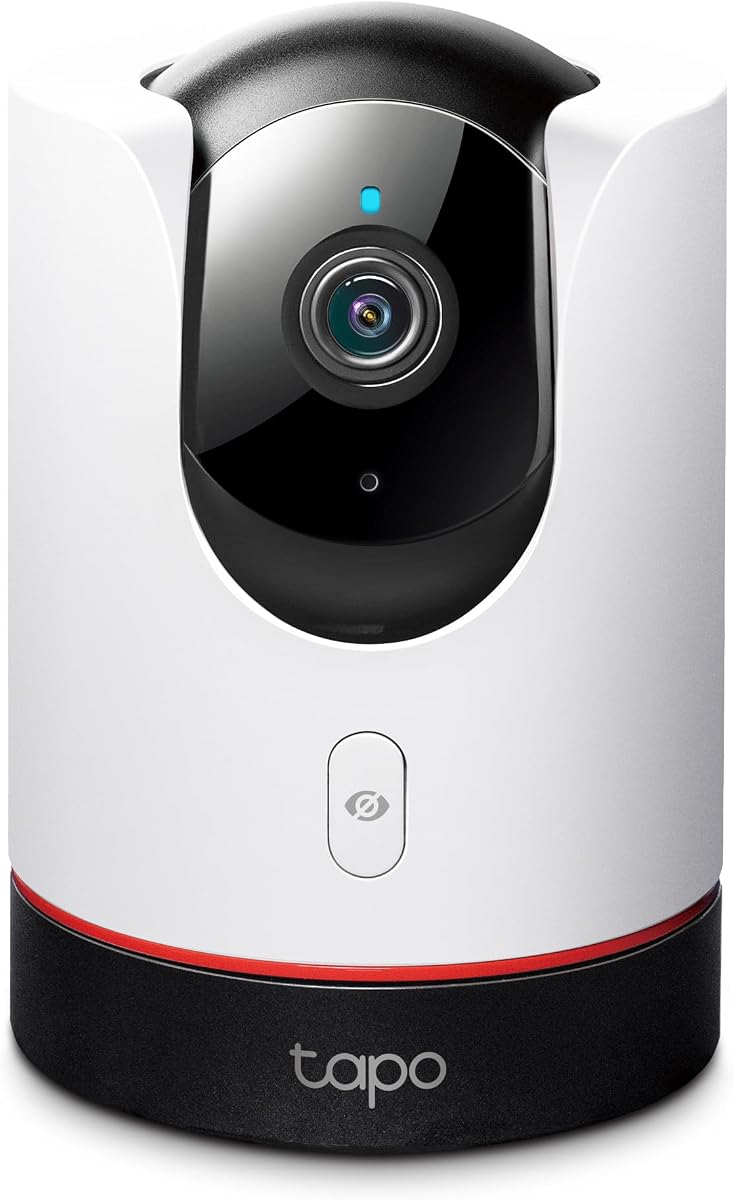
TP-Link Tapo C225
4.5Editor score
2K QHD Resolution
360 Degree Pan Tilt
Physical Privacy Mode
Starlight Sensor Night Vision
This comprehensive guide compares the top Apple Homekit security cameras for October 2026, evaluating features, resolution, and privacy to help you choose.
Securing your home with smart technology requires reliable cameras that integrate seamlessly with your existing ecosystem. Apple Homekit security cameras offer end to end encryption and privacy focused features that give you peace of mind while monitoring your property.
We have evaluated the leading models available in the market by focusing on resolution quality, smart detection capabilities, storage options, and ecosystem compatibility. Our analysis ensures you receive accurate information to make an informed decision for your specific surveillance needs.
Each product pick highlights key strengths, limitations, and ideal use cases to help you find the right fit. Please note that availability and pricing can change frequently so we recommend verifying current details before making a purchase decision.
4.5Editor score
4.3Editor score
4.3Editor score
The following table provides a side by side comparison of the top rated Homekit compatible security cameras. Use this overview to quickly assess resolution, field of view, and unique features across all models.



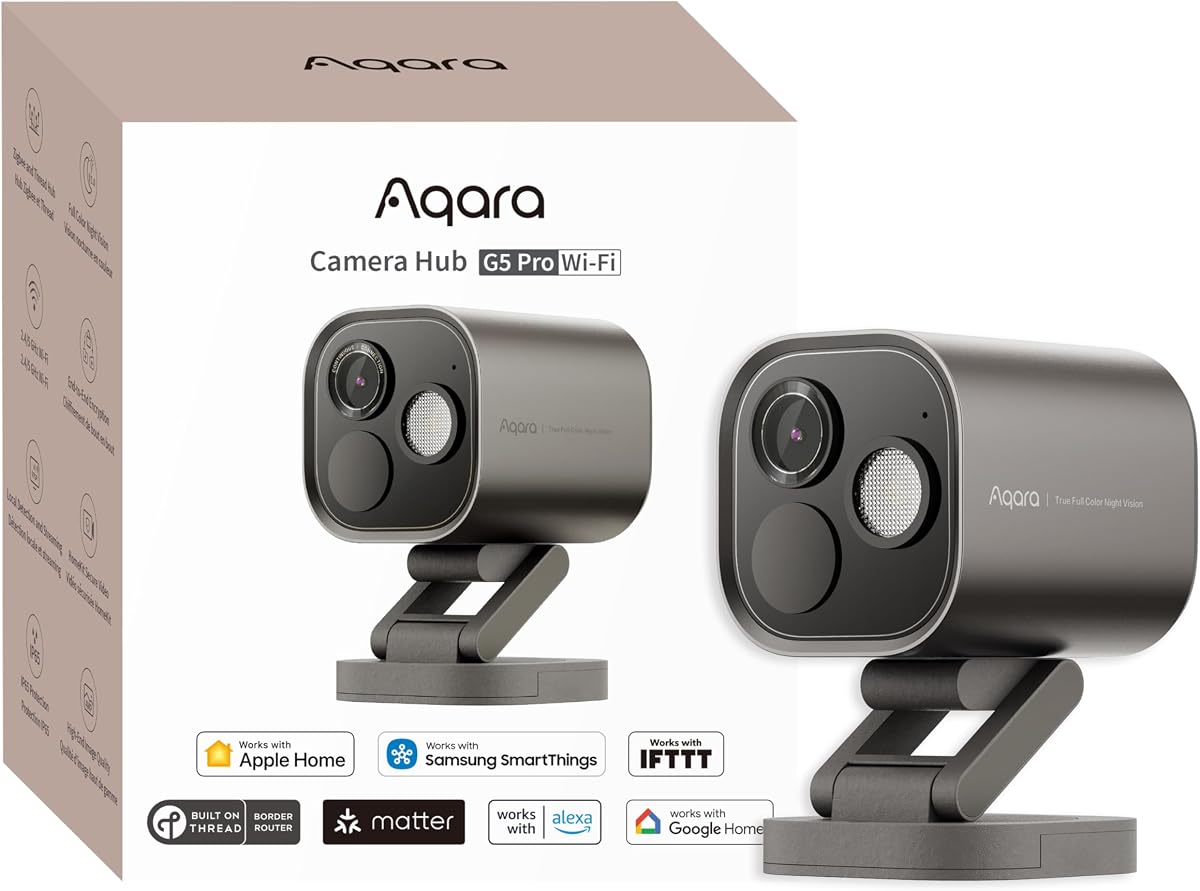
The Aqara 4MP Camera Hub G5 Pro WiFi stands out as a top contender for Homekit security users who demand high resolution and privacy. It delivers exceptional 4MP imaging with true color night vision capabilities that eliminate the need for traditional infrared glow. This model combines advanced local AI detection with robust hub functionality making it a versatile centerpiece for your smart home setup.
We may earn a commission when you buy through this link, at no additional cost to you.
Its standout feature is the ability to process visual and sound data locally on the device ensuring your personal information stays private. The camera supports detailed object recognition including faces vehicles and packages while also detecting abnormal sounds like crying or alarms. Additionally it integrates seamlessly into the Aqara ecosystem allowing you to connect Zigbee and Thread devices directly through the camera.
While the reliance on an active iCloud subscription for Homekit Secure Video may be a consideration for some users the benefits of end to end encryption and local processing are substantial. The physical design includes a dimmable spotlight that aids in identification without relying on visible infrared light. Users should note that continuous 24/7 recording requires RTSP configuration with local storage.
This camera is ideal for homeowners who want a high performance security solution that doubles as a smart home hub. It offers excellent clarity for day and night monitoring while providing advanced automation triggers based on specific visual or audio events. For those prioritizing privacy and ecosystem integration this model offers a compelling balance of features and performance.
The built in Neural Processing Unit enables precise detection of faces vehicles and animals without uploading data to the cloud. It also listens for specific abnormal sounds allowing automations to trigger even during internet outages.
Unlike traditional cameras that switch to black and white in low light this model uses a large aperture sensor to capture true color images at night. A built in spotlight enhances visibility further improving intruder deterrence.
We may earn a commission when you buy through this link, at no additional cost to you.
The TP-Link Tapo C225 offers an exceptional value for those seeking a reliable indoor security camera with Homekit integration. It captures crisp 2K QHD video and provides a full 360 degree horizontal field of view ensuring no corner of your room goes unnoticed. This camera is particularly appealing for budget conscious buyers who do not want to sacrifice essential features like physical privacy protection.
We may earn a commission when you buy through this link, at no additional cost to you.
Its physical privacy mode is a standout feature that blocks the lens housing when you want absolute visual privacy ensuring no recordings occur. The starlight sensor allows for clear imaging even in very low light conditions without needing additional illumination. Advanced AI technology accurately identifies people pets and vehicles reducing false alerts and keeping you informed of relevant activity.
While it requires a separate microSD card for local storage this flexibility allows you to choose the capacity that fits your needs without ongoing subscription costs. The design has also been recognized with a Red Dot Award reflecting its high build quality and aesthetic appeal. Users should note that it is designed for indoor use only and lacks weather resistance for outdoor mounting.
This model is perfect for renters or homeowners looking for an easy to use indoor solution that integrates well with Apple devices. It balances cost and performance effectively providing clear video quality and smart detection capabilities. For those who prioritize physical privacy and affordability this camera is an excellent choice for home monitoring.
A physical shutter blocks the lens when privacy mode is activated giving you complete visual assurance that no one is watching. This is a critical feature for users concerned about data security and privacy.
The motorized pan and tilt mechanism allows the camera to scan the entire room ensuring every angle is monitored. This eliminates the need for multiple cameras in smaller spaces.
We may earn a commission when you buy through this link, at no additional cost to you.
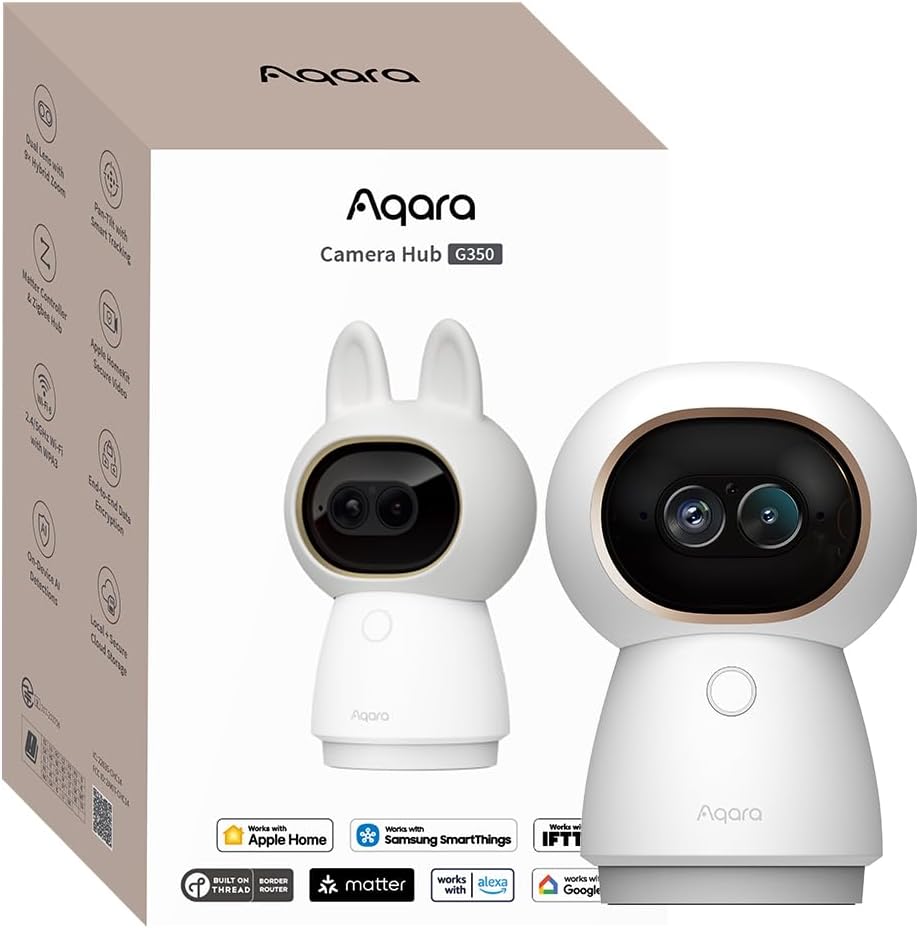
The Aqara Indoor Security Camera G350 represents the pinnacle of indoor monitoring technology with its 4K dual lens system and advanced hub capabilities. It combines a wide angle lens with a telephoto lens to deliver both panoramic views and zoomed details simultaneously. This camera is designed for users who want top tier image quality and extensive smart home integration in a single device.
We may earn a commission when you buy through this link, at no additional cost to you.
Its AI tracking features are sophisticated allowing the camera to follow subjects with close up capture without losing clarity. The gesture recognition adds a layer of convenience allowing you to trigger scenes with a simple hand signal. Privacy is prioritized with a physical mode that retracts the lens completely providing visual proof that recording has stopped.
As a hub it supports up to 80 Aqara Zigbee devices or a mix of Zigbee and Thread devices centralizing your smart home control. While the price is higher than standard cameras the dual functionality as a security camera and a hub justifies the investment. The local processing ensures data remains within your home without unnecessary cloud uploads.
This camera is ideal for tech enthusiasts who want the best in image quality and automation capabilities. It offers unparalleled detail for indoor monitoring while integrating seamlessly with the Matter ecosystem. For those willing to invest in a premium solution this model delivers superior performance and convenience.
The combination of a 4K wide angle lens and a 2.5K telephoto lens allows you to see the whole room and zoom in on details simultaneously. This dual view is unique in the market.
You can trigger automation scenes using specific hand gestures like a wave or an OK sign. This adds a new interactive dimension to home security control.
We may earn a commission when you buy through this link, at no additional cost to you.
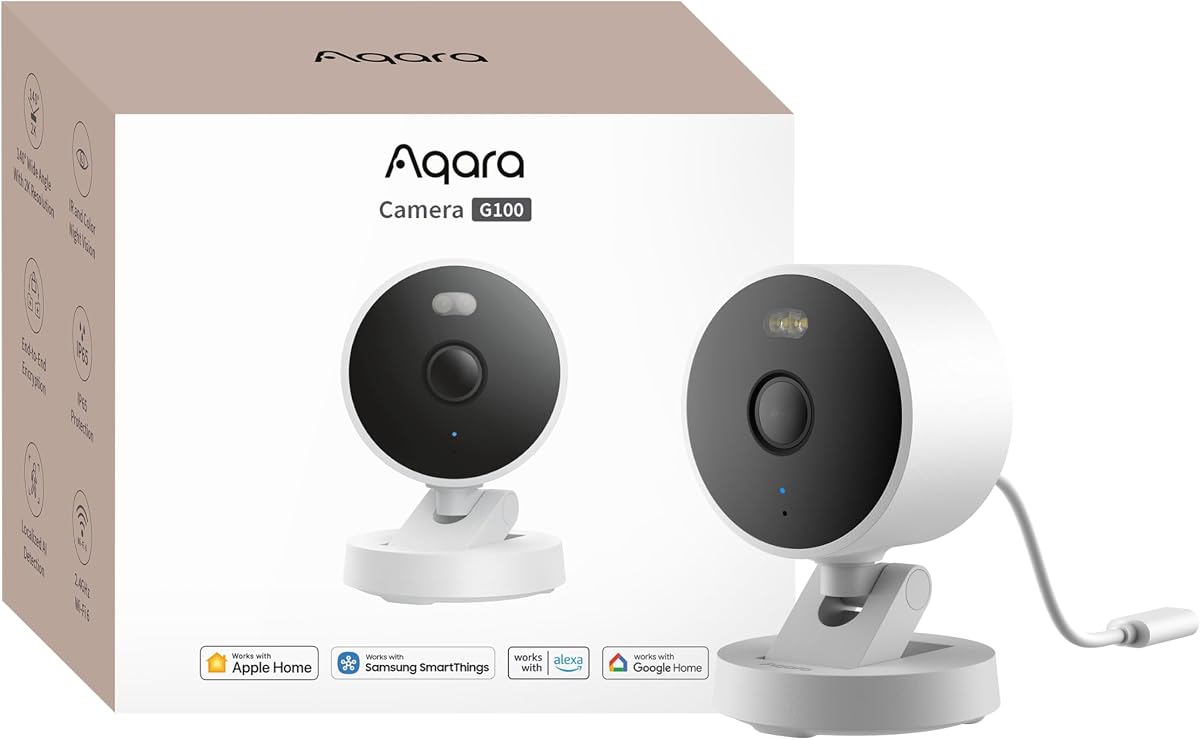
The Aqara 2K Indoor/Outdoor Security Camera G100 is a versatile option designed to handle both interior and exterior monitoring. It features durable IP65 housing that withstands rain and dust making it suitable for porch or yard placement. With its 2K clarity and wide field of view it provides detailed images day and night without compromising on performance.
We may earn a commission when you buy through this link, at no additional cost to you.
It offers two night vision modes including a spotlight color mode that illuminates dark areas for full color recording. The local AI detection allows the camera to distinguish between people and pets reducing unnecessary notifications. You can store footage locally on a microSD card or use cloud storage options for enhanced security and encryption.
Users should be aware that the night vision modes need to be manually enabled in the app as they do not activate automatically. The power adapter is not included in the box which is a minor inconvenience during setup. However the support for Wi-Fi 6 ensures stable connectivity even in congested network environments.
This camera is a solid choice for users who need a flexible solution for multiple environments. It balances indoor and outdoor functionality while providing robust security features and privacy protection. For those seeking a reliable camera for varied mounting locations this model offers excellent adaptability.
With IP65 protection the G100 can be used indoors or outdoors without worrying about weather damage. This flexibility allows you to use one camera model for different areas of your home.
The spotlight provides illumination allowing the camera to record in color even at night. This makes it easier to identify details like clothing or vehicle colors.
We may earn a commission when you buy through this link, at no additional cost to you.
The Eve Cam is designed exclusively for Apple Homekit Secure Video ensuring maximum privacy and data security for your home. It processes video locally within your home preventing your personal footage from being uploaded to external servers. This approach provides peace of mind for users who prioritize data protection above all else.
We may earn a commission when you buy through this link, at no additional cost to you.
It sends instant notifications to your iPhone iPad or Apple Watch when motion is detected allowing you to check on your home from anywhere. The camera can distinguish between people and pets reducing false alerts so you know when it matters. Its design aligns perfectly with Apple ecosystem standards ensuring a smooth user experience.
While it requires a Home hub and iCloud plan which may add to the overall cost the privacy benefits are significant. The lack of registration or cloud dependency means your data remains under your control at all times. Users should note that it only supports Homekit and does not work with third-party apps.
This camera is ideal for Apple users who want a security solution that respects their privacy and integrates seamlessly. It offers robust detection features without compromising on data security. For those who value privacy and ecosystem consistency this model is a reliable choice.
Video analysis is performed securely on your home hub ensuring that your footage never leaves your network. This local processing is a key privacy feature.
Built for Homekit the camera connects directly with your Apple devices without needing extra bridges or apps. This simplifies setup and daily use.
We may earn a commission when you buy through this link, at no additional cost to you.
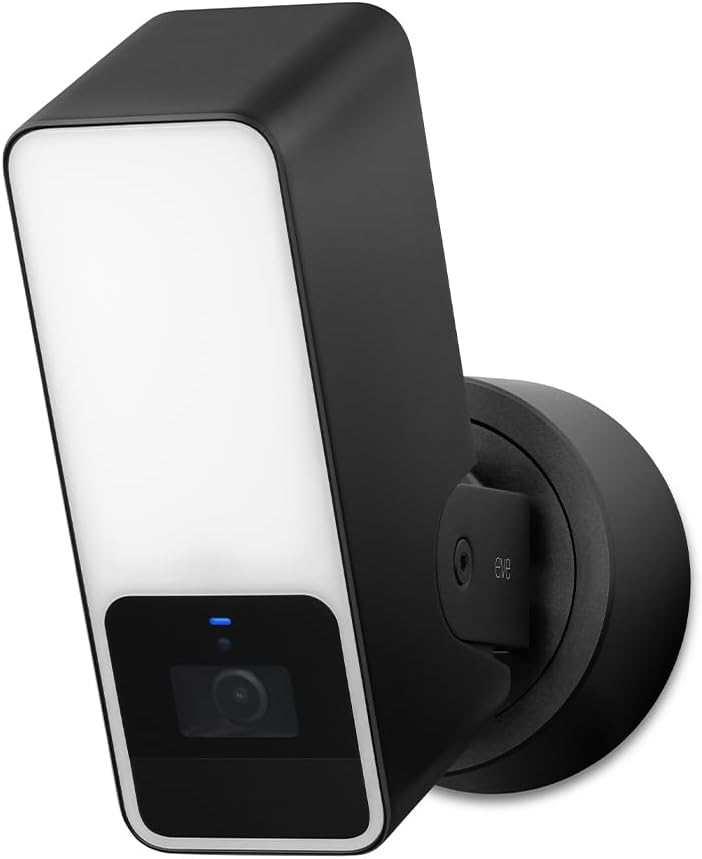
The Eve Outdoor Cam combines a security camera with a powerful floodlight providing both monitoring and deterrence in one device. It is designed exclusively for Homekit Secure Video ensuring your data remains secure and private. The camera captures 1080p video and can distinguish between people pets and vehicles so you receive relevant notifications only.
We may earn a commission when you buy through this link, at no additional cost to you.
Its floodlight is dimmable and boosts visibility when motion is detected enhancing safety around your home. Two-way communication allows you to speak with visitors or deter unwanted activity. The privacy features are robust with no cloud storage or registration ensuring your footage stays local.
Installation requires a neutral wire and a ground wire connection which may need professional assistance for some users. The price is higher than standard cameras but the added floodlight functionality provides significant value. Users should ensure their electrical setup supports these requirements before purchasing.
This camera is perfect for those who want a powerful outdoor solution with strong privacy protections. It combines illumination and security to create a safer environment. For homeowners seeking a high-end outdoor camera this model offers excellent functionality.
The built-in floodlight acts as a deterrent by illuminating the area when motion is detected. This helps discourage intruders and improves visibility at night.
With no cloud registration or tracking your data remains secure and private. End to end encryption ensures only you can access your video footage.
We may earn a commission when you buy through this link, at no additional cost to you.
The Logitech Circle View is an easy to use weatherproof camera designed specifically for Apple Homekit. It features a durable IP64 rated body that handles outdoor conditions while providing razor sharp 1080p video. Its wide 180 degree field of view ensures a broad perspective of your property without blind spots.
We may earn a commission when you buy through this link, at no additional cost to you.
High-quality sensors with dynamic range allow you to see details in both bright sunlight and shadows. A rear privacy button lets you instantly disable recording when you want privacy. The design is compact with a metal base that blends seamlessly with most exterior environments.
It operates on motion detection rather than continuous recording which can be more efficient but may miss short events between triggers. The power supply is included but requires a wired connection. Users should note that it is not compatible with the Logitech Circle app.
This camera is suitable for homeowners who want a reliable weatherproof option with Homekit integration. It offers a wide view and good privacy controls. For those needing a simple outdoor camera this model provides solid performance.
The 180 degree optics capture a broad area reducing the need for multiple cameras. This is ideal for monitoring driveways or patios.
A rear button allows instant privacy by disabling the camera. This hardware control ensures you can guarantee no recording occurs.
We may earn a commission when you buy through this link, at no additional cost to you.
The Aqara E1 is a high resolution indoor camera that offers 2K clarity and full 360 degree coverage. Its pan tilt motor allows it to track movement and provide a wide view of your room. The camera supports privacy modes that pivot the lens to block recording when you want to be alone.
We may earn a commission when you buy through this link, at no additional cost to you.
It includes built in sound detection for events like alarms or barking ensuring you stay informed of important changes. Local AI processing filters motion events to reduce false notifications and improve accuracy. You can store footage on a microSD card for continuous recording or use cloud storage for secure backups.
Users should note that the power supply is not included and 5GHz Wi-Fi is not supported. However the Wi-Fi 6 support ensures smooth performance on 2.4GHz networks. The USB-C port provides flexibility for power connection.
This camera is a great choice for indoor monitoring with strong privacy features. It balances high quality video with flexible storage options. For those seeking a reliable indoor camera this model delivers solid performance.
The camera can pivot its lens to block the view when privacy mode is active. This ensures visual privacy without needing software controls.
Built-in AI detects specific sounds like alarms or crying. This allows you to focus on alerts that matter most.
We may earn a commission when you buy through this link, at no additional cost to you.
The eufy Security E30 captures detailed 4K video for indoor monitoring and provides excellent clarity for pets and family. It offers a panoramic 360 degree view allowing you to navigate the room view easily. The camera tracks movement automatically ensuring you never miss an activity in your home.
We may earn a commission when you buy through this link, at no additional cost to you.
Its integrated spotlight allows for color night vision which is helpful for identifying details in low light. Local storage options mean you can save footage on an SD card without paying monthly subscription fees. Two-way audio helps you communicate in real time with anyone at home.
While the camera supports Homekit the resolution is limited to 1080p within the Apple app. The SD card for local storage is sold separately which is a consideration during purchase. The AI tracking ensures a complete view of activity without missing steps.
This model is ideal for pet owners who want detailed video and privacy features. It offers high resolution recording without ongoing costs. For those needing a reliable indoor camera this model is a strong contender.
The 360 degree view allows you to see the entire room. Quick Focus Tap lets you switch attention instantly.
Local storage options mean you can store footage without subscription fees. This reduces the long-term cost of ownership.
We may earn a commission when you buy through this link, at no additional cost to you.
The Aqara G5 Pro PoE offers the same high performance as its WiFi variant but uses Power over Ethernet for simplified installation. It delivers 4MP resolution with true color night vision and local AI detection to keep data private. This camera is ideal for users who want stable connectivity without wireless interference.
We may earn a commission when you buy through this link, at no additional cost to you.
It supports a dual-band network and acts as a hub for up to 80 Aqara Zigbee devices or a mix of Zigbee and Thread. The PoE setup allows for long cable runs and clean installations without external power adapters. It also includes a USB-C port for flexibility if PoE is not used.
You will need a PoE switch for power which is not included. However the benefits of wired reliability and centralized power make this worthwhile for permanent setups. The physical design and features match the WiFi model ensuring consistent performance.
This camera is perfect for installations where stability is key and wiring is an option. It provides advanced privacy and hub features. For those seeking a robust outdoor solution this model offers excellent reliability.
PoE allows power and data transmission over a single cable. This simplifies installation and reduces clutter around your camera mount.
Data is processed locally on the device ensuring your video remains private. This prevents unauthorized access to your footage.
We may earn a commission when you buy through this link, at no additional cost to you.
Choosing the right Homekit security camera involves balancing features resolution privacy and price. Use these factors to identify the model that fits your home security needs.
Resolution determines how clear your footage will be especially when identifying faces or details. Most cameras offer 1080p but many top models now provide 2K or 4K clarity for sharper images day and night.
Look for larger sensors and wider apertures which improve light intake and performance in low light.
A wider field of view reduces blind spots and the need for multiple cameras. Consider 360-degree pan tilt options for indoor monitoring or wide angle lenses for outdoor areas.
Ensure the camera covers the area you need without distortion or loss of detail.
Homekit Secure Video offers end to end encryption ensuring your footage is only accessible by you. Check if the camera supports local processing to keep data within your home.
Physical privacy modes or lens covers provide additional assurance that recording stops when you want.
Some cameras allow local storage on microSD cards while others require cloud subscriptions. Local storage avoids monthly fees but requires managing your own backups.
Choose a model that offers flexibility to fit your budget and technical comfort.
Advanced AI can distinguish between people pets and vehicles reducing false alerts. Some cameras detect sounds like alarms or crying which adds another layer of security.
Ensure the camera supports Homekit automation to trigger alerts or actions based on events.
Some models act as hubs for Zigbee or Thread devices reducing the need for extra bridges. Compatibility with other smart home platforms like Alexa or Google may also be relevant.
Verify the camera supports your existing smart home ecosystem for seamless automation.
Consider whether you need a wired or wireless setup. Some cameras support PoE for simplified installation while others rely on Wi-Fi networks.
Check Wi-Fi standards like Wi-Fi 6 for better performance in congested network environments.
For outdoor cameras an IP65 or higher rating ensures protection against rain and dust. Indoor cameras do not need this level of protection but should still have sturdy builds.
Select a model built to withstand the environmental conditions of your installation location.
Begin by ensuring your Home hub is active and your iOS devices are updated. Use the Home app to add the camera as a secure accessory and configure its settings.
Position the camera to maximize coverage while avoiding direct sunlight or obstructions. Adjust night vision modes based on your preference for color or infrared visibility.
Regularly update the camera firmware and check storage capacity to ensure continuous operation. Clean lenses periodically to maintain clear video quality and prevent image distortion.
Homekit Secure Video requires an iCloud+ subscription but this is often included in many existing iCloud plans. Some cameras also offer free local storage options so you can choose to avoid cloud fees.
Access is primarily limited to Apple devices like iPhone iPad Mac and Apple Watch. However some manufacturers provide third-party apps for additional viewing options if you require broader access.
Local storage depends on resolution and recording frequency. A 512GB microSD card can store days of footage. For cloud storage check your iCloud+ plan limits.
Yes Homekit Secure Video uses end to end encryption ensuring only you can view your footage. This keeps your data private from unauthorized access.
Many modern Homekit cameras include AI that distinguishes between people pets and vehicles. This reduces false alerts so you receive relevant notifications.
Local storage cameras can continue recording even without internet. Some models with local AI can trigger automations during outages. Always check connectivity options.
Many models support multiple ecosystems allowing control via Alexa or Google Home. However advanced features are often exclusive to Homekit.
Some cameras have IP65 or higher ratings suitable for outdoor use. Ensure the model you select is rated for weather exposure.
The top picks offer a range of options from budget friendly to premium hubs ensuring you find a solution that meets your needs.
Prioritize privacy features and resolution to ensure you have reliable protection without compromising on data security.
Always verify current availability and features as products may evolve. Choosing the right camera will give you confidence in your home security setup.