
ARCTIC P12 Pro A-RGB
4.7Editor score
High static pressure cooling
Fluid dynamic bearing
Up to 3000 RPM speed
Discover the top addressable RGB fans for PC builds. This guide compares cooling performance, lighting effects, and noise levels to help you choose.
Addressable RGB fans have transformed modern PC builds by combining efficient cooling with customizable lighting. These fans allow users to control individual LEDs for dynamic color effects that enhance the aesthetic appeal of any computer case while maintaining optimal thermal performance.
We evaluated ten leading addressable RGB fans based on airflow capacity, noise levels, bearing quality, and lighting synchronization capabilities. Our analysis focuses on real-world performance metrics and user feedback to ensure each recommendation delivers reliable value for diverse building scenarios.
Each pick highlights specific strengths like daisy-chain connectivity or silent operation. Prices fluctuate frequently so verify current costs before purchasing. This guide provides detailed specifications to help you find the perfect cooling solution for your unique setup.
4.7Editor score

4.7Editor score
4.8Editor score
This comparison table outlines key specifications across all ten selected addressable RGB fans. Use these details to evaluate airflow, speed, bearing type, and unique features before making your final selection.




The Thermalright TL-C12C-S five pack earns our Editor's Choice award for balancing performance and affordability. With a 4.7 rating it delivers reliable cooling and vibrant ARGB lighting suitable for most standard PC builds.
We may earn a commission when you buy through this link, at no additional cost to you.
Its S-FDB bearing ensures minimal noise even at maximum speed of 1550 RPM. The blades are designed to reflect light effectively creating a soft uniform glow that syncs seamlessly with motherboard ports for customizable color effects.
While these fans lack a dedicated controller the included cables provide adequate length for most cases. The 66.17 CFM airflow is sufficient for general case ventilation though high static pressure applications may require specialized models.
This pack is ideal for budget conscious builders needing multiple fans for front rear and top mounts. The combination of durable bearings and bright lighting makes it a top contender in the addressable RGB market.
S-FDB bearings reduce blade shaking and extend lifespan while keeping noise levels low during idle and load scenarios.
Up to 17 lighting modes allow customization without software ensuring your build matches your personal aesthetic preferences.
We may earn a commission when you buy through this link, at no additional cost to you.
The CORSAIR RS120 ARGB triple pack stands out for its streamlined daisy-chain connection design. This feature significantly reduces cable clutter making it perfect for cases with limited routing space while maintaining full control over speeds and lighting.
We may earn a commission when you buy through this link, at no additional cost to you.
Its Magnetic Dome Bearing technology ensures quiet operation even at speeds up to 2100 RPM. The airflow of 72.8 CFM is among the highest in this list making it excellent for radiator cooling where pushing air through dense fins is necessary.
The AirGuide technology directs airflow precisely at hot components improving thermal efficiency. However the higher price and requirement for specific motherboard headers mean these are better suited for enthusiasts who prioritize organization over cost.
For those building a high performance system with limited cable access these fans offer a clean solution. The balance of noise reduction and high static pressure ensures your system stays cool under heavy loads.
Connect multiple fans with one 4-pin PWM and one ARGB connector simplifying installation and reducing internal mess.
Anti-vortex vanes focus air movement to maximize cooling on specific components like GPUs or CPU radiators.
We may earn a commission when you buy through this link, at no additional cost to you.
Priced under ten dollars the ARCTIC P12 Pro A-RGB is the definitive budget pick for addressable RGB fans. It offers performance specs typically found in more expensive models including a wide speed range and efficient bearing technology.
We may earn a commission when you buy through this link, at no additional cost to you.
The fan is optimized for high static pressure meaning it pushes air through resistances like radiators effectively. With speeds reaching up to 3000 RPM it provides aggressive cooling when needed while stopping completely at low PWM signals for silence.
While its lighting is less elaborate than premium options it still supports ARGB syncing for visual customization. The manufacturing precision ensures smooth running and minimal vibration which contributes to a pleasant user experience.
This fan is perfect for builders who prioritize raw cooling power and cost over flashy lighting effects. Its reliability and efficiency make it a smart choice for liquid cooling setups or dense case environments.
Designed to penetrate dense radiators and mesh panels ensuring reliable cooling even in restricted airflow environments.
Self-lubricating fluid dynamic bearings minimize friction and noise for years of silent operation.
We may earn a commission when you buy through this link, at no additional cost to you.
Thermaltake CT120 EX fan pack introduces MagForce 2.0 magnetic connection for easier daisy-chaining. This design simplifies installation by connecting multiple fans with only one cable reducing clutter significantly inside the case.
We may earn a commission when you buy through this link, at no additional cost to you.
The nine addressable LEDs offer bright customizable lighting controlled via 5V motherboard sync software. Hydraulic bearings provide reliable silent operation while the embedded anti-vibration mounting system prevents unwanted resonance during use.
While it requires specific connectors the performance and aesthetics are robust for standard PC builds. The magnetic approach is innovative and helps maintain a tidy interior which enhances the visual appeal of RGB setups.
Ideal for users seeking a modern install experience this pack delivers on both form and function. The combination of magnetic ease and hydraulic durability makes it a strong choice for mid-range builds.
Magnetic daisy-chaining reduces ports and cables for a cleaner build process and better internal organization.
Anti-vibration mounts absorb resonance ensuring fans run smoothly without rattling against the case frame.
We may earn a commission when you buy through this link, at no additional cost to you.
This six pack includes four forward and two reverse fans designed for optimized chassis airflow. The reverse blades maintain lighting visibility when installed at the bottom or side intake ensuring consistent aesthetics throughout the case.
We may earn a commission when you buy through this link, at no additional cost to you.
Each fan features 28 ARGB LEDs offering superior brilliance compared to standard options. The included hub simplifies control combining PWM and RGB management into one device reducing cable clutter significantly for simpler case organization.
The three-sided prism design enhances light diffusion creating a uniform glowing effect across the blades. While the hub adds to the component count it streamlines wiring for users who want centralized control without motherboard dependencies.
This kit is perfect for builders wanting comprehensive lighting coverage with flexible fan placement. The reverse fan feature is particularly useful for modern cases with side glass panels requiring unobstructed light.
Keep RGB visible when used as bottom intake by using reverse blades designed specifically for this purpose.
Combined PWM and RGB controller offers centralized management for multiple fans without extra motherboard headers.
We may earn a commission when you buy through this link, at no additional cost to you.
The Thermalright TL-C12C-S X3 pack is ideal for cases needing fewer fans. It shares the same high-quality S-FDB bearing and performance specs as the five pack making it reliable for smaller setups.
We may earn a commission when you buy through this link, at no additional cost to you.
With 1550 RPM and 66.17 CFM airflow this fan delivers solid cooling with minimal noise. The LED blades reflect light softly creating an appealing visual effect that syncs with motherboard ports easily.
Since it comes as a triple pack it reduces bulk for builds with limited space. The design matches cooler cases perfectly providing a seamless look without the extra cables or components of larger kits.
This is a great choice for users who only need three fans for balanced airflow. It maintains the value and performance of the larger pack while fitting compact PC designs.
Delivers same high airflow and noise levels as larger packs in a smaller convenient package for limited setups.
Shares S-FDB bearing and LED design with the five pack ensuring consistent build quality across variants.
We may earn a commission when you buy through this link, at no additional cost to you.
Thermalright TL-C12C-S X5 variant focuses on silent operation with a noise rating of 25.6 dBA. This makes it perfect for quiet home offices or media centers where sound levels are a primary concern.
We may earn a commission when you buy through this link, at no additional cost to you.
It features intelligent temperature control automatically adjusting speed based on system needs. The S-FDB bearing keeps noise low while maintaining sufficient airflow of 66.17 CFM for standard cooling demands.
The lighting remains bright but is optimized for softness blending well with cooler aesthetics. This version provides excellent value for those prioritizing silence over maximum airflow capacity.
Ideal for passive enthusiasts this fan ensures a cool and quiet environment. The automatic speed adjustment adds convenience without requiring complex manual configurations.
Automatically adjusts fan speed via motherboard connections to balance cooling and noise dynamically.
Noise levels kept under 26 dBA for comfortable usage in quiet environments without disturbing activities.
We may earn a commission when you buy through this link, at no additional cost to you.
The Thermaltake CT120 ARGB dual pack features a redefined seven-blade design optimized for airflow and pressure. This makes it highly effective for pushing air through radiator fins on liquid cooling systems.
We may earn a commission when you buy through this link, at no additional cost to you.
With speeds up to 2000 RPM it provides strong cooling power while daisy-chain design reduces cable clutter. Hydraulic bearings ensure the operation over time maintaining a clean build appearance.
The nine addressable LEDs offer sufficient lighting for standard cases though less than premium options. Anti-vibration mounting ensures the frame stays solid during high speed operation.
Perfect for radiator upgrades this pack combines airflow efficiency with easy cabling. Its durability and performance make it a reliable choice for liquid cooling setups.
Seven-blade design balances CFM and static pressure for efficient cooling through dense radiator fins.
Solid frame and anti-vibration mounting keep the fan stable during high-speed operation.
We may earn a commission when you buy through this link, at no additional cost to you.
This Thermaltake LE120 ARGB triple pack comes with a 3-way PWM splitter for quick installation. The nine blades deliver 66.1 CFM airflow ensuring effective cooling for standard case setups.
We may earn a commission when you buy through this link, at no additional cost to you.
Daisy chain cables simplify wiring by connecting multiple fans efficiently. The hydraulic bearings maintain low noise during operation making it suitable for daily use without distractions.
Lighting is controlled via motherboard sync software offering customization through system settings. While not the most advanced lighting system it provides reliable color management for most builds.
Ideal for users needing fast easy installation this kit saves setup time. The high rating reflects its reliability and value in the addressable fan category.
Included 3-way PWM splitter allows fast setup reducing time spent routing complex cable connections.
Nine blades and 1500 RPM deliver optimal airflow and noise balance for general case cooling.
We may earn a commission when you buy through this link, at no additional cost to you.
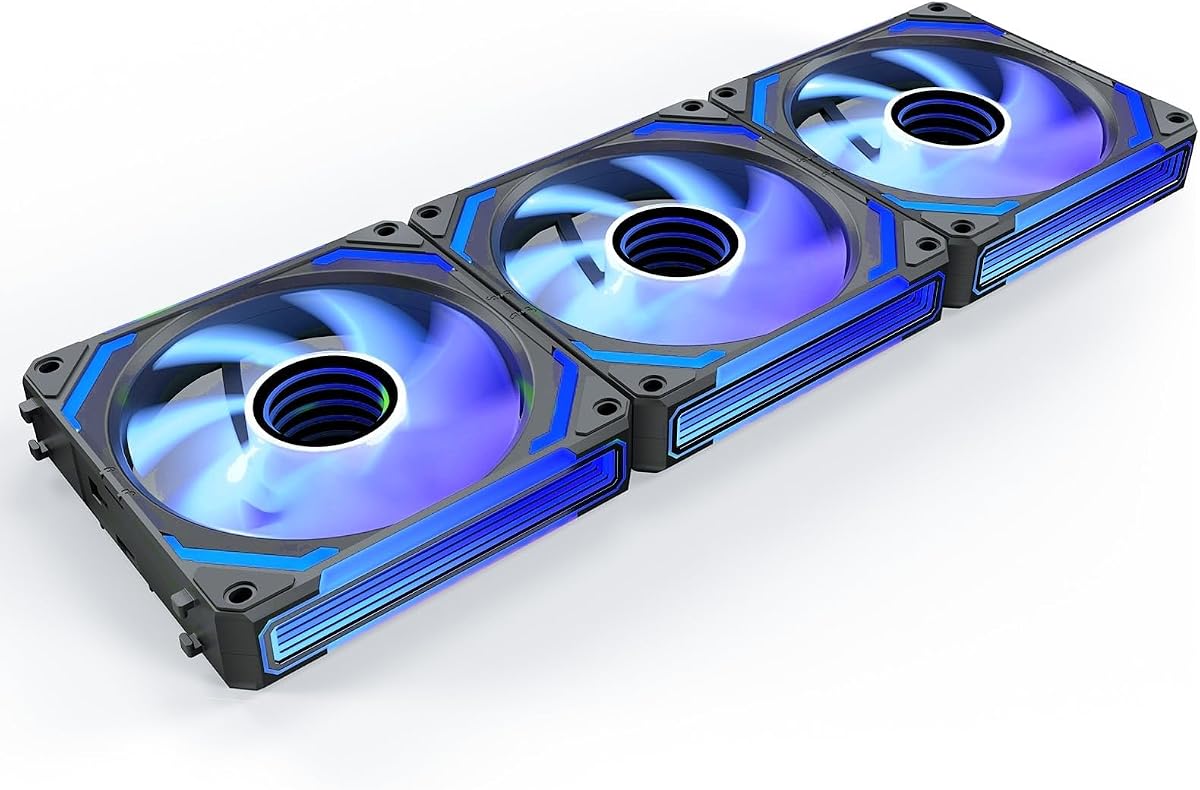
The AsiaHorse COSMIQ 120mm pack features a stunning infinity mirror RGB design that creates a layered high-end visual atmosphere. This premium feature transforms any ordinary case into a beautiful desktop landscape.
We may earn a commission when you buy through this link, at no additional cost to you.
Beyond looks it supports music sync changing colors with ambient sound or game audio. The FDB bearings ensure silent operation even at 2000 RPM providing powerful cooling without disrupting the environment.
With a dedicated controller and daisy chain design it simplifies cable management while offering full lighting control. The universal compatibility ensures it fits most cases and CPU coolers seamlessly.
For those seeking top-tier aesthetics this fan is unmatched. The price reflects its premium features making it an ideal choice for showcase builds and high-end gaming PCs.
Layered optical design creates a 3D depth effect enhancing the visual impact of your PC build.
Built-in sound pickup adapts lighting to music or game audio for an immersive interactive experience.
We may earn a commission when you buy through this link, at no additional cost to you.
Choosing the right addressable RGB fans involves balancing cooling performance with aesthetic requirements. Consider these factors to ensure your build looks great and runs cool efficiently.
The bearing type determines the lifespan and noise level of the fan. Fluid Dynamic Bearings (FDB) and S-FDB bearings are preferred for their quiet operation and durability over time. Hydraulic bearings are also common and provide reliable service life for general use.
Look for bearings explicitly rated for long service life to avoid replacements and maintain low noise levels during daily operation.
Airflow measured in CFM indicates how much air the fan moves while static pressure in mm-H2O indicates force against resistance. High CFM is ideal for open case ventilation whereas high static pressure is necessary for radiators or dense mesh panels.
Match the fan type to its placement in your case to ensure maximum cooling efficiency without unnecessary noise.
PWM (Pulse Width Modulation) allows the motherboard to adjust fan speeds based on temperature. Look for fans with 4-pin PWM connectors for precise control over speeds ranging from idle to maximum RPM.
Ensure your motherboard supports PWM control to utilize automatic speed adjustment features effectively.
Addressable LEDs allow individual color control for complex effects. More LEDs generally mean brighter and smoother lighting. However balance this with your preference for brightness and software compatibility.
Check if the LED count and brightness meet your aesthetic expectations for your specific build style.
Daisy-chain connections let you connect multiple fans with single connectors reducing cable clutter. This design simplifies installation and improves airflow by removing obstructing cables.
Prioritize fans with daisy-chain capabilities if your case has limited cable routing space or headers.
Some fans include dedicated controllers while others rely on motherboard sync. Controllers offer flexibility for cases without compatible ARGB headers but add cost and components to your build.
Check your motherboard capabilities before purchasing to decide whether an included controller is necessary.
Standard fans are 120mm or 140mm. Verify your case clearance and screw hole spacing before buying. Anti-vibration mounts are helpful to prevent unwanted resonance during high-speed operation.
Ensure the fan size matches your case mounts to avoid installation issues and maximize cooling potential.
Prices vary widely based on features and branding. Balance your budget with required performance specs. Sometimes buying multi-packs offers better value per unit than single fans.
Consider buying multiple fans in packs to ensure color consistency and cost efficiency across your build.
Install the fans according to case airflow direction with arrows on the frame indicating intake or exhaust. Secure them tightly using included screws to prevent vibration noise and ensure they are connected to the correct motherboard headers.
Connect the PWM and ARGB cables to your motherboard ports ensuring they are fully seated. Use daisy-chain connectors if available to reduce clutter. Check that all cables are routed safely away from fan blades to avoid accidental contact.
Install manufacturer software or use motherboard RGB utilities to customize lighting. Clean the fans every few months with compressed air to remove dust. Regular maintenance keeps them running quietly and efficiently over time.
RGB fans light up in one color across the entire fan while ARGB (Addressable RGB) fans let you control individual LEDs for dynamic color effects. ARGB offers more customization but requires a 3-pin 5V header for connection. This distinction affects both visual options and compatibility requirements.
Yes ARGB fans require a 3-pin 5V ARGB header on your motherboard. Most modern boards include this port but older ones may need an adapter. Check your motherboard manual to confirm the header type and pin layout before purchasing fans.
No ARGB lighting requires a 3-pin 5V connector while PWM speed control uses a 4-pin header. These must be connected separately. Some hubs combine both connections but the motherboard still needs separate headers for each function.
Use universal RGB software like SignalRGB or OpenRGB to sync lighting across different brands. Not all manufacturers support the same control protocols so you may need third-party tools for unified color control across mixed setups.
Yes daisy-chain designs reduce cable clutter and simplify installation. Using a single cable to link multiple fans improves airflow and keeps the case cleaner. It also reduces strain on motherboard headers by using fewer physical connections.
Flickering usually means a loose connection or power issue. Check that the ARGB connector is fully seated and not touching other pins. Ensure the total current draw does not exceed the motherboard header limit by using a controller hub.
120mm fans are common and versatile while 140mm fans usually offer better airflow at lower speeds. If your case supports 140mm it is generally preferred for case fans. Stick to 120mm for radiators unless your case explicitly supports larger sizes.
No basic lighting functions can be controlled through BIOS settings or simple software provided by motherboard manufacturers. Advanced customization requires installing specific RGB software. However some fans come with hardware controllers for standalone lighting control without software.
We reviewed ten top addressable RGB fans ranging from budget picks like ARCTIC to premium options like AsiaHorse. Each option offers unique strengths whether you need silent operation strong airflow or advanced lighting effects.
Prioritize your case needs when selecting a fan. Look for bearing quality daisy-chain options and motherboard compatibility to ensure a smooth installation and reliable performance over time.
Prices and stock levels change frequently so verify current details before purchasing. Use this guide as a reference to make an informed choice that matches both your budget and aesthetic goals.