
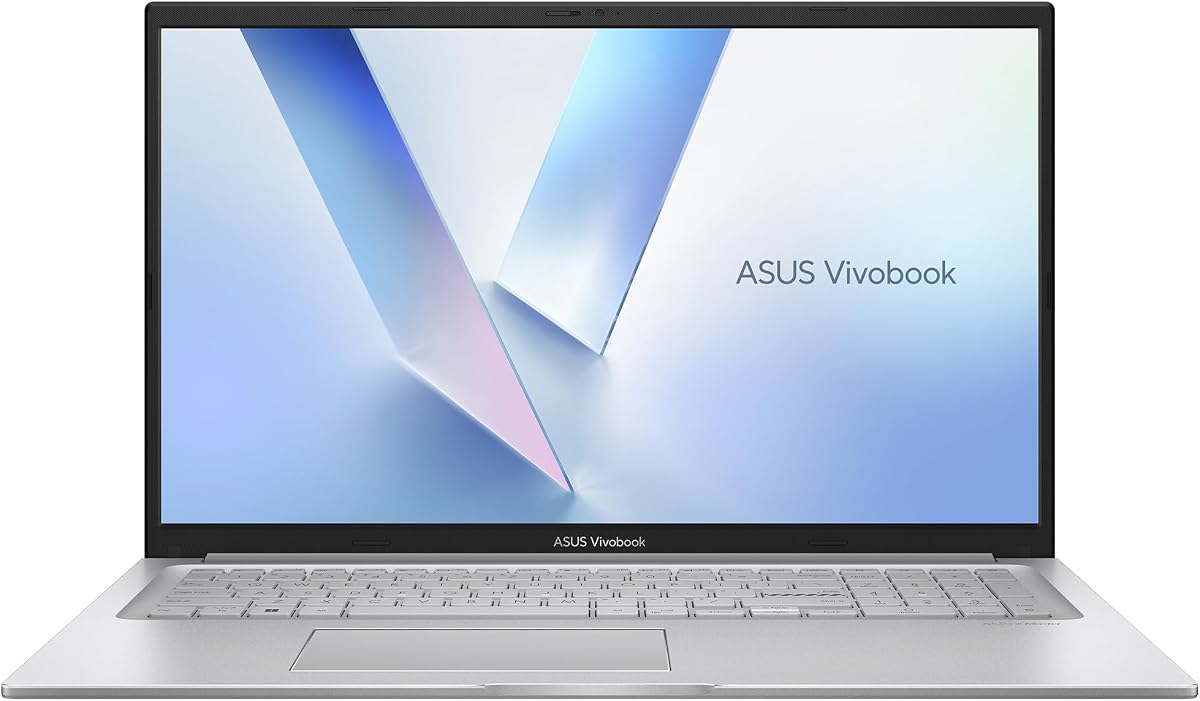
ASUS Vivobook Go 15.6 Slim Laptop
4.3Editor score
AMD Ryzen 3 7320U Processor
8GB DDR5 RAM Memory
128GB SSD Storage
Finding the right laptop can be challenging with so many options available today. The ASUS Vivobook line offers a diverse range of machines tailored for students, professionals, and casual users alike. Each model balances performance, portability, and price to suit different workflows.
We have carefully evaluated ten distinct ASUS Vivobook configurations to bring you a comprehensive comparison. Our analysis focuses on processor power, memory capacity, storage speed, display quality, and overall build durability. This ensures you get a clear picture of what each device delivers.
Every pick in this list highlights unique strengths and potential trade-offs for specific use cases. Prices and availability can change frequently so always verify current details before purchasing. Our goal is to simplify your decision-making process with accurate and up-to-date information.
4.3Editor score

4.5Editor score

4.2Editor score
As an Amazon Associate we earn from qualifying purchases.
The following table provides a side-by-side overview of the key specifications for all ten models. This helps you quickly identify differences in processors, memory, storage, and display sizes to narrow down your choices based on your specific requirements.






The ASUS Vivobook 15 stands out as the premier choice for users demanding high performance. With a 4.5 rating it delivers elite-level computing capabilities powered by the Intel Core i9 processor. This model is specifically optimized for next-generation AI workloads and complex simulations.
We may earn a commission when you buy through this link, at no additional cost to you.
Its standout feature is the combination of 32GB RAM and a 1TB SSD ensuring smooth operation even under heavy loads. The thermal management system prevents throttling during intensive tasks. Additionally the physical webcam shield offers enhanced security for professional environments.
While the cost is higher the performance benefits justify the investment for power users. The included PCO Cooler helps maintain peak frequencies. Some may prefer factory sealed units but the upgrades provide significant value for specific needs.
This laptop is ideal for professionals and creators who need reliable speed. The versatile connectivity eliminates dongle dependency. We recommend it for those prioritizing raw performance and future-proofing their workflow.
The Intel Core i9 processor is optimized for next-gen AI workloads enabling seamless multitasking and faster processing of creative software.
Privacy is protected through a secure fingerprint reader and a physical webcam shield providing instant login and physical privacy control.
We may earn a commission when you buy through this link, at no additional cost to you.
The ASUS Vivobook 16 introduces the Qualcomm Snapdragon X processor offering a unique approach to laptop efficiency. With a 4.4 rating this device focuses on power efficiency and AI capabilities. The Hexagon NPU provides up to 45 TOPS for AI tasks.
We may earn a commission when you buy through this link, at no additional cost to you.
Its large 16-inch display boasts a 1920 x 1200 resolution delivering vibrant visuals for work and entertainment. The integrated Adreno GPU offers generational improvements in performance. This model is designed for users valuing long battery life and modern connectivity.
While powerful the architecture differs from traditional Intel chips. Some legacy software may require optimization for ARM compatibility. Users should verify app support before purchasing to ensure seamless operation.
This laptop suits those seeking a balance of performance and endurance. The 16GB RAM supports smooth multitasking. We recommend it for general productivity and media consumption where efficiency is key.
The Qualcomm Hexagon NPU enables seamless connectivity and AI processing evolving the way you create and communicate efficiently.
Indulge in stunning visuals with breathtaking resolution and brilliant life-like colors on a 60Hz refresh rate display.
We may earn a commission when you buy through this link, at no additional cost to you.
The ASUS Vivobook 16 WUXGA combines portability with robust performance. Rated 4.5 it features the Intel Core i7 processor for high-performance computing. Its lightweight design makes it ideal for students and professionals on the go.
We may earn a commission when you buy through this link, at no additional cost to you.
The 16-inch WUXGA display offers vibrant colors and sharp visuals enhancing the viewing experience. With 16GB RAM and 512GB SSD multitasking is smooth. Connectivity is supported via Wi-Fi 6 and a range of physical ports.
While it lacks discrete graphics the Intel Iris Xe handles everyday visuals well. Users needing heavy gaming may find it limiting. However for general productivity it offers excellent value.
This device is perfect for daily tasks and mobile work. The fast storage ensures quick boot times. We recommend it for users prioritizing screen quality and portability over extreme power.
Lightweight and portable the notebook delivers high-performance computing and multitasking wherever you need it.
The 16-inch WUXGA display provides vibrant colors and sharp visuals for work and entertainment.
We may earn a commission when you buy through this link, at no additional cost to you.
The ASUS Vivobook 17 provides a spacious workspace with its 17.3-inch display. Rated 4.0 it balances performance and utility for everyday tasks. The large screen reduces eye strain and supports multiple windows efficiently.
We may earn a commission when you buy through this link, at no additional cost to you.
Key features include an ErgoSense keyboard with numeric keys for better typing comfort. Fast charging allows reaching 60% battery in 49 minutes. Built to MIL-STD standards it withstands daily wear well.
The additional weight is a trade-off for the screen real estate. It may be less portable than smaller models. However the enhanced productivity tools make it suitable for desk-based work.
This laptop fits users needing ample screen space for spreadsheets or creative work. The reliable performance handles daily needs well. We recommend it for home office setups where portability is less critical.
The ErgoSense keyboard with numeric keys optimizes typing comfort for data entry and everyday work.
Built to meet US MIL-STD 810H military-grade standards it ensures added confidence for reliable everyday use.
We may earn a commission when you buy through this link, at no additional cost to you.
The ASUS 2023 Vivobook Go 15 is designed for value without sacrificing performance. With a 4.3 rating it handles daily tasks smoothly. The AMD Ryzen 5 processor ensures ultrafast and smooth experience for browsing and apps.
We may earn a commission when you buy through this link, at no additional cost to you.
Fast charging technology recharges the battery to 50% in just 30 minutes. This convenience is vital for students moving between classes. The laptop stays cool thanks to IceCool thermal technology and meets military standards.
While 8GB RAM is sufficient for light multitasking it may struggle with heavy applications. Video calls are enhanced by AI noise-canceling for clear communication. It offers great utility for the price.
This model is perfect for budget-conscious users needing reliable performance. The generous screen size enhances immersion. We recommend it for students and light office work where cost efficiency matters.
The ErgoSense keyboard design reduces strain on your hands and wrists for comfortable extended typing sessions.
Built-in Wi-Fi 6E and Bluetooth 5 offer the most stable and fast connectivity for all your devices.
We may earn a commission when you buy through this link, at no additional cost to you.
The ASUS Vivobook Go 15.6 Slim offers a compact and budget-friendly solution. With a 4.3 rating it provides essential performance for browsing and productivity. The slim design makes it easy to carry everywhere.
We may earn a commission when you buy through this link, at no additional cost to you.
It features 8GB DDR5 RAM for faster memory handling multiple apps. The NanoEdge display offers vibrant colors with a smooth refresh rate. Webcam privacy shutter ensures security during video calls.
Storage is limited to 128GB which may require cloud services for files. This is acceptable for users with minimal local data needs. The trade-off allows for a lower price tag.
This laptop suits casual users and basic office tasks. Its fast charging helps keep up with daily demands. We recommend it as a secondary device or for tight budgets.
The design weighs only 3.59 lbs making it easy to transport for daily commutes or travel.
Includes USB-C USB-A HDMI and audio jacks ensuring versatile connectivity without dongles.
We may earn a commission when you buy through this link, at no additional cost to you.
The ASUS Vivobook Core i9 is a powerhouse for demanding professional workloads. Rated 5.0 it delivers elite-level performance for simulations and creative software. The customizable RAM options allow scaling up to 48GB.
We may earn a commission when you buy through this link, at no additional cost to you.
Next Gen AI optimization ensures seamless multitasking. The physical webcam shield provides privacy alongside a fingerprint reader. Windows 11 Pro adds enterprise-grade security and features for business users.
The upgraded RAM and SSD carry a 3-year coverage which adds value. However opening the seal might deter some buyers. Still the performance and reliability justify this for power users.
This laptop is best for engineers and content creators. The versatile connectivity eliminates dongle dependency. We recommend it for those who need maximum flexibility and processing power.
Designed for the modern professional the backlit keyboard ensures easy work in low-light environments.
Integrated fingerprint reader and webcam privacy shield provide the perfect balance of utility and protection.
We may earn a commission when you buy through this link, at no additional cost to you.
The ASUS Vivobook 14 Blue offers a unique combination of modest CPU with high RAM. Rated 4.1 it handles multiple browser tabs and apps smoothly. The 24GB RAM ensures applications run without bottlenecks.
We may earn a commission when you buy through this link, at no additional cost to you.
A 1TB PCIe NVMe SSD allows fast bootup and data transfer. The compact 14-inch form factor makes it portable. Wi-Fi 6 provides stable and fast wireless connections for home and office.
While the i3 processor is not for heavy computing the memory compensates for daily tasks. Users prioritizing multitasking over raw speed will appreciate this balance. It is practical for general use.
This model fits users needing capacity in a small package. The high bandwidth RAM supports efficient workflows. We recommend it for casual users and light work requiring ample storage.
24GB high-bandwidth RAM smoothly runs multiple applications and browser tabs all at once.
Includes USB-C USB-A HDMI and audio jacks for versatile and reliable connectivity.
We may earn a commission when you buy through this link, at no additional cost to you.
The ASUS Vivobook 14 Snapdragon X brings modern AI features to a compact device. With a 4.8 rating it offers smooth multitasking and efficient computing. The Snapdragon X processor supports Copilot+ PC capabilities.
We may earn a commission when you buy through this link, at no additional cost to you.
Its 14-inch screen delivers crisp visuals for work and entertainment. 16GB RAM ensures plenty of memory for apps and files. The design prioritizes efficiency and seamless connectivity.
Users should verify app compatibility for optimal experience. However the performance for daily tasks is impressive. It sets a standard for future-ready budget-friendly devices.
This laptop is ideal for those wanting AI features in a portable size. The ample storage supports fast access to files. We recommend it for general productivity and media consumption.
Snapdragon X processor and 16GB RAM ensure smooth multitasking and efficient computing for Copilot+ PC capabilities.
The 14-inch FHD+ screen with 1920 x 1200 resolution delivers crisp clear visuals for work and entertainment.
We may earn a commission when you buy through this link, at no additional cost to you.
The ASUS Vivobook 14 Copilot+ PC leverages AMD AI technology for next-gen performance. Rated 4.2 it features the Ryzen AI 7 350 with XDNA NPU optimized for efficiency. It transforms the way you create and find content.
We may earn a commission when you buy through this link, at no additional cost to you.
Its WUXGA display with 60Hz refresh offers vivid visuals for gaming and media. With 16GB RAM multitasking is effortless. The inclusion of Game Pass and DirectX 12 Ultimate adds entertainment value.
While the price is higher the AI capabilities justify the investment. Recall and Live Captions offer unique productivity features. The premium build reflects a commitment to future-ready computing.
This laptop is perfect for those valuing AI and gaming in one device. The battery life and charging are practical. We recommend it for advanced users seeking a high-end experience.
AMD Ryzen AI 7 350 delivers ultimate AI processing efficiency up to 50 TOPS for productivity and gaming.
Indulge in stunning visuals with breathtaking resolution and brilliant life-like colors on a 60Hz display.
We may earn a commission when you buy through this link, at no additional cost to you.
Selecting the right ASUS Vivobook depends on your specific needs and usage scenarios. This guide outlines key factors to consider for making an informed decision.
The processor determines how well the laptop handles tasks. Intel Core i9 and i7 models are best for heavy workloads while Ryzen and i3 suffice for everyday use.
Choose a processor that matches your software demands for optimal speed.
RAM affects multitasking capabilities. 8GB is standard for basic tasks but 16GB or more is recommended for demanding apps. SSD storage ensures quick boot times and file access.
Prioritize at least 16GB RAM and 512GB SSD for a balanced experience.
Screen size impacts portability and viewing space. Smaller 14-inch models are easy to carry while 17-inch options offer immersive workspaces. WUXGA resolutions provide sharper visuals than standard FHD.
Select a display that fits your workspace and portability needs.
Battery life varies by processor efficiency. Some models offer fast charging to reduce downtime. Consider how often you need to recharge during your day.
Look for fast charging features if you are always on the move.
Military-grade durability ensures the laptop withstands physical stress. ErgoSense keyboards and privacy shutters add usability and security. Build quality is crucial for long-term reliability.
Choose models with reinforced chassis and protective features for safety.
Windows 11 Pro offers enterprise features while Home is sufficient for casual users. Some models include Copilot+ capabilities for AI tasks. Verify software compatibility with your workflow.
Ensure the OS version supports your specific applications and security needs.
Ports like USB-C HDMI and audio jacks reduce the need for dongles. Wi-Fi 6 ensures stable internet connections. Comprehensive connectivity is essential for modern setups.
Check the available ports to match your peripherals without extra adapters.
Prices vary significantly based on specs. Balance your budget with performance needs to get the best value. Upgraded models may cost more but offer better longevity.
Invest in features that directly impact your daily productivity and satisfaction.
Keep your laptop on a hard flat surface to ensure proper ventilation and prevent overheating. Avoid using it on soft surfaces like beds which block air intake vents.
Regularly clean the screen and keyboard with a soft microfiber cloth to remove dust and fingerprints. Do not use harsh chemicals that could damage the display coating or plastic body.
Update your drivers and Windows system frequently to maintain security and performance. Enable fast charging options when convenient but avoid draining the battery completely every time.
Vivobook Go models are generally budget-friendly with lighter specs suitable for basic tasks. Standard Vivobook models offer higher performance and better build quality for professional use.
Yes many Vivobook models provide excellent portability and battery life for students. The balance of performance and cost makes them ideal for online classes and homework.
Some specific configurations come with Windows 11 Pro while others have Home. Always check the product details to confirm the operating system version before buying.
Most modern Vivobook laptops feature integrated non-removable batteries to maintain a slim design. Charging is handled via USB-C or AC adapters depending on the model.
Many models allow upgrades but some soldered components limit expansion. Check specific product details or contact support to confirm upgradeability before making your purchase.
Standard coverage usually includes 1 year for parts and labor. Upgraded components in custom bundles may have extended 3-year coverage from the vendor.
We have reviewed ten top ASUS Vivobook models that cater to different needs and budgets. From budget-friendly options to high-performance AI-ready machines this guide helps you identify the right fit.
Prioritize the features that matter most such as processor speed or display quality. For heavy workloads choose the i9 models while casual users can opt for Ryzen or Snapdragon chips.
Always verify current prices and availability as details may change over time. Your ideal Vivobook is just a click away with this detailed comparison to guide you.