
AI Drawing Projector for Kids
4.4Editor score
AI text to image generation
Transform photos into traceable art
Built-in speaker for learning packs
Explore the top AI drawing projectors for kids and artists, comparing features, ease of use, and creative tools to find the perfect device for your needs.
AI drawing projectors have revolutionized how children and artists bring ideas to life on paper. These devices use artificial intelligence to convert text or photos into traceable outlines instantly.
We compared ten top models based on image clarity, AI capabilities, connectivity options, and suitability for different age groups. Our analysis focuses on real-world usability and creative potential.
Each pick highlights unique strengths like built-in themes, app integration, or professional-grade resolution. Note that availability and offers may change, so verify details before purchasing.
4.4Editor score

4.8Editor score

4.6Editor score
This side-by-side comparison evaluates all ten models across key performance metrics including resolution, connectivity, and AI features to help you decide quickly.





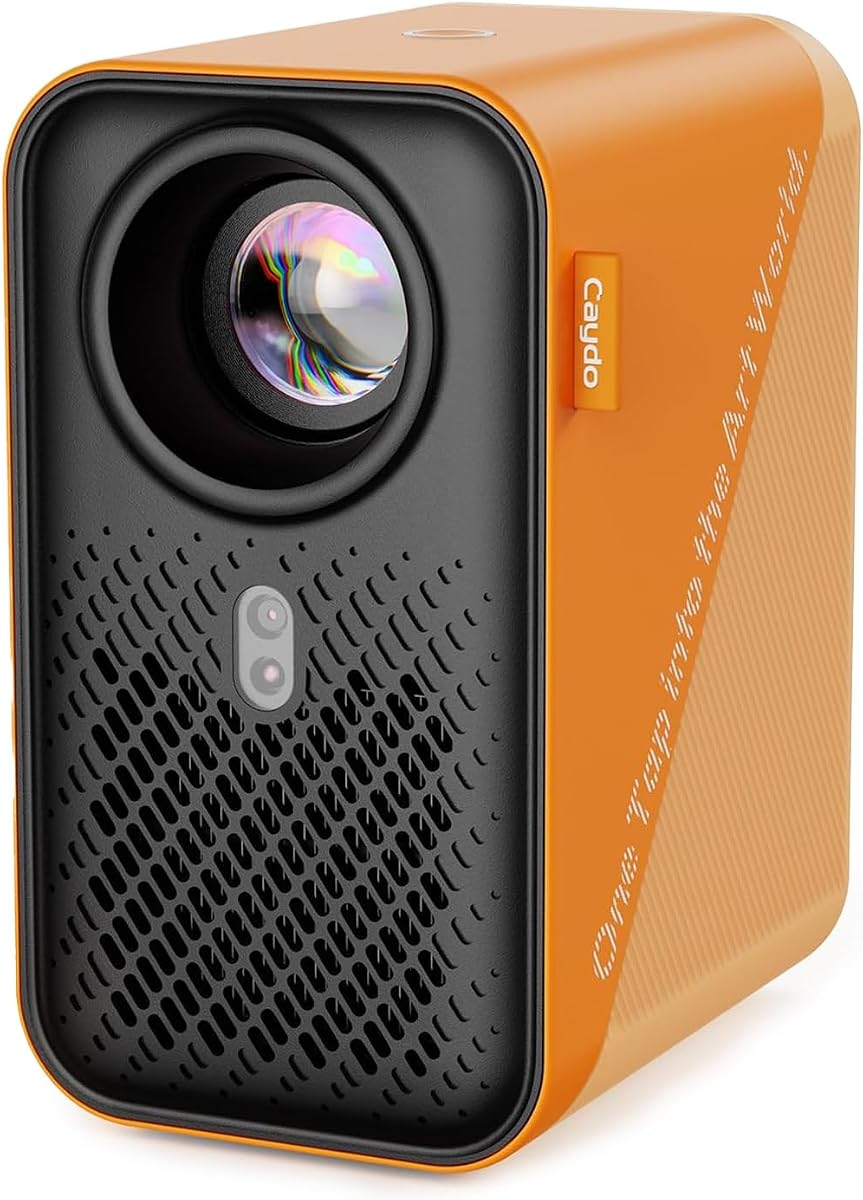

This AI drawing projector is an excellent budget-friendly option for children ages five to twelve. It transforms text ideas and photos into custom pictures that kids can trace and color.
We may earn a commission when you buy through this link, at no additional cost to you.
The standout feature is its ability to generate drawings from text prompts like a dancing dragon. Users can also convert family photos into art, creating personal memories through creative play.
While it lacks a built-in battery requiring constant power connection, this ensures consistent performance during use. The included learning packs offer educational value with numbers and words.
Ideal for parents seeking an affordable gift that sparks creativity. Its simple interface makes it accessible for young artists ready to explore imagination with AI help.
Type ideas or upload photos to get unique traceable outlines instantly.
Learn numbers and words with sound as matching pictures appear.
We may earn a commission when you buy through this link, at no additional cost to you.
The Caydo T3 Joy is a top pick for young artists starting their creative journey at age four and up. It combines safety features with abundant built-in content to keep kids engaged.
We may earn a commission when you buy through this link, at no additional cost to you.
Its SGS certified eye protection ensures comfort during screen-free play. The step-by-step drawing guides build confidence, while the App offers endless creative possibilities beyond the built-in themes.
Parents appreciate the adjustable timer settings that encourage healthy breaks. Although relying on an app for unlimited content adds a step, it significantly expands what children can create.
This model is perfect for boys and girls eager to draw independently. It balances fun design with safety, making it a thoughtful gift that grows with their skills.
SGS certified RG0 blue light safety protects young eyes during drawing.
Download the Caydo App to unlock new patterns and AI features.
We may earn a commission when you buy through this link, at no additional cost to you.
This version elevates the experience with native 720P resolution and multimedia features. It suits kids aged five and up who want high-quality images and entertainment beyond drawing.
We may earn a commission when you buy through this link, at no additional cost to you.
The projector shines down away from eyes for safety. Auto-brightness ensures clear images day or night, while built-in WiFi and Bluetooth allow streaming cartoons once art sessions end.
Though the price reflects these premium features, the value lies in versatility. Kids can switch from tracing detailed patterns to watching movies, ensuring the device remains useful longer.
Ideal for families seeking a comprehensive art and entertainment tool. It transforms a simple toy into a versatile projector that supports creative growth and relaxation equally.
Native 720P resolution delivers sharp and clear images for tracing.
Use built-in WiFi and Bluetooth to stream videos or play music.
We may earn a commission when you buy through this link, at no additional cost to you.
This AI projector targets ages ten and up, offering detailed realistic images unsuitable for toddlers. It transforms imaginative ideas into traceable outlines using voice or text commands.
We may earn a commission when you buy through this link, at no additional cost to you.
The large projection area and ability to work on canvas or fabric make it versatile for teens and adults. It builds real drawing skills by training hand-eye coordination and proportion.
While it does not support older cartridges, the new generation offers improved functionality. The focus on screen-free creativity helps users finish art without excessive screen exposure.
Perfect for tweens and adults looking to develop artistic skills seriously. Its advanced capabilities make it a thoughtful gift for hobbyists and artists seeking precision.
Trace onto paper, canvas, fabric, or even cookies for creative fun.
Tracing trains hand-eye coordination and proportion like art students.
We may earn a commission when you buy through this link, at no additional cost to you.
This projector prioritizes stable connectivity and flexibility for various environments. It uses dual-band WiFi for precise mirroring without needing dedicated app downloads via web control.
We may earn a commission when you buy through this link, at no additional cost to you.
The ability to work offline makes it ideal for remote studios or locations without internet. Users appreciate the manual focus button that ensures sharp images on any surface.
While lacking AI generation, it excels at tracing photos or plans accurately. The adjustable stand supports both horizontal and vertical projects, offering versatility for artists and educators.
Suitable for professionals needing reliable tracing tools. Its straightforward design and offline capability ensure creative workflows remain uninterrupted regardless of connectivity issues.
Control projection settings directly from a phone browser without downloads.
Works flawlessly in remote locations without WiFi access.
We may earn a commission when you buy through this link, at no additional cost to you.
This model features an upgraded 5G dual-band chip for high-speed connectivity. It reduces latency significantly compared to standard models, ensuring smoother real-time tracing from mobile devices.
We may earn a commission when you buy through this link, at no additional cost to you.
Web control via QR code makes setup quick without app downloads. The FCC ID certification provides safety assurance, while the versatile mount adapts to various workspaces easily.
Although customer ratings are lower, its technical specs promise stable performance. The focus adjustment button helps fine-tune images, making it a capable tool for detailed professional sketches.
Good for users prioritizing connection speed over advanced features. Its design supports uninterrupted workflows, appealing to artists who need precise real-time accuracy during creative tasks.
Upgraded 5G chip reduces latency for seamless real-time tracing.
Scan the QR code to access web controls instantly on phone.
We may earn a commission when you buy through this link, at no additional cost to you.
This projector targets artists with native 1080P resolution and 250 ANSI lumens brightness. Its exclusive drawing assistant offers tools like grids and zoom for precise scaling and composition.
We may earn a commission when you buy through this link, at no additional cost to you.
Auto focus and keystone correction ensure sharp images across various angles. The offline functionality means drawing tools work without internet, ideal for studios with poor connectivity.
Though ratings are moderate, the technical features support professional workflows. Bluetooth audio adds convenience for music playback, though it does not support video transmission separately.
Suitable for artists needing precision and reliability. Its robust feature set ensures reference images remain clear, helping create high-quality art without technical interruptions.
Use built-in grids and zoom for precise scaling and composition.
Drawing tools remain functional without internet connection.
We may earn a commission when you buy through this link, at no additional cost to you.
The P3 boosts brightness to 400 ANSI lumens for vivid images even in daylight. Its exclusive drawing assistant and swivel base provide flexibility for walls or easels.
We may earn a commission when you buy through this link, at no additional cost to you.
Auto focus adjusts clarity in under three seconds, saving time during setups. WiFi 6 ensures fast data transfer, while USB drive support allows immediate image loading without internet.
Customers appreciate the vivid projection and rapid focus. While the price is higher, the brightness and speed improvements justify the cost for professional or serious hobbyist use.
Ideal for artists needing reliable performance and brightness. It ensures reference photos stay vivid, helping match traced strokes perfectly to digital files.
400 ANSI lumens deliver crisp images even during the day.
Advanced algorithms lock clarity quickly to under three seconds.
We may earn a commission when you buy through this link, at no additional cost to you.
This portable option includes exclusive drawing software for smoother artistic processes. It supports 5G dual-band WiFi for faster transmission and lower latency during streaming or tracing.
We may earn a commission when you buy through this link, at no additional cost to you.
The sealed optical core prevents dust entry, reducing image degradation over time. Users can connect to external speakers via Bluetooth 5.0 to enhance audio effects during use.
With a 10,000-hour lamp life, it offers long-lasting performance. While remote batteries are not included, the robust connectivity and optical design provide solid value for enthusiasts.
Best for artists needing portable reliability. Its sealed design and dual-band WiFi ensure consistent image quality, making it a practical choice for various creative settings.
Lamp life up to ten thousand hours ensures durable performance.
Sealed optical core prevents dust entry and image black spots.
We may earn a commission when you buy through this link, at no additional cost to you.
This model features upgraded 5G dual-band modules ensuring secure stable connections. It reduces latency for smooth real-time drawing experiences directly on mobile devices.
We may earn a commission when you buy through this link, at no additional cost to you.
Web-based online control allows access via browser without downloads. The stable versatile stand ensures clarity on any surface, whether for cookie decorating or large canvas drawings.
Focus adjustment buttons help fine-tune images for precision. FCC certification adds safety assurance, making it a reliable choice for hobbyists seeking portable tracing solutions.
Ideal for users needing a compact and versatile tool. Its reliable connectivity and adjustable stand support diverse creative workflows, from education to professional design tasks.
Upgraded 5G module ensures smooth real-time drawing without latency.
Stable mount allows customization of height and projection angle.
We may earn a commission when you buy through this link, at no additional cost to you.
Selecting the right AI drawing projector depends on your intended use, age group, and required features. Consider these factors to find a device that matches your needs.
Devices vary by target age groups, from toddlers to adults. Younger kids benefit from simplified interfaces and built-in themes, while older users may need detailed resolution and advanced AI capabilities.
Check the recommended age range to ensure the device matches your child's development level.
Resolution affects tracing clarity. Higher native resolution like 720P or 1080P ensures clean lines for detailed work. Brightness measured in ANSI lumens impacts visibility in different lighting conditions.
For professional use, prioritize models with at least 720P resolution and 250 ANSI lumens for daylight clarity.
Some projectors offer AI text-to-image generation or photo conversion. Look for features that convert ideas into outlines if you want creative flexibility beyond pre-installed patterns.
Ensure the AI interface is intuitive and supports the type of input you prefer, such as text or voice.
Connectivity includes WiFi, Bluetooth, and offline modes. Dual-band WiFi ensures stable connections for mirroring. Offline support is crucial for remote use or spaces with poor internet.
Prioritize models with stable dual-band chips to reduce latency during real-time drawing.
Projectors shine light directly; look for SGS certified RG0 blue light safety. This ensures the light shines onto paper away from eyes, reducing strain during long sessions.
Certified eye safety features are essential for children's health and comfort during creative play.
Some models require companion apps for full functionality while others include built-in libraries. Check if additional patterns or themes require subscriptions or downloads after purchase.
Devices with built-in patterns reduce reliance on apps and simplify setup for young users.
Power options vary between corded and battery. Many devices require constant power connection which ensures performance but limits portability. Check if included adapters fit your setup.
If portability is key, ensure the device supports external power banks or battery packs if available.
Adjustable stands allow projection onto walls, canvases, or vertical surfaces. Look for models with focus buttons and keystone correction to ensure sharp alignment regardless of surface.
Versatile stands expand creative possibilities, supporting both horizontal paper work and vertical wall projects.
Begin by setting up the projector on a stable surface and connecting it to power. Ensure the lens is uncovered and clean before turning it on to avoid image distortion.
For AI features, download any required apps and connect via WiFi or USB. Upload photos or type prompts to generate traceable outlines. Adjust focus and brightness for clarity.
Maintain your device by keeping the lens dust-free and storing it in a cool dry place. Use soft cloths for cleaning and avoid harsh chemicals to preserve optical quality.
Yes, many models feature SGS certified eye protection that shines light onto paper rather than directly at eyes. This reduces blue light exposure and protects vision during use. Always check the specific safety ratings before purchasing.
Many devices support offline modes for tracing built-in images. However, AI generation and app features often require internet. Check connectivity options to match your workspace needs.
Yes, professional models offer higher resolution and detailed tracing capabilities suitable for adults. They can handle complex sketches and canvas work with precision.
Most devices require corded power and do not include built-in batteries. This ensures consistent performance but limits portability. Some may support external power banks.
Use a soft, dry microfiber cloth to gently wipe the lens. Avoid harsh chemicals or abrasive materials that could scratch the optical surface and degrade image quality.
Yes, most models allow you to transfer photos via WiFi or USB. The device then converts the image into a traceable outline for creative use.
Our top picks include budget-friendly options for young kids and premium models for professional artists. Each offers unique AI and tracing capabilities to inspire creativity.
Prioritize features like eye safety, resolution, and connectivity to match your specific needs. The right device can transform imagination into tangible art effortlessly.
Remember to verify current availability and offers before purchasing. Conditions may change, so double-check details for the most accurate information.