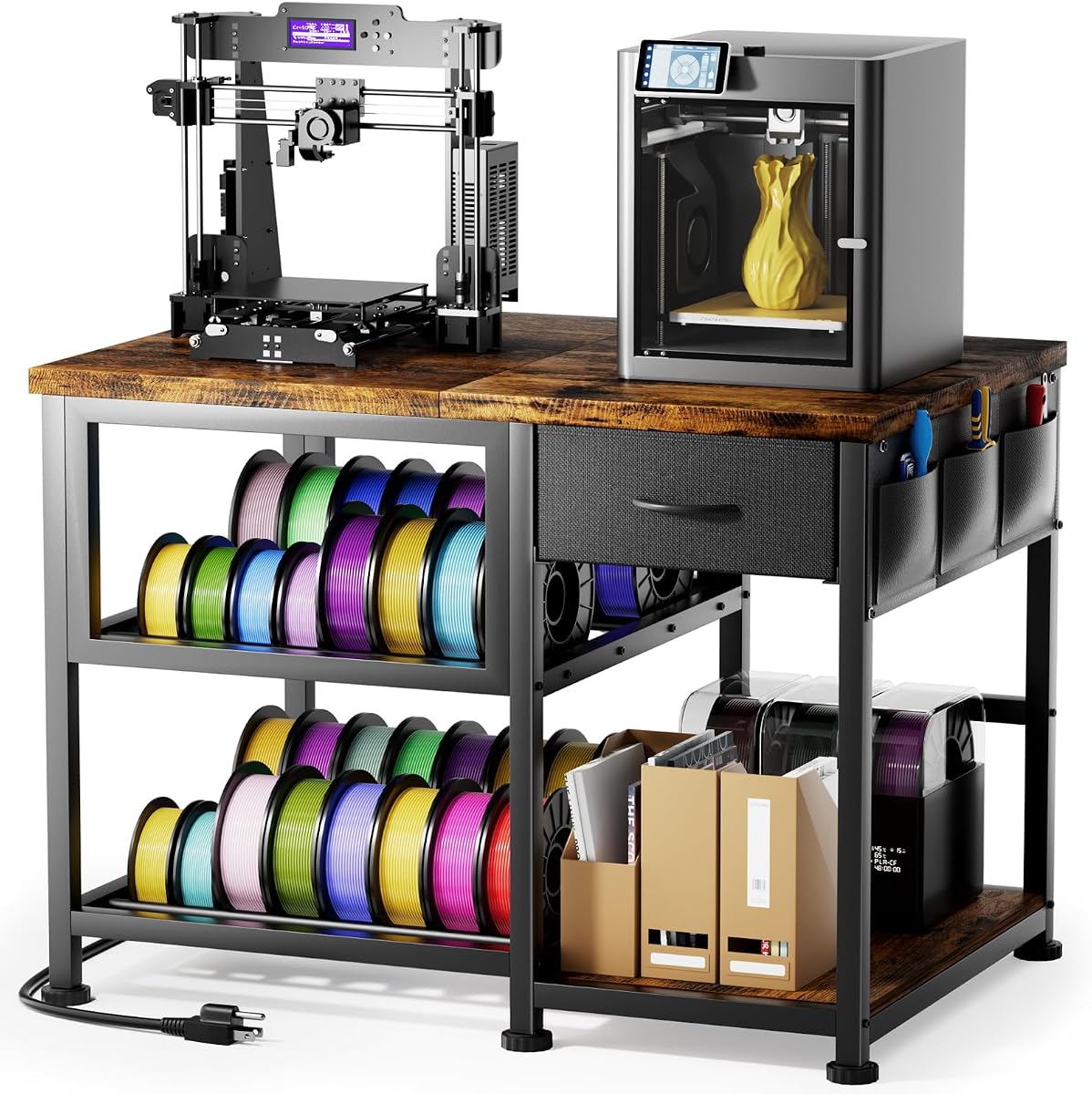
3D Printer Stand with Filament Storage Rack, Heavy Duty 3D Printer Table with Power Outlet
4.7Editor score
Integrated power outlet
Wood and metal build
3 tier filament holder
Finding the right workspace is crucial for any 3D printing enthusiast. A dedicated table stand ensures stability while filament storage keeps your materials organized and protected from environmental factors that could ruin your prints.
We evaluated ten highly rated options based on stability, storage capacity, build quality, and user feedback. Each product offers unique features designed to streamline your workflow and protect your valuable printing equipment from vibration and clutter.
Each pick highlights specific strengths like vibration dampening or power integration. Prices and availability change frequently so always check the current listings before making your final decision to ensure you get the best value today.
4.7Editor score

4.3Editor score

4.8Editor score
As an Amazon Associate we earn from qualifying purchases.
The following comparison table provides a side by side overview of all ten selected workstations. Review the key specifications and features to determine which model best fits your specific space requirements and printing workflow needs today.


This heavy duty table stands out as a robust solution for serious makers who need reliable stability. It holds significant weight without wobbling and offers ample space for both printers and filament spools.
We may earn a commission when you buy through this link, at no additional cost to you.
The vibration absorbing design is a major benefit for print quality. By minimizing mechanical noise this stand helps prevent ghosting on your prints. The integrated drawer keeps tools close while the shelves organize up to 56 spools efficiently.
While the unit is sturdy it does require some effort to assemble. The weight that provides stability also makes it difficult to relocate once set up. You should plan its position carefully before tightening all bolts.
If you prioritize print quality and organization this model is an excellent choice. It transforms a chaotic setup into a professional workstation. We recommend it for anyone serious about frequent high volume printing projects.
The unique structure absorbs vibrations effectively ensuring smoother prints. This feature directly impacts surface quality on tall complex models by reducing mechanical interference during operation.
Storage for up to 56 spools keeps your workshop efficient. You can easily see what materials you have without cluttering your desk or floor space with loose rolls.
We may earn a commission when you buy through this link, at no additional cost to you.
This workstation blends functionality with style making it suitable for both home offices and professional studios. The inclusion of a power outlet is a thoughtful touch that reduces cable clutter significantly.
We may earn a commission when you buy through this link, at no additional cost to you.
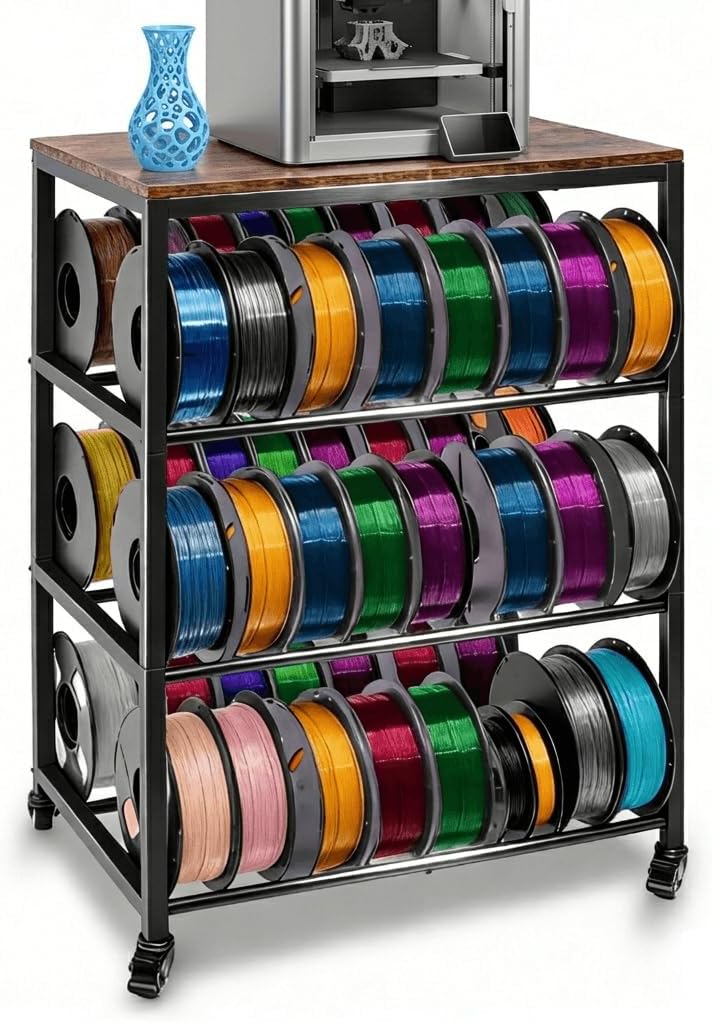
The combination of wood and metal creates a sturdy yet aesthetically pleasing frame. You get easy access to tools via side pockets and a dedicated drawer for parts. Mobility makes it easy to rearrange your space.
It is more expensive than basic metal options but the finish justifies the cost for many users. You may need to check instructions carefully during assembly to ensure proper alignment of the wooden components.
For those who want a piece of furniture that looks great while working this is ideal. It keeps your environment tidy and ready for creative work. We think it is worth the investment for serious hobbyists.
The integrated outlet allows you to plug in your printer and laptop directly. This eliminates the need for extra extension cords keeping your workspace cleaner and safer.
Wheels allow you to move the unit easily around your room. The vertical design uses height to store materials without taking up excessive floor space.
We may earn a commission when you buy through this link, at no additional cost to you.
This stand offers impressive stability at a very accessible price point. It is a great entry level option for makers who need a dedicated spot for their printer and filament without breaking the bank.
We may earn a commission when you buy through this link, at no additional cost to you.
The thick steel tubing provides a solid base that prevents wobbling. The compact size fits well in smaller rooms while still holding a good number of spools on the lower shelves. Assembly is straightforward.
The surface area is smaller than larger models so plan your printer size carefully. MDF tops can be susceptible to moisture if not sealed but it works well in dry environments. It is a practical choice for limited spaces.
If budget is a primary concern this model delivers strong performance. It proves you do not need to spend a fortune to get a stable workstation. We recommend it for smaller home setups and beginners.
The square design maximizes space efficiency in tight corners. The heavy base ensures your printer remains steady during long prints without tipping or shaking.
Clear instructions allow you to set this up quickly. Most users report finishing in under twenty minutes which means you can start printing sooner.
We may earn a commission when you buy through this link, at no additional cost to you.
This hub integrates multiple functions to streamline your printing process effectively. The power hub allows you to manage devices centrally which reduces cable mess significantly in your workspace area.
We may earn a commission when you buy through this link, at no additional cost to you.
The X-bracket stability system ensures that heavy printers stay level. You can connect laptops and lights directly at the stand which simplifies your setup. Storage compartments keep accessories within reach without cluttering the desk.
Assembling this unit requires careful attention to all parts and screws. It is larger than compact models so ensure you have adequate room before purchase. The build quality supports a wide range of printer sizes and weights.
It is an excellent choice for users who want an organized all-in-one solution. The convenience of integrated power saves time and effort. We suggest it for workshop environments that need a central command station.
Power ports and USB slots reduce the need for separate strips. This setup lets you focus on creative work rather than managing cables and devices constantly.
The X-bracket design minimizes vibrations during operation. This feature is critical for maintaining print accuracy on detailed or large scale projects.
We may earn a commission when you buy through this link, at no additional cost to you.
This workstation is specifically designed for those running two machines simultaneously. The dual zoning prevents interference between printers and keeps your tools organized by station. It supports a heavy load capacity for demanding use.
We may earn a commission when you buy through this link, at no additional cost to you.
Each zone has its own frame which ensures stability is not compromised. The side mesh racks offer unique storage that frees up desktop space. You can sort filament by printer which makes workflow very efficient.
The unit is quite large and requires significant floor space. You need to measure your area carefully before buying. Assembly instructions are detailed but the process takes time due to the size of the parts.
It is the top pick for users with multiple printers who need separation. The robust construction handles heavy setups well. We recommend it for home studios or small businesses running high volume projects.
Separate frames for each zone ensure stability is maintained. This design prevents vibrations from one printer affecting the other during operation.
Unique hanging racks on the sides store extra supplies. This keeps your main work area clear while making tools and filament easily accessible.
We may earn a commission when you buy through this link, at no additional cost to you.
This model focuses on practical organization for your tools and supplies. The dual fabric drawers provide a soft place to keep small items safe from damage. It is a straightforward solution for a tidy workspace.
We may earn a commission when you buy through this link, at no additional cost to you.
The steel frame supports significant weight while keeping the look clean. You can store your spare parts and tools in the drawers for easy access. The top shelf is large enough for a medium printer and accessories.
Fabric drawers are convenient but may not be as durable as metal ones over time. The assembly is generally quick but ensure you follow steps for stability. It offers good value for the features provided.
We suggest it for users who need basic storage without complexity. The design is functional and keeps your area organized. It is a solid choice for budget conscious buyers who want reliability.
The fabric drawers protect delicate tools from scratches. This feature ensures your tweezers and cutters remain in good condition for future projects.
The heavy duty steel ensures the stand does not flex. This reliability is key for maintaining consistent print quality over many hours of use.
We may earn a commission when you buy through this link, at no additional cost to you.
This workstation brings a modern style to your printing setup. The wood desktop offers a warm finish that blends well with home offices. It includes power ports for easy device connection without clutter.
We may earn a commission when you buy through this link, at no additional cost to you.
You get a dedicated drawer for tools and a large spool rack. This keeps your essentials organized and reachable. The frame is sturdy and supports standard printers well. Assembly instructions are clear.
The wood surface may require care to prevent damage from heat or spills. You should place protective mats under hot equipment to be safe. It is a premium option that looks better than standard metal stands.
We recommend it for users who value design in their workshop. It balances function and looks effectively. It is a great choice for home studios that double as workspaces.
Integrated USB and AC ports simplify device connections. You can charge devices while printing without needing extra adapters or cords.
The four tier rack holds many spools visibly. This design helps you track material levels and keep the area looking neat and tidy.
We may earn a commission when you buy through this link, at no additional cost to you.
This model is designed for efficiency in smaller spaces. It includes a power strip which is a rare find at this price point. The layout is simple and easy to maintain for daily use.
We may earn a commission when you buy through this link, at no additional cost to you.
You can organize tools in fabric drawers and keep spools on lower shelves. It holds standard printers without issue. The dimensions ensure it fits in tight spots. Assembly is quick and straightforward.
It has less capacity than larger tables so plan accordingly for spools. The build is solid but not as heavy duty as industrial options. It is perfect for occasional or light daily printing.
We suggest it for students or home users with limited space. It offers essential features without taking up too much room. It is a reliable choice for those who need a compact solution.
The smaller footprint fits in tight areas easily. This makes it ideal for apartments or rooms where floor space is limited and precious.
The built-in strip allows easy power access. You can keep your printer and electronics connected neatly without extra cords.
We may earn a commission when you buy through this link, at no additional cost to you.
This cart offers excellent mobility with locking wheels for stability. You can move your printer easily and secure it when printing. The enclosed cabinet protects sensitive materials from dust and moisture effectively.
We may earn a commission when you buy through this link, at no additional cost to you.
The rustic brown finish gives it a distinct look. Storage is divided for active and protected spools. The frame absorbs vibrations well to ensure smooth prints. Assembly is straightforward with clear steps.
The cabinet adds bulk which might not fit in small corners. Wheels work well but may need adjustment on rough surfaces. It balances transportability with protection in a unique way.
We recommend it for users who need to move their setup. The protection features are excellent for long term storage. It is a smart choice for mobile workshops.
The cabinet keeps sensitive spools away from dust. This feature helps maintain material integrity and print quality over time.
Wheels and brakes allow easy relocation and secure locking. You can move the cart to different spots as needed and fix it in place when working.
We may earn a commission when you buy through this link, at no additional cost to you.
This heavy duty cart offers massive storage capacity with mobility. You can store many spools and still move the unit easily. The load rating supports heavy printers and accessories without stress.
We may earn a commission when you buy through this link, at no additional cost to you.
The four tiers allow you to organize tools and materials effectively. Lockable casters keep the cart steady during printing. The wooden top provides a solid surface for your equipment. It is a versatile option.
Assembly involves more parts than simple stands so take your time. Ensure the casters are locked before use for safety. It takes up floor space but the storage benefit is worth it.
We recommend it for workshop users who need mobile storage. The high capacity is ideal for large collections. It is a practical choice for those who need to move heavy loads.
The four tier design holds heavy loads securely. This supports multiple heavy printers and bulk filament without sagging or wobbling.
Lockable casters provide stability when needed. You can move the unit when open and secure it tightly during active printing.
We may earn a commission when you buy through this link, at no additional cost to you.
Selecting the right stand depends on your space printer size and organization needs. This guide covers the key factors to consider to ensure you get a unit that supports your printing workflow effectively.
Stability is critical for print quality as vibrations can cause imperfections. Look for tables with solid steel frames and features designed to reduce wobble. Heavy duty construction ensures your printer stays level even during long runs.
Always check the material thickness and design for vibration control. A stable base prevents defects like ghosting and ensures consistent results every time.
The ability to store spools safely is a major feature for any stand. Evaluate how many rolls the shelves hold and if they protect from dust or moisture. Adjustable spacing helps accommodate different spool sizes effectively.
Choose a stand that matches your spool volume to keep your desk clear. Sufficient storage prevents clutter and keeps materials organized for easy access.
Measure your available space before buying to ensure the table fits well. Consider both width and depth to accommodate your printer and workspace. A compact unit may save room but limit future expansion or tool storage options.
Select a model that balances storage with available space in your room. Proper dimensions ensure your workflow remains smooth without cluttering your floor.
Ensure the stand supports the weight of your printer and accessories. High capacity tables provide peace of mind and prevent structural issues. Check the weight limits listed by the manufacturer for safety.
Adequate load capacity guarantees safety and durability over time. Never overload a unit beyond its stated limits to avoid accidents.
Decide if you need wheels to move your printer easily. Locking casters offer a balance between mobility and stability. Some tables are heavy and fixed for maximum stability while others are mobile for flexibility.
Choose based on how often you rearrange your space. A stable fixed base is better for constant setups while wheels help if you move frequently.
Integrated power ports help reduce cable clutter around your desk. USB and AC outlets allow you to power devices without extra strips. This feature simplifies your setup and makes your workspace safer.
Look for models with built-in power solutions to streamline your workflow. Clean power management improves organization and reduces tripping hazards.
Wood and metal combinations offer durability and aesthetics. Check if surfaces are resistant to scratches and damage. High quality materials ensure the stand lasts longer under daily use.
Invest in a stand with robust materials for long term use. Good construction protects your investment and keeps your setup looking professional.
Simple assembly saves time and frustration during setup. Look for units with clear instructions and all necessary tools. A quick setup allows you to start printing sooner without delays.
Select a model that is easy to assemble to avoid confusion. Good design reduces the effort needed to get your workstation ready.
Place your printer on the top surface and secure it to prevent shifting. Ensure the stand is level on the floor to avoid vibrations. Adjust leveling feet if needed to achieve a perfect balance.
Organize your filament spools on the designated shelves for easy access. Keep materials away from direct sunlight to prevent degradation. Close cabinet doors or covers when not using to protect from dust and moisture.
Regularly clean your workspace to prevent dust from affecting your printer. Check the casters or feet for wear and replace if needed to maintain stability. Keep tools in drawers or pockets to keep your area tidy.
Check the dimensions and load capacity before purchasing to ensure compatibility. Most of the recommended stands are built to support a wide range of printer models and weights. Measure your device to confirm it fits safely on the surface.
Some models include 360 degree wheels with locks while others are fixed. Look for units that specifically mention mobility features if you need to move the setup. Fixed units tend to be more stable during long prints.
Use stands with enclosed cabinets or moisture proof materials. Keep spools in sealed bags when not in use and dryers to keep them fresh. Some models offer dedicated compartments that reduce exposure to humidity.
Most stands are designed as fixed units so adding shelves is difficult. Plan your storage needs carefully before buying to avoid outgrowing the model. Some designs allow minor adjustments but expansion is limited.
Follow the instructions step by step and use all included hardware. Tighten bolts securely but avoid over tightening to prevent damage. Having two people helps to hold parts in place during assembly.
Most units are designed for indoor environments to protect materials and electronics. Moisture and temperature fluctuations can damage both the stand and your printer. Keep your setup in a climate controlled space for best results.
We have reviewed ten top options offering stability storage and design for all needs. Whether you want heavy duty durability or a compact mobile unit there is a fit here. The Editor's Choice stands out for vibration dampening and organization.
Prioritize features that match your printing frequency and available space. Stability is key for quality while mobility helps adaptability in your workspace. Consider power integration to simplify your setup significantly.
Remember to check current prices and availability as these change often. We hope this guide helps you select the right stand to enhance your printing experience. Happy building and may your prints always be perfect.