
Nektar SE49
4.5Editor score
Affordable entry level price point
DAW integration for popular software
Compact design for small desks
This guide compares the top 49 Key MIDI Keyboards available in 2026, evaluating features, integration, and value for producers seeking the ideal input device.
Finding the right input device is crucial for any music producer or composer working with digital audio workstations. A 49 key MIDI keyboard strikes the perfect balance between portability and range, offering enough keys to play melodies and chords comfortably without taking up too much desk space. These controllers serve as the central hub for your studio, allowing you to trigger virtual instruments, automate parameters, and record performances with tactile precision.
To help you navigate the crowded market, we have compared ten of the most popular 49 key MIDI keyboards available this year. Our evaluation focuses on key action quality, software integration capabilities, control surface features like knobs and faders, and the overall value proposition for different user budgets. We analyzed technical specifications, user feedback, and real-world performance to ensure this list reflects the current state of the industry.
Each pick in this guide highlights specific strengths, whether it is seamless DAW integration, premium keybeds, or an extensive software bundle. You will find detailed breakdowns of pros and cons to help you match a controller to your specific workflow needs. Please note that product prices and availability can change frequently, so always verify current details before making your final purchasing decision.
4.5Editor score

4.7Editor score

4.4Editor score
This side-by-side comparison outlines the key specifications and features of each controller to help you identify which model aligns best with your production style and budget constraints.




The Novation Launchkey 49 MK4 stands out as the top choice for producers who demand seamless integration with their digital audio workstation. With a high rating from users, it delivers a versatile experience that bridges the gap between hardware controls and software parameters effectively.
We may earn a commission when you buy through this link, at no additional cost to you.
This controller excels in its ability to map controls automatically to major DAWs like Ableton Live and Logic Pro. The FSR drum pads are particularly impressive, offering polyphonic aftertouch which is rare at this price point. This allows for nuanced expression when playing drums or triggering clips dynamically.
While the price is higher than entry-level options, the included software and build quality justify the investment. The Scale Mode helps beginners avoid wrong notes, and the integration with Native Instruments software adds significant value for those using Komplete libraries.
If you are looking for a controller that grows with your skills and offers professional features without needing external mapping, this is the ideal pick. It is best suited for intermediate to advanced users who need reliable control over their production environment.
Launchkey comes with custom scripts that map faders and knobs directly to DAW mixer and plugin parameters automatically.
The 16 full-size pads support velocity and aftertouch allowing for dynamic performance and clip triggering.
We may earn a commission when you buy through this link, at no additional cost to you.
The Arturia KeyLab mk3 represents the pinnacle of MIDI controller design with its premium build and extensive feature set. Users appreciate the tactile quality and the depth of control it offers over virtual instruments and effects.
We may earn a commission when you buy through this link, at no additional cost to you.
Key features include aftertouch on all keys which adds expressiveness to performances. The RGB backlit pads and large LCD screen provide clear visual feedback during use. The inclusion of Analog Lab V software offers thousands of presets right out of the box.
The main drawback is the cost which places it in the higher end of the market. Additionally, its size means it requires more desk space than compact models. However for studio users this is rarely an issue.
This keyboard is perfect for professionals who need a high-end controller that doubles as a main interface. It is best for those who value build quality and deep software integration over portability.
Every key supports aftertouch allowing for dynamic modulation of sound based on pressure applied after striking.
The LCD screen displays parameters and settings clearly reducing the need to look at your computer monitor.
We may earn a commission when you buy through this link, at no additional cost to you.
The Nektar SE49 is an excellent entry point for beginners who need a 49 key MIDI keyboard without breaking the bank. It offers essential controls and integrates well enough with popular software to get started quickly.
We may earn a commission when you buy through this link, at no additional cost to you.
This controller focuses on simplicity with basic transport controls and octave buttons. It comes bundled with a DAW which is a significant value add for new producers. The keys are velocity sensitive allowing for dynamic playing.
While it lacks the advanced features of higher end models, it does exactly what is needed for learning and basic recording. The build is functional rather than premium, but it holds up well for home studio use.
For anyone starting their music production journey or looking for a secondary controller, this is a smart buy. It is best suited for those prioritizing cost over advanced performance features.
The controller works plug and play with most operating systems reducing the need for complex driver installations.
Included software packages help beginners start making music immediately without additional software purchases.
We may earn a commission when you buy through this link, at no additional cost to you.
The M-AUDIO Oxygen 49 MKV is designed for producers who want extensive control over their mix and parameters directly from the keyboard. It features a robust set of faders and knobs that save time during production.
We may earn a commission when you buy through this link, at no additional cost to you.
Integration with Native Instruments is seamless thanks to NKS support which allows easy browsing of sounds. The Smart Chord and Scale modes help in creating complex harmonies quickly. It also includes a solid software package.
The keybed is functional but feels lighter compared to more expensive models. Setting up the mappings requires some initial time but the auto-mapping features simplify the process significantly for most users.
This keyboard is ideal for beat makers and arrangers who need tactile control over faders and effects. It balances cost and features well making it a strong contender in the mid-range category.
Direct support for Native Instruments products lets you browse and load presets using the keyboard knobs.
This feature allows you to trigger chords with single notes helping you create harmonies without music theory knowledge.
We may earn a commission when you buy through this link, at no additional cost to you.
The M-AUDIO Oxygen Pro 49 offers advanced features like aftertouch and semi-weighted keys that appeal to more serious performers. It is a step up from the standard Oxygen series with more pads and connectivity.
We may earn a commission when you buy through this link, at no additional cost to you.
The inclusion of a 5-pin MIDI output allows for connection to legacy hardware synthesizers. The software bundle is extensive offering many virtual instruments and plugins. The RGB pads are customizable and responsive to velocity.
The price is higher than entry-level models but the professional features justify the cost. It is slightly larger in size which should be considered for small desktop setups. Overall it is a versatile tool.
This controller is best for users who need MIDI output for external gear and aftertouch for expressive playing. It is a solid choice for those looking for a long-term primary keyboard.
The 5-pin MIDI output allows you to control external hardware synthesizers without needing an extra interface.
Pressure sensitivity on keys adds expression to sounds allowing modulation after the note is played.
We may earn a commission when you buy through this link, at no additional cost to you.
The Arturia KeyLab Essential mk3 is a strong contender that combines a solid hardware design with one of the best software bundles in its class. The Analog Lab V included provides a vast library of sounds.
We may earn a commission when you buy through this link, at no additional cost to you.
Features like the LCD screen allow for easier parameter adjustments on the fly. The pads are velocity sensitive and lit for low light environments. DAW integration is custom built for major systems like Ableton and Logic.
While the price is higher than basic controllers, the value of the software included is significant. It is slightly less robust than the full mk3 model but still feels premium. The design is sleek and modern.
This keyboard is best for producers who value sound design and want a wide range of preset sounds immediately. It suits those who want a reliable interface with great software support.
The included software offers over 2000 presets covering vintage synths modern sounds and orchestral instruments.
The small LCD screen shows current settings and mappings making it easier to navigate without a computer.
We may earn a commission when you buy through this link, at no additional cost to you.
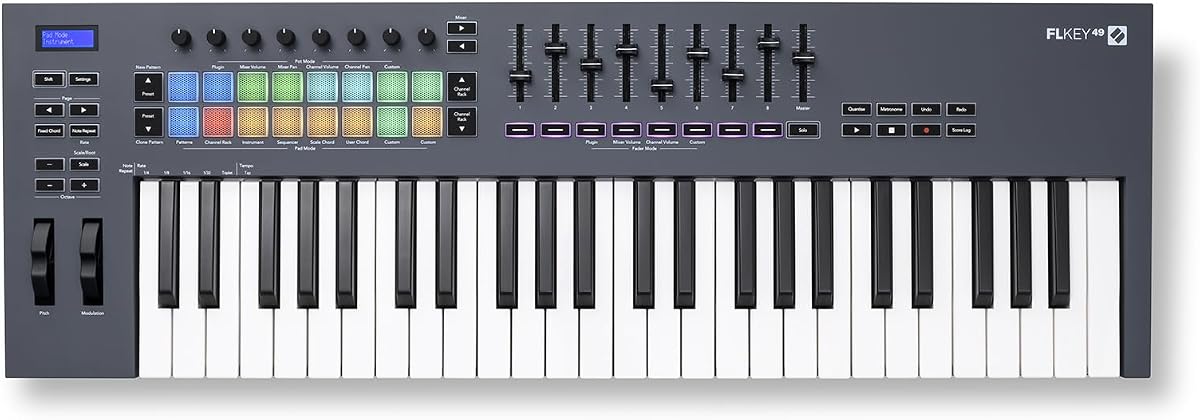
The Novation FLkey 49 is tailored specifically for producers using FL Studio providing a unique workflow experience. It maps directly to the mixer and channel rack saving significant time during production.
We may earn a commission when you buy through this link, at no additional cost to you.
Transport buttons and automation recording are accessible via dedicated keys reducing mouse usage. The sequencer mode allows pads to be used for step sequencing directly within the software. This is highly efficient for beat making.
If you use a different DAW this keyboard may not offer the same benefits as the Launchkey. The price is higher but for FL users the productivity gains are worth it. Build quality is consistent with Novation.
This keyboard is best for FL Studio users who want to streamline their workflow. It is a niche but powerful tool that maximizes the potential of that specific software environment.
Pads map to FL Studio step sequencer enabling you to program beats and patterns without clicking the mouse.
Nine faders control mixer volumes and automation allowing for real-time mixing without reaching for the mouse.
We may earn a commission when you buy through this link, at no additional cost to you.
The M-AUDIO Keystation 49 MK3 is a straightforward controller that focuses on core functionality without unnecessary complexity. It is an excellent choice for those who want to plug in and start playing.
We may earn a commission when you buy through this link, at no additional cost to you.
Features include essential controls like a volume fader and pitch wheels. It does not require drivers making it easy to use with any computer or mobile device. The key feel is consistent for the price.
It lacks the extensive knobs and faders of more expensive models but serves well for recording melodies and chords. The included software adds some value but is not the main focus. It is durable and portable.
This keyboard is best for students or those needing a secondary controller. It is a no-nonsense tool that works reliably for basic music creation tasks.
No drivers are required to use this controller with Mac PC or iOS devices via adapters.
The slim footprint fits easily into any studio setup or desktop workspace.
We may earn a commission when you buy through this link, at no additional cost to you.
The midiplus AK490 is a basic controller that covers the fundamentals of MIDI input at a very low cost. It is suitable for beginners on a tight budget who need a simple way to record notes.
We may earn a commission when you buy through this link, at no additional cost to you.
It includes a standard MIDI DIN out which allows for connection to hardware gear without a computer. The octave buttons and pitch wheels are standard features for this type of controller. It is lightweight.
There are few extra features like pads or faders which limits its utility for advanced production. The keybed is basic but functional for simple input. It is a utilitarian tool for recording.
This keyboard is best for those who need a spare keyboard or just want to record basic MIDI data. It is a budget option for users who do not need advanced controls.
The MIDI DIN output allows you to connect the controller to hardware synthesizers without using a computer.
It includes standard wheels and octave buttons to manage pitch and range during performance.
We may earn a commission when you buy through this link, at no additional cost to you.
This generic 49-key MIDI keyboard is a compact choice designed for basic music practice and desktop use. It serves as an affordable entry into MIDI input for those who need a simple controller.
We may earn a commission when you buy through this link, at no additional cost to you.
The ABS construction makes it lightweight and portable but less durable than metal options. It fits easily on small desks and is suitable for practice sessions. The features are minimal focusing on core functionality.
Users should expect basic performance and standard controls. It is not recommended for professional production but works for casual use. The price is very low which reflects the feature set.
This controller is best for students or casual hobbyists. It is a simple and affordable way to start making music on a computer.
The small size makes it easy to fit on small desks or store away when not in use.
It provides essential MIDI input for software instruments without extra features.
We may earn a commission when you buy through this link, at no additional cost to you.
Choosing the right MIDI controller depends on your budget, DAW, and specific workflow needs. Consider these key factors before making your decision.
The quality of the keys determines how playable the controller is. Look for velocity sensitive keys that respond well to your touch. Semi-weighted keys offer a better piano feel than synth-action keys.
Prioritize controllers with keys that match your playing style for better expressiveness.
Seamless integration with your digital audio workstation saves time on mapping. Check if the manufacturer provides custom scripts for your specific DAW like Ableton or FL Studio.
Controllers with built-in mapping reduce setup time and improve workflow efficiency.
Consider how many knobs faders and pads you need for mixing. A controller with 9 faders and 8 knobs allows better control over effects and volume.
More controls offer more tactile interaction with your software reducing mouse usage.
Many controllers come with bundled software like DAWs and virtual instruments. Evaluate the value of these additions as they can save money initially.
Software bundles often include high-quality presets that help you start making music immediately.
Durability is important especially if you plan to move the controller frequently. Metal and plastic construction varies by model and price.
Look for sturdy materials if you want the controller to last through regular use.
Set a budget that aligns with your needs. Entry-level options are affordable but lack advanced features while premium models cost more.
Balance cost with the features you actually need to avoid overspending on unused tools.
Connect your keyboard to your computer via USB and install any necessary drivers. Once connected open your DAW and ensure it recognizes the input device. Map controls to software parameters using the provided scripts.
Regularly clean the keys and surface with a dry cloth to prevent dust buildup. Store the controller in a dry place when not in use to protect electronic components.
Check for firmware updates periodically to ensure compatibility with your DAW. Keep your cable organized and avoid bending it sharply to maintain a secure connection.
Most modern MIDI keyboards are class compliant and do not require drivers. However some models may offer optional drivers for advanced features. Check the product details for specific system requirements.
Semi-weighted keys have a springy feel similar to acoustic pianos. Synth-action keys are lighter and faster to play. Choose based on your playing style and instrument emulation needs.
Yes you can connect many USB MIDI keyboards to phones using an adapter like the Apple Camera Adapter. Ensure your DAW app supports external MIDI input for best results.
DAW scripts map physical controls like faders to software parameters automatically. This saves time and allows for intuitive mixing without manual assignment in the software.
MIDI pads are typically used for drum programming clip launching or triggering samples. They offer a tactile way to create beats and trigger events in real-time.
Download the official software from the manufacturer website and connect your keyboard via USB. Follow the instructions to upload the latest firmware to your device.
We have reviewed ten excellent 49 key MIDI keyboards suitable for various needs. The Novation Launchkey 49 MK4 leads for integration while the Nektar SE49 offers value for budget buyers.
Consider your primary DAW and required controls when selecting. Features like aftertouch and fader counts significantly impact your workflow efficiency.
Prices and stock may change frequently so verify current availability before buying. We hope this guide helps you find the perfect controller for your music production setup.