
ARCTIC P8 (5 Pack)
4.6Editor score
Optimised for static pressure
Five pack value deal
Fluid Dynamic Bearing
This guide compares the top 80mm case fans for quiet cooling, static pressure, and value across budget and premium builds.
Finding the right 80mm case fan is crucial for compact builds and specialized cooling needs. These small fans must balance airflow, noise, and durability to keep systems running smoothly without taking up too much space.
We compared ten real products based on user ratings, technical specs, and brand reputation. Our list covers everything from budget-friendly options to premium models designed for silence and high static pressure in tight enclosures.
Each pick highlights key features like bearing type, PWM control, and noise levels. Note that prices and availability change frequently, so check current listings before making your final decision for your specific setup.
4.6Editor score

4.9Editor score

4.8Editor score
The following table provides a side-by-side comparison of all ten selected fans. It highlights key specifications like speed, noise, and bearing type to help you choose the right fit for your chassis or device.


The Noctua NF-A8 PWM stands out as a premium quiet fan designed for superior performance in compact systems. With an impressive rating, it delivers consistent cooling while maintaining very low noise levels through advanced acoustic optimisation.
We may earn a commission when you buy through this link, at no additional cost to you.
Its Flow Acceleration Channels and optimized frame work together to maximize airflow and static pressure. The 4-pin PWM interface allows for automatic speed control via your motherboard headers ensuring efficient cooling exactly when needed.
While it costs more than budget options, the included accessories like anti-vibration mounts and extension cables add significant value. The only trade-offs are the distinctive brown color and the higher initial investment for the build.
This fan is ideal for anyone building an HTPC, ITX case, or NAS where silence and reliability are critical. We recommend it for users who prioritize long-term performance and quiet operation above all else.
The frame design reduces turbulence and noise ensuring a smoother airflow path through the fan blades.
With over 150000 hours of mean time to failure this fan is built to last for years of continuous operation.
We may earn a commission when you buy through this link, at no additional cost to you.
This five pack offers exceptional value for users needing multiple fans for a large case or several devices. Each unit guarantees efficient cooling even with increased air resistance making it suitable for heatsinks and radiators.
We may earn a commission when you buy through this link, at no additional cost to you.
The redesigned blades and optimized motor design ensure that friction is minimized for greater efficiency. The Fluid Dynamic Bearing features an oil capsule to avoid lubricant leakage and enhance the overall service life of the fan.
Since these are 3-pin fans you cannot control speed via PWM which may result in higher noise at full speed. However for the price you get reliable cooling units that perform well above their weight class.
Perfect for budget builds or server racks where you need many fans without breaking the bank. This pack is a smart choice for anyone needing bulk cooling solutions with proven durability.
The fan structure is tuned to push air through dense radiators or heatsinks efficiently.
Buying five fans at once reduces the per-unit cost significantly compared to individual purchases.
We may earn a commission when you buy through this link, at no additional cost to you.
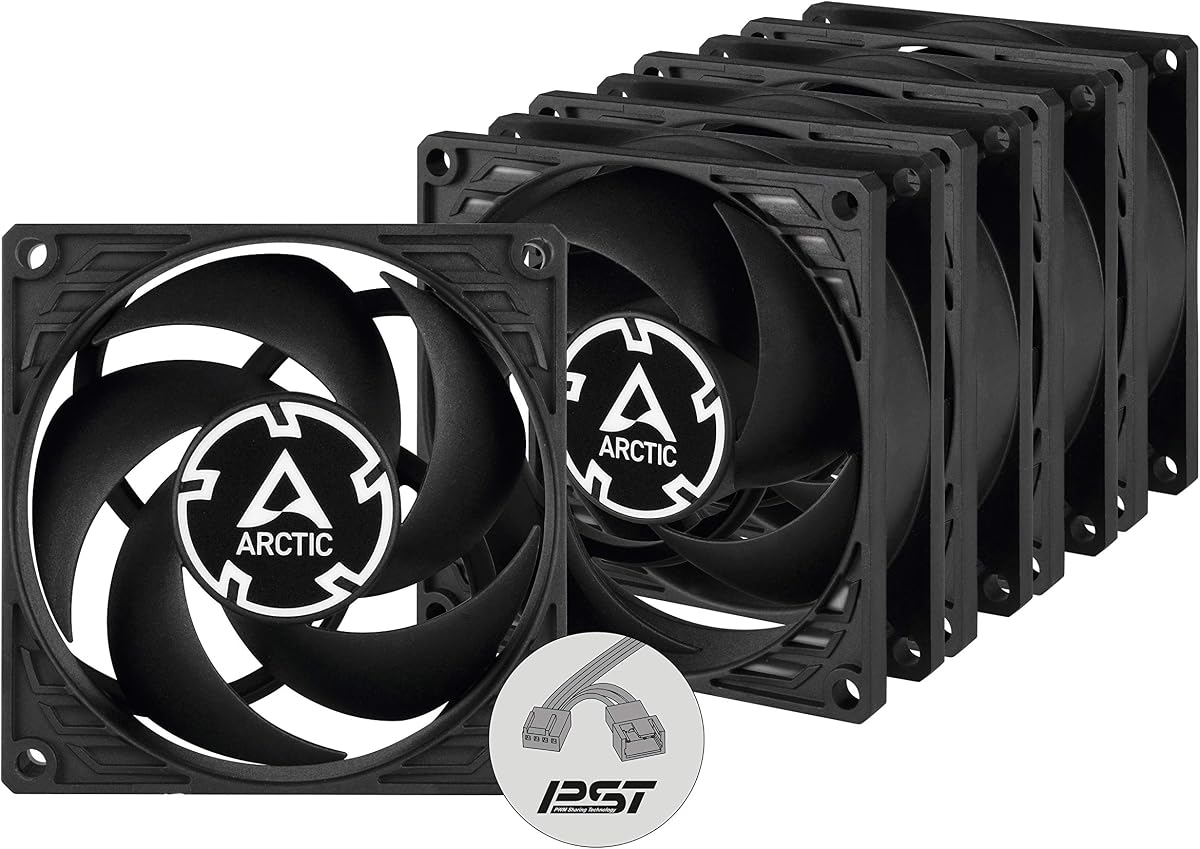
This version upgrades the standard P8 with PWM Sharing Technology allowing you to control all five fans from one header. The wide regulation range ensures smooth transitions between low idle and high performance speeds.
We may earn a commission when you buy through this link, at no additional cost to you.
The Neodym-Iron-Boron-Magnet ring in the motor provides higher efficiency and lower power consumption than predecessors. Even at low speeds the motor noise is barely noticeable making it suitable for silent builds.
While the price is higher than the standard pack the convenience of PWM control justifies the cost for many users. The main downside is the bulk of the package if you only need one or two fans.
Ideal for complex builds where airflow management is key and you want synchronized fan speeds. This pack bridges the gap between budget pricing and premium control features effectively.
One cable controls multiple fans reducing clutter and simplifying motherboard header usage.
New generation magnet rings improve energy efficiency and allow for quieter operation.
We may earn a commission when you buy through this link, at no additional cost to you.
The redux edition offers the core NF-R8 quality at a more accessible price point for budget conscious buyers. It delivers high performance cooling with excellent balance between performance and quietness.
We may earn a commission when you buy through this link, at no additional cost to you.
The 1800rpm limit ensures quieter operation compared to full speed options while still providing powerful airflow when required. This makes it ideal for chassis ventilation where noise is a concern.
Unlike the premium models this version does not include anti-vibration mounts or cables so you may need to buy them separately. However the core fan performance remains solid and reliable.
Choose this if you want Noctua reliability without the extra cost of accessories or color options. It is a practical choice for replacements in NAS or server environments.
Removes non-essential accessories to focus on the fan itself and lower the cost.
Limited max speed keeps noise levels manageable without sacrificing cooling capability.
We may earn a commission when you buy through this link, at no additional cost to you.
This fan is designed specifically for silent operation with low noise levels that suit office desktops and quiet PC builds. It fits standard 80mm mounts and is compatible with many common cases.
We may earn a commission when you buy through this link, at no additional cost to you.
Optimized blade design helps deliver excellent ventilation to reduce system heat buildup which extends hardware life. It is often used in mining rigs where consistent airflow is critical.
The bearing is rated for long life though specific hours are not listed. It is a no fuss option that works well for replacements or non-critical cooling tasks.
Best for users who need a cheap replacement and prioritize silence over high-end specs. It does the job reliably for general case cooling tasks.
Noise levels are kept low through careful bearing and motor design.
Handles high performance environments well by maintaining steady airflow.
We may earn a commission when you buy through this link, at no additional cost to you.
The P8 Silent focuses on delivering virtually silent operation at lower speeds making it ideal for quiet environments. The motor is developed to reduce friction and noise significantly.
We may earn a commission when you buy through this link, at no additional cost to you.
It guarantees efficient cooling even when air resistance is high which makes it effective for heatsinks and radiators. The bearing design reduces friction further for better efficiency.
Since it is a 3-pin fan you are locked to its rated speed without software control. This simplifies installation but limits flexibility for users who want dynamic speed control.
Choose this if absolute silence at a fixed speed is your primary goal. It works best in passively cooled chassis or where noise is the main concern.
The motor is engineered to produce almost no noise at low fan speeds.
Designed to push air through dense components without losing effectiveness.
We may earn a commission when you buy through this link, at no additional cost to you.
This fan brings the high performance of the A series in a sleek all black design for modern builds. It includes swappable anti-vibration pads in multiple colors for customisation.
We may earn a commission when you buy through this link, at no additional cost to you.
The Flow Acceleration Channels ensure superior quiet cooling performance even in compact PC cases. PWM control allows for automatic speed adjustment to balance noise and airflow.
The main drawback is the higher price compared to standard brown versions but the aesthetics add value. The color pads are sold separately which may require extra planning.
Ideal for gamers or enthusiasts who want premium cooling with a unified look. This is a top choice for black themed builds.
All black components give a modern look to classic Noctua performance.
Users can change the color of mounts to match their build theme.
We may earn a commission when you buy through this link, at no additional cost to you.
This pack offers the benefits of the Silent model in bulk for larger projects. It guarantees efficient cooling even with increased air resistance for better overall system airflow.
We may earn a commission when you buy through this link, at no additional cost to you.
The virtually silent fan motor ensures low noise operation which is ideal for office or home setups. Static pressure optimisation allows it to work well with radiators.
As with other 3-pin silent models speed control is limited. However the low base speed means it stays quiet naturally without needing regulation.
Perfect for those who need multiple silent fans for a server or large enclosure. It balances noise and airflow well in multi-fan setups.
Getting five silent fans at once reduces installation time for large projects.
Static pressure design ensures air reaches critical components effectively.
We may earn a commission when you buy through this link, at no additional cost to you.
The P8 Max is the most powerful 80mm fan in the lineup with speeds up to 5000 RPM. It is designed for high performance cooling in tight spaces.
We may earn a commission when you buy through this link, at no additional cost to you.
The wide RPM range allows for flexible control via PWM which lets you dial up performance when heat loads are high. High static pressure makes it great for radiators.
At maximum speed it generates significant noise which may be unwanted for desktop builds. However for server racks or industrial use this power is necessary.
Select this if you need maximum airflow from a small form factor. It is best suited for demanding environments.
Speeds from 500 to 5000 RPM provide excellent flexibility for different needs.
Engineered to deliver maximum cooling performance in small spaces.
We may earn a commission when you buy through this link, at no additional cost to you.
This fan features an ultra-thin profile that fits where standard 25mm fans cannot. It is a great option for cases with limited depth or low profile CPU coolers.
We may earn a commission when you buy through this link, at no additional cost to you.
PWM control allows for automatic speed control based on motherboard temperature. The S-FDB V2 bearings are developed to keep noise low while maintaining high cooling performance.
The 15mm thickness limits total blade area which can impact static pressure compared to thicker fans. But for low height constraints it provides excellent value and performance.
Choose this if you need to fit a fan in a tight or thin space. It is a versatile option for custom cases.
15mm thickness allows installation in cases with tight internal clearances.
Advanced bearings ensure quiet operation even at higher speeds.
We may earn a commission when you buy through this link, at no additional cost to you.
Choosing an 80mm fan involves balancing size, noise, and airflow. This guide outlines the key factors to consider to ensure you pick the right fan for your case or device.
Most 80mm fans are 25mm thick but some are thinner like 15mm models. Check your case or chassis depth to ensure the fan will fit without obstruction.
Always measure the internal dimensions before buying to avoid clearance issues with components or screws.
4-pin PWM fans allow motherboard speed control based on temperature which saves energy and reduces noise at idle. 3-pin fans run at fixed speeds unless you use a manual controller.
For modern builds PWM is recommended for better flexibility and silence compared to fixed speed options.
Look at dB(A) and Sone ratings to understand how loud a fan will be. Lower numbers mean quieter operation which is vital for HTPC or home office use.
Higher RPM fans produce more noise so consider your tolerance level before selecting high speed models.
Airflow is measured in CFM and indicates how much air the fan moves. Static pressure is measured in mmH2O and matters for pushing air through dense radiators or filters.
Choose high static pressure for heatsinks and high airflow for open chassis vents to maximise cooling efficiency.
Fluid Dynamic Bearings last longer than sleeve bearings and run quieter. Check the MTTF rating to estimate the lifespan of the fan for continuous use.
Higher quality bearings reduce vibration which contributes to overall quietness and reliability.
Premium fans often include anti-vibration mounts screws and extensions to simplify installation. Cheaper models may require you to source these separately.
Check the bundle contents to avoid extra costs or difficulty mounting the fan securely.
Brands like Noctua and Arctic are known for reliable quality and good warranty support. Established brands usually have better QA and consistent performance across batches.
Read user reviews to verify the manufacturer's claims about noise and longevity before buying.
Buying packs of five can be cost effective if you need multiple fans. Ensure all units are identical for consistent performance across your system.
Single units offer more flexibility if you only need to replace one fan in a specific spot.
Install the fan with the correct airflow direction by checking the arrows on the frame. Airflow should be directed to exhaust hot air or pull cool air into the case properly.
Secure the fan with screws or vibration mounts to prevent rattling and wear. Loose fans can cause noise and reduce their overall lifespan over time.
Periodically dust the blades and bearings to maintain performance. Use compressed air to remove debris that builds up over months of operation.
The Noctua NF-A8 PWM is widely considered the best for noise due to its acoustic optimisation. It offers excellent cooling without high decibel levels even at higher speeds.
Yes you can plug a 3-pin fan into a 4-pin PWM header but speed control will be limited. The fan will run at full speed unless controlled via voltage mode.
Noise depends on speed and model. Low RPM models like the ARCTIC P8 Silent are very quiet while high speed models like the P8 Max can be loud.
PWM is recommended for small cases to balance airflow and heat. It allows automatic speed control so the fan is silent when not needed.
Quality fans often last over 150000 hours. Check the MTTF rating to estimate lifespan for continuous 24/7 operation without issues.
25mm fans are standard and move more air while 15mm fans are thinner for tight spaces. Choose based on your case depth requirements.
The Noctua NF-A8 PWM and ARCTIC P8 models offer the best balance of quality and performance for most users. These top picks cover premium silence and budget value equally well.
Prioritize your specific needs such as noise levels or static pressure before choosing. Ensure the fan fits your case and matches your motherboard headers properly.
Prices change frequently so verify current deals before making your final purchase. A quick check often saves money on high quality cooling gear.