
Akai Professional LPK25
4.7Editor score
Plug-and-play USB power
Built-in arpeggiator
Compact and portable design
Explore our expert comparison of the top 25 key MIDI controllers for 2026. We evaluate features, compatibility, and build quality to help producers find the
Finding the right 25 key MIDI controller can transform your music production workflow. These compact devices offer essential controls for playing melodies, triggering samples, and mixing tracks without taking up too much desk space.
We analyzed ten popular models based on user feedback, feature sets, and software integration. Our goal was to identify controllers that balance portability with robust functionality for beginners and seasoned producers alike.
Each selection highlights specific strengths like key feel, pad responsiveness, and DAW integration. Please note that availability and specifications may shift over time, so verify details before purchasing.
4.7Editor score

4.6Editor score

4.6Editor score
This side-by-side comparison highlights the core specifications of each controller to help you quickly identify which model fits your specific production needs.



The Akai Professional MPK Mini MK3 stands out as a top choice for music producers seeking a compact yet powerful controller. With a rating reflecting high user satisfaction, it delivers a premium feel in a small package that fits easily on any desk.
We may earn a commission when you buy through this link, at no additional cost to you.
Its velocity-sensitive mini keys offer expressive control for melodies and chords. The innovative four-way thumbstick provides precise pitch and modulation adjustments. Additionally, the eight MPC-style drum pads are excellent for programming beats and triggering samples with accuracy.
While the keys are small, they are designed for portability and speed. Some users might prefer full-sized keys for traditional piano playing. However, for electronic music production, these trade-offs are generally acceptable given the controller's rich feature set.
This controller is ideal for producers who need a reliable tool for both home studio work and live performance. Its integration with popular DAWs ensures a smooth workflow from idea to finished track.
The built-in arpeggiator allows you to create complex patterns with a single note press, speeding up your composition process.
Support for Native Kontrol Standard means you can directly control Native Instruments software without complex manual mapping.
We may earn a commission when you buy through this link, at no additional cost to you.
For those just starting their journey in music production, the Akai Professional LPK25 offers an accessible entry point. It maintains a high rating due to its straightforward design and reliable performance for basic MIDI tasks.
We may earn a commission when you buy through this link, at no additional cost to you.
This controller features responsive mini keys and a built-in arpeggiator that helps generate rhythmic patterns easily. The dedicated octave up and down buttons let you access a full range of notes despite the compact keyboard layout.
It lacks drum pads and advanced controls like knobs or faders, which limits its versatility for complex productions. However, for focusing purely on melody writing or simple beat creation, it remains a practical choice.
We recommend this controller for students or hobbyists who want to test MIDI capabilities without a significant investment. Its plug-and-play compatibility ensures you can start creating music immediately upon unboxing.
The clean layout minimizes confusion, allowing new users to focus on composition rather than technical configuration.
It works seamlessly with all major DAWs, ensuring you can use it with your preferred software right away.
We may earn a commission when you buy through this link, at no additional cost to you.
The Arturia MiniLab 3 is designed to adapt to your unique style and workflow. Users appreciate its fluid interaction design, making it easy to control tracks without relying on a computer mouse.
We may earn a commission when you buy through this link, at no additional cost to you.
It features premium velocity-sensitive keys and eight pad controllers for drum programming. The inclusion of four faders allows for quick mixing adjustments and parameter tweaking during live performance sessions.
While the faders are smooth, some users might prefer a heavier mechanical feel for precise control. The white finish looks modern but requires care to keep clean. These are minor issues compared to its overall functionality.
This controller is great for producers who value a streamlined workflow and need quick access to mixing controls. It balances portability with enough physical controls to handle complex projects.
The controller comes with a suite of software tools that help you get started with professional sound design.
Controls are placed logically to minimize hand movement, improving speed and comfort during long sessions.
We may earn a commission when you buy through this link, at no additional cost to you.
The Novation Launchkey Mini 25 MK4 represents a premium option in the compact controller market. It is highly rated for its ability to integrate seamlessly with major DAWs and its thoughtful control layout.
We may earn a commission when you buy through this link, at no additional cost to you.
Its keybed offers a high-quality feel that mimics larger keyboards. The sixteen fully assignable pads support step sequencing and clip launching, offering significant creative flexibility. Scale mode helps avoid wrong notes by locking keys to a specific scale.
The higher price may be a barrier for casual users. The extensive feature set might initially seem overwhelming for absolute beginners. However, these complexities are part of what makes it a powerful tool for serious producers.
This controller is perfect for electronic music producers who need reliable clip launching and strong DAW integration. It bridges the gap between a simple keyboard and a full control surface.
This feature ensures every note you play fits within your chosen musical scale, making composition much faster.
The pads allow you to trigger audio clips instantly, which is essential for live performance and dynamic arrangement.
We may earn a commission when you buy through this link, at no additional cost to you.
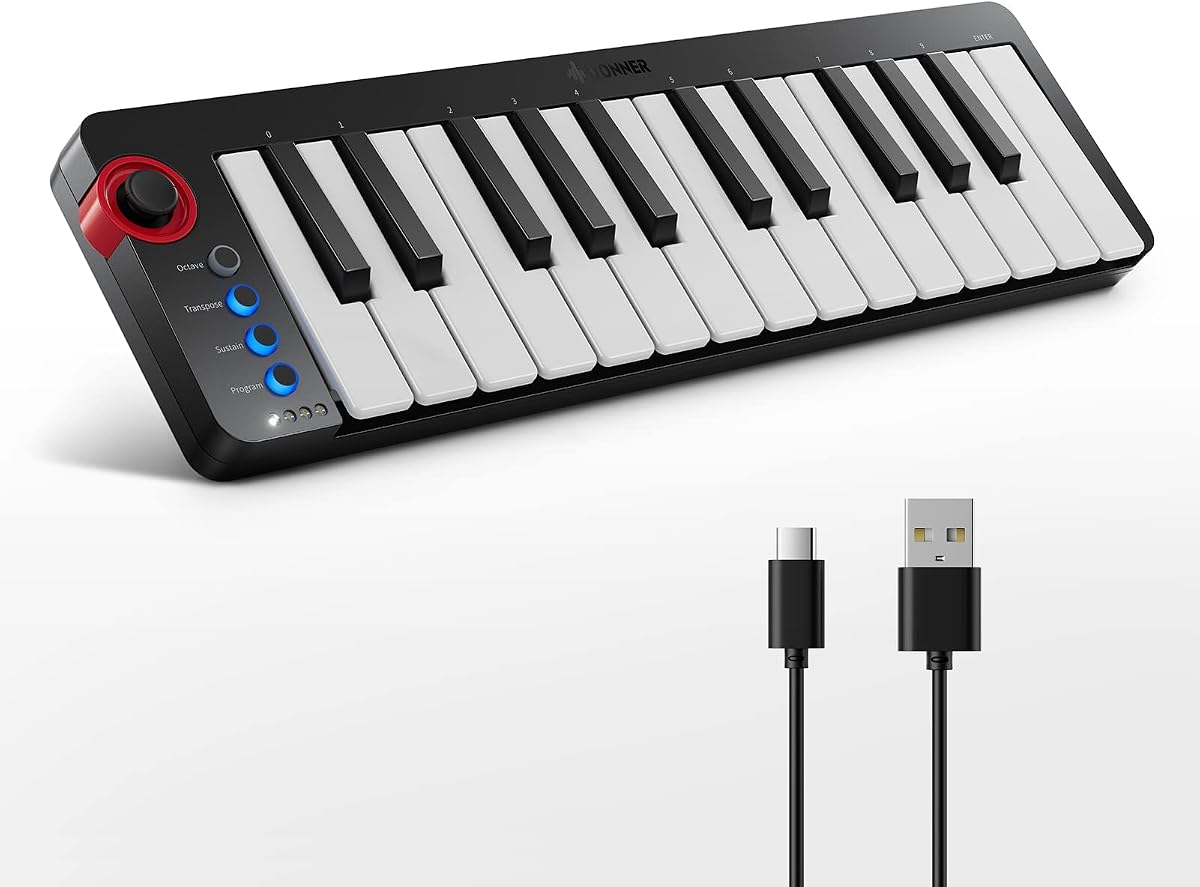
The Donner N-25 is designed with beginners in mind, offering a friendly introduction to MIDI production. It includes educational content to help users understand the basics of music arrangement and composition.
We may earn a commission when you buy through this link, at no additional cost to you.
Its layout features light-up buttons that provide visual feedback, making it easier to learn note patterns. The velocity-sensitive keys allow for dynamic expression. It connects easily to computers and mobile devices without extra drivers.
The build quality is lighter than premium models, and the sound engine is relatively basic. However, these compromises keep the cost low and make it ideal for learning. It serves as a great stepping stone for new musicians.
This controller is highly recommended for students or hobbyists looking to learn music production. The included courses add significant value by providing structured guidance alongside the hardware.
With forty keyboard teaching courses, you gain structured lessons that help you apply technical skills to real music.
It connects to smartphones and tablets with an OTG adapter, allowing you to create music on the go.
We may earn a commission when you buy through this link, at no additional cost to you.
The Rhymo 25-Key is tailored for producers who prioritize mobility and modern connectivity. It offers both USB-C and Bluetooth MIDI options, making it versatile for use with tablets and mobile apps.
We may earn a commission when you buy through this link, at no additional cost to you.
Its slim profile allows it to slip into a bag easily. The X-Y joystick provides pitch and modulation control. The velocity-sensitive keys support Full Level mode, allowing for consistent output levels during performance.
Bluetooth MIDI setup can sometimes be finicky depending on your device. The controls are straightforward but lack the depth of more expensive models. For travel and light production, these limitations are acceptable.
This controller is ideal for mobile producers who use tablets or smartphones for music creation. Its portability and wireless capabilities make it a practical companion for on-the-go creativity.
The ability to connect without a cable frees you from your desk, enabling more dynamic performance spaces.
USB-C ensures fast data transfer and easy power delivery using standard cables found on most devices.
We may earn a commission when you buy through this link, at no additional cost to you.
The M-VAVE 25-Key offers robust wireless capabilities for a compact controller. Its built-in battery allows for around sixteen hours of use, making it suitable for long sessions without a power source.
We may earn a commission when you buy through this link, at no additional cost to you.
Eight RGB backlit pads and eight rotary knobs provide extensive control over your software. The capacitive touch stripes offer pitch and modulation effects. This combination makes it a versatile tool for both studio and live settings.
The battery requires periodic recharging, which adds a maintenance step. The keybed may feel light compared to professional models. However, the freedom of movement it provides is a major advantage for performers.
This controller is excellent for musicians who need to move around during performances or who work in spaces without easy power access. Its wireless reliability is a standout feature.
The long-lasting battery ensures you can focus on performance without worrying about plugging in cables.
Touch stripes add a modern interface for expressive control, enhancing how you interact with synths.
We may earn a commission when you buy through this link, at no additional cost to you.
The Akai Professional MPK Mini Play MK3 is unique for its ability to function as a standalone instrument. This makes it ideal for sketching ideas without needing to boot up a computer.
We may earn a commission when you buy through this link, at no additional cost to you.
It features a built-in speaker and over one hundred internal sounds. The OLED display provides clear feedback on parameters. It also works as a USB MIDI controller when connected to your DAW for more complex projects.
The internal sounds are convenient but limited compared to professional software. The speakers are small and best used for quick checks rather than critical listening. These limitations are expected for a device of this size.
This controller is perfect for travelers or casual producers who want to compose anywhere. Its ability to work independently of a computer is a significant convenience factor.
Having sounds built in means you can record ideas immediately when inspiration strikes, without setup time.
The OLED display keeps you informed of settings and parameters clearly, reducing guesswork during use.
We may earn a commission when you buy through this link, at no additional cost to you.
The black variant of the MPK Mini MK3 offers the same functional capabilities as the standard version but with a sleeker aesthetic. It fits perfectly into a dark studio environment and maintains the high build quality Akai is known for.
We may earn a commission when you buy through this link, at no additional cost to you.
It includes velocity-sensitive keys, eight drum pads, and a four-way thumbstick. The NKS integration allows for easy control of Native Instruments libraries. The design is compact yet sturdy enough for daily use.
The glossy finish can attract fingerprints and dust, requiring regular cleaning. Functionally, it is identical to the white model. This is a minor trade-off for those who prefer a darker studio look.
We recommend this controller for producers who value both function and form. Its robust feature set ensures it remains a useful tool for years, regardless of its color.
The black color scheme blends well with professional studio equipment, maintaining a cohesive visual look.
Regardless of color, you get the same high-performance controls and software integration as the standard model.
We may earn a commission when you buy through this link, at no additional cost to you.
The Akai Professional APC Key 25 MK2 is specifically designed for use with Ableton Live. It features a unique layout that prioritizes clip launching and scene management. This focus makes it an excellent choice for Ableton users.
We may earn a commission when you buy through this link, at no additional cost to you.
Its 5×8 RGB pad matrix allows you to launch up to forty clips simultaneously. The dedicated arrow buttons help you navigate tracks and scenes efficiently. It also includes Ableton Live Lite to get you started.
Because it is optimized for Ableton, it might be less intuitive for users of other DAWs. The focus on clip launching means fewer knobs for mixing compared to other models. However, for Live users, these features are invaluable.
This controller is highly recommended for any musician deeply integrated into the Ableton ecosystem. Its workflow enhancements can significantly speed up arrangement and performance tasks.
The large grid of pads makes it easy to trigger loops and samples live, creating dynamic performances.
Pre-mapped controls mean you can start working immediately without needing to set up complex MIDI assignments.
We may earn a commission when you buy through this link, at no additional cost to you.
Selecting the right controller depends on your specific needs, budget, and production style. We break down the essential factors to help you make an informed decision.
Most 25 key controllers use mini keys to save space. Consider whether you need velocity sensitivity for dynamic playing. Full-size keys are rare in this category but some premium models offer larger surfaces.
Look for keybeds that match your playing style. If you plan to play piano parts frequently, a semi-weighted feel might be preferable even if keys are small.
Evaluate how many physical controls you need beyond keys. Drum pads are essential for beat-making. Faders and knobs are vital for mixing and tweaking synth parameters live.
A layout that matches your workflow reduces the need to use a mouse. More controls mean more hands-on manipulation of your music software.
Ensure the controller works well with your chosen software. Some models come with pre-mapped templates for specific DAWs like Ableton Live or Logic. This saves setup time.
Universal compatibility is important if you switch software often. Check if the manufacturer provides custom mapping tools or editor software.
If you travel frequently, a lightweight and durable controller is crucial. USB bus power means you do not need extra adapters. Wireless support can free you from cables during performances.
Consider how you will connect to your devices. USB-C is becoming standard, and MIDI over Bluetooth is useful for mobile setups. Check for sustain pedal inputs if you need expressive control.
Many controllers come with software licenses or instrument libraries. This adds significant value especially for beginners. Look for DAW editions that offer full features.
Exclusive bundles from native manufacturers can enhance your sound palette. Ensure the software is current and actively supported by the developer.
Sturdy construction ensures longevity and stability during intense sessions. Check if the controller has rubber feet or a weighted base to prevent slipping on the desk.
Durability is especially important for live use. Plastic should feel rigid and not hollow. High-quality materials contribute to a better user experience.
Prices vary significantly based on features and brand. Determine how much you are willing to spend for basic functionality versus advanced features.
Sometimes paying more gets you better durability and software value. A cheaper model might save money upfront but cost more in the long run if you need to replace it.
Think about whether you might want more controls later. Some models offer daisy chaining or expandability. Ensure your setup can grow with your skills.
Compatibility with other gear like audio interfaces matters. Check for MIDI ports if you plan to connect external synthesizers. A flexible system saves upgrades later.
Start by connecting the controller to your computer using a USB cable. Most modern models are class-compliant and do not require drivers. You can select the controller in your software MIDI preferences immediately.
Install any included software and editor tools to customize mappings. Adjust knob sensitivity and pad velocity to suit your playing style. Saving presets ensures your settings are ready when you start working.
Keep your controller clean by dusting it regularly with a dry cloth. Avoid spills and excessive pressure on keys. Store it in a padded case when transporting to protect against impacts and damage.
Most controllers require a computer to generate sounds via software. Some standalone models have built-in sounds and can work without one. Check the specs if you plan to use it independently.
Mini keys are smaller to fit into portable units. Full-size keys feel more like a piano but are less common in 25 key models. Choose based on your need for portability versus playing comfort.
Yes, many support OTG connections for tablets and phones. Bluetooth MIDI models work wirelessly with iOS and Android. Ensure your apps support external MIDI controllers.
Many include DAW Lite versions and instrument plugins. The amount and type of software vary by manufacturer. Check the product page for a full list of included titles.
Most models have dedicated octave up and down buttons. This shifts the pitch range of the keys. Use this to access low bass or high notes without changing software settings.
Velocity sensitivity detects how hard you press keys and changes volume accordingly. It adds expression to your playing. It is essential for realistic instrument performance.
Our top picks highlight the versatility available in today's market. From the Akai MPK Mini MK3 for overall performance to the Arturia MiniLab 3 for workflow adaptability, there is a strong option for every user.
Prioritize features that align with your specific production goals. If you focus on beat-making, look for responsive pads. For melody writing, pay attention to key feel and software integration.
Always verify current pricing and availability before making a purchase. Specifications can change as manufacturers update their product lines regularly.