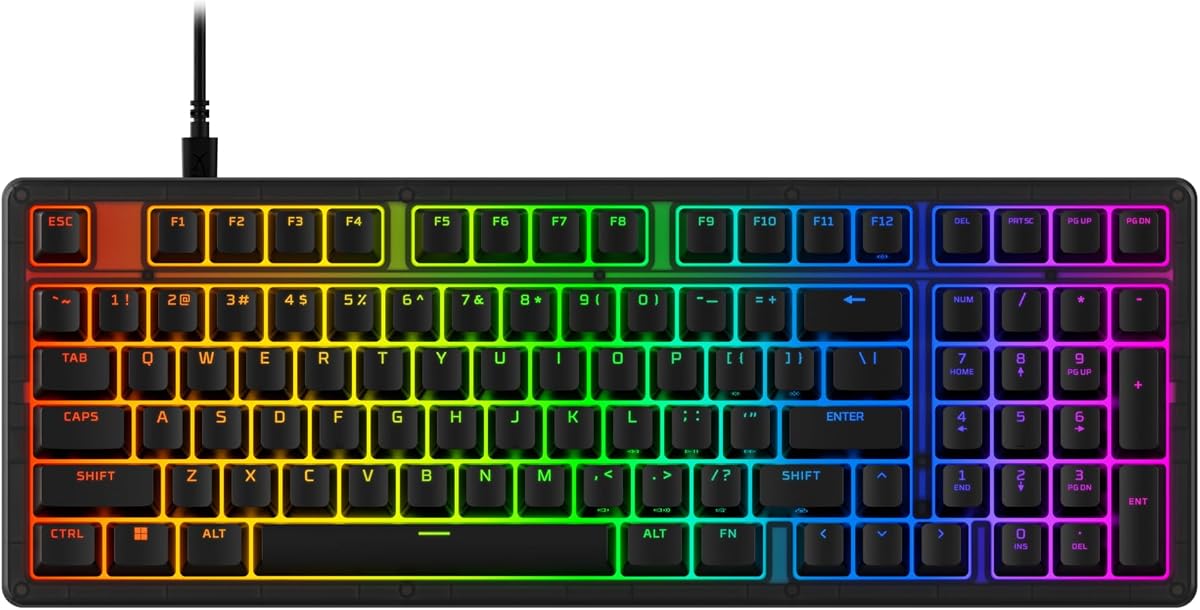
HyperX Eve 1800
4.6Editor score
10-zone RGB lighting
Dedicated media buttons
Anti-ghosting support
Finding the right input device can transform your workflow significantly. A compact layout offers essential keys without the bulk of full-size boards. We focus on models that balance functionality with desk space efficiency for modern users.
Our selection process involved analyzing user feedback, technical specifications, and design versatility. We prioritized keyboards that maintain full functionality while reducing footprint. Each entry represents a distinct approach to compact typing experiences.
Each review highlights specific strengths and potential limitations for informed decisions. Prices and availability fluctuate frequently so verify current listings before purchasing. These models cater to diverse needs from gaming to professional office environments.
4.6Editor score

4.6Editor score

4.4Editor score
As an Amazon Associate we earn from qualifying purchases.
This side-by-side comparison evaluates all ten selected models based on key specifications and use cases.


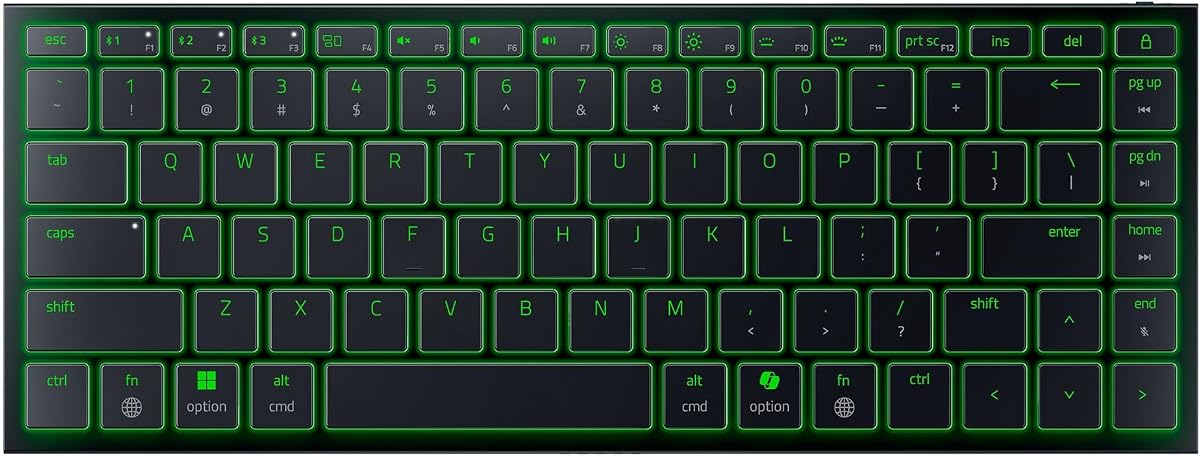


The HyperX Origins 2 1800 stands out as the top choice for gamers and enthusiasts seeking a compact layout without sacrificing performance. With a 4.6 rating and robust specifications, it delivers near-instantaneous input via an 8k polling rate. The hotswap sockets allow easy customization of switches and keycaps for a truly personalized typing experience.
We may earn a commission when you buy through this link, at no additional cost to you.
Its high-profile form factor elevates keys for comfortable engagement while flip-down feet adjust the angle perfectly. The O-ring mount and silicon weight enhance acoustics reducing wobble during intense sessions. Users benefit from 10-zone RGB customization and macro support through HyperX NGENUITY software enabling deep personalization.
While the software requires setup and color housing options are limited, the performance advantages outweigh these minor drawbacks. The factory-lubed switches provide smooth actuation and the swappable housing design future-proofs the board. This model is ideal for those who value speed and flexibility.
For anyone building a competitive gaming setup or needing a durable daily driver, this keyboard excels. It balances essential full-size functions within a compact footprint efficiently. The combination of mechanical precision and modern features makes it our definitive top pick for this category.
The 8000Hz polling rate ensures every keystroke registers instantly giving you a competitive edge in fast-paced games.
Hotswap sockets let you swap switches effortlessly without soldering adapting the keyboard to your evolving preferences easily.
We may earn a commission when you buy through this link, at no additional cost to you.
The HyperX Eve 1800 offers an exceptional entry point into compact gaming keyboards without breaking the bank. Rated 4.6 stars, it features responsive membrane switches that deliver cushioned feedback suitable for daily tasks and gaming. The 10-zone RGB lighting adds aesthetic appeal allowing users to sync colors with their setup.
We may earn a commission when you buy through this link, at no additional cost to you.
Dedicated media buttons provide quick access to volume and mode switching enhancing workflow efficiency. Anti-ghosting and 12-key rollover ensure reliable keypresses during complex inputs. The compact layout frees up desk space for mouse movement while retaining essential full-size functionality.
Although it uses membrane switches instead of mechanical ones, the tactile feedback remains satisfying for most users. The software customization is functional but not as deep as premium models. This makes it a solid choice for budget-conscious buyers prioritizing features over switch type.
Ideal for students or casual gamers needing a reliable keyboard with style, this model delivers value. It combines practical design with attractive lighting at a competitive price. We recommend it for those seeking an affordable yet capable compact keyboard.
Dynamic 10-zone RGB lighting lets you personalize your desk aesthetics to match your gaming style or room decor.
Built-in dedicated media buttons allow instant volume and profile adjustments without navigating through system menus.
We may earn a commission when you buy through this link, at no additional cost to you.
The Logitech Alto Keys K98M represents the premium tier with its gasket-mounted mechanical design and wireless versatility. It scores 4.4 stars for delivering immersive typing experiences through vibration-absorbing technology. The 98-key layout maintains a numpad while staying compact for modern desks and laptop setups.
We may earn a commission when you buy through this link, at no additional cost to you.
Hot-swappable 5-pin sockets allow easy switch upgrades without tools. Concave keycaps and stable Marble Switches ensure smooth and responsive keystrokes. Logi Options+ app support enables productivity features like AI-enhanced shortcuts and macro programming for streamlined workflows across devices.
While the lack of RGB and higher cost may deter some, the build quality and typing feel justify the investment. USB-C charging and up to 12 months of wireless use reduce maintenance needs. It suits professionals needing a reliable high-end tool.
For writers, developers, or remote workers seeking comfort and connectivity, this keyboard is ideal. It balances tactile precision with modern wireless conveniences seamlessly. We select it as the best premium option for those valuing ergonomics and versatility.
The UniCushion gasket mount absorbs vibrations delivering a premium typing feel that reduces fatigue over long work sessions.
Seamless Bluetooth and Logi Bolt connectivity allow instant switching between Windows Mac and mobile devices for fluid productivity.
We may earn a commission when you buy through this link, at no additional cost to you.
The Cherry G80-1800 targets industrial and professional environments requiring reliability and space efficiency. With a 4.1 rating, it features CHERRY MX Black switches rated for over 100 million actuations ensuring long-term performance. Its compact dimensions save desk space while maintaining essential input capabilities.
We may earn a commission when you buy through this link, at no additional cost to you.
USB and PS/2 connectivity with an included adapter offers flexibility for legacy and modern systems. Gold crosspoint contacts ensure consistent switching performance even under continuous use. Codeset 3 support enables compatibility with Unix computers extending its utility in specialized IT setups.
While it lacks RGB and media buttons, its rugged build and straightforward design excel in functional settings. The long cable accommodates varied workstation layouts effectively. It is a practical choice for environments where durability matters most.
For offices or industrial facilities needing a robust keyboard, this model delivers consistent value. It prioritizes function and longevity over flashy aesthetics. We recommend it for users requiring reliable mechanical input in demanding conditions.
Designed for continuous operation with gold crosspoint contacts ensuring reliable performance over millions of keystrokes.
Included PS/2 adapter and Codeset 3 support allow use on older Unix systems and industrial controllers.
We may earn a commission when you buy through this link, at no additional cost to you.
Cherry's G80-1800LPCEU-2 model extends the reliable industrial line with enhanced interface versatility. While specific user ratings are unavailable, the product line is known for quality mechanical keyswitches. The compact 15.9 inch width optimizes workspace efficiency in tight control panels or office setups.
We may earn a commission when you buy through this link, at no additional cost to you.
USB and PS/2 interfaces ensure broad compatibility across different systems and legacy devices. Mechanical keys provide consistent tactile feedback suitable for data entry and control tasks. The design emphasizes durability and functional precision over consumer-oriented features.
Its specialized build targets industrial applications where standard keyboards may fail. The compact size allows integration into restricted spaces easily. Although priced higher, the robust construction justifies the expense for professional use.
For technical environments needing dependable mechanical input, this keyboard fits well. It balances size constraints with high-quality switching. We note it as a strong option for industrial and professional technical setups.
Measuring roughly 15.9 inches wide it fits into tight workstation configurations without sacrificing essential key access.
Support for both USB and PS/2 connections ensures it works with diverse computing environments and legacy hardware.
We may earn a commission when you buy through this link, at no additional cost to you.
The Razer Joro Wireless targets gamers needing portability without sacrificing core features. With a 4.0 rating, it packs a function row and arrow keys into a slim 16.5mm profile. At just 374g, it is highly portable for travel or desk switching.
We may earn a commission when you buy through this link, at no additional cost to you.
Ultra-low profile switches minimize strain and provide quick actuation. Razer Chroma RGB lighting supports dynamic effects for aesthetic customization. Bluetooth 5.0 allows connection to up to three devices enabling flexible workflows between gaming and productivity.
Snap Tap technology prioritizes inputs for faster directional changes which benefits competitive play. However, battery life may vary with settings and usage intensity. The lower rating suggests potential mixed user feedback compared to heavier competitors.
Ideal for gamers on the go or those needing a spare travel keyboard, this model offers convenience. It combines gaming features in a lightweight package. We suggest it for users prioritizing mobility and portability.
Its slim ultra-lightweight build makes it effortless to carry anywhere without adding bulk to your travel bag.
Prioritize inputs between two keys without releasing the previous one for faster directional changes in gameplay.
We may earn a commission when you buy through this link, at no additional cost to you.
This variant of the Cherry 800 series retains a 104-key layout while maintaining compact dimensions. With a 3.7 rating, it offers high service life and gold crosspoint contacts for reliability. The ergonomic design suits users requiring standard key counts in smaller spaces.
We may earn a commission when you buy through this link, at no additional cost to you.
Individual keys with gold contacts ensure consistent electrical performance. Codeset 3 support via PS/2 adds compatibility for specialized systems. Despite its age, it remains a valid option for industrial and legacy computing needs where stability is key.
Users may find the lack of modern connectivity limiting for home use. However, its build quality remains a strong point for heavy-duty environments. The trade-off involves fewer consumer features for durability.
For IT departments managing older systems or specialized terminals, this keyboard provides stability. It is a specialized tool rather than a general-purpose consumer product. We note it for legacy compatibility and robustness.
Gold crosspoint contacts on individual keys ensure consistent switching performance over millions of actuations.
PS/2 connection support for Codeset 3 enables use on older Unix servers and industrial control systems.
We may earn a commission when you buy through this link, at no additional cost to you.
The Cherry Stream TKL removes the number pad to create space for better mouse ergonomics. Rated 4.3 stars, it uses CHERRY SX scissor technology for precise pressure points and quiet typing. The GS mark confirms tested safety and quality standards.
We may earn a commission when you buy through this link, at no additional cost to you.
Six practical multimedia keys offer quick access to system functions. The integrated metal plate and rubberized feet ensure stability and prevent slipping on desks. It suits frequent typists who prioritize quiet operation and comfortable hand positioning.
Lacking a numeric keypad limits financial or data entry efficiency. However, for general office work, the space saving is beneficial. The wired connection ensures consistent performance without battery concerns.
For open offices or quiet workspaces, this keyboard reduces noise pollution effectively. Its compact design promotes healthier posture during daily tasks. We recommend it for users valuing ergonomics and noise reduction.
Whisper-quiet keys make it ideal for shared workspaces where loud typing can distract colleagues.
Removing the number pad allows the mouse to sit closer naturally reducing shoulder strain over time.
We may earn a commission when you buy through this link, at no additional cost to you.
The Logitech Pebble Keys 2 K380s is designed for on-the-go productivity with a sleek portable profile. A 4.3 rating reflects its reliable Bluetooth connectivity and three-year battery life. Its slim form factor fits easily into bags and laptop sleeves for travelers.
We may earn a commission when you buy through this link, at no additional cost to you.
Easy-Switch buttons allow connection to three devices enabling quick transitions between workstations. The keyboard uses certified recycled plastic reducing environmental impact without compromising durability. Keycaps offer a familiar laptop-like typing experience for comfort.
While the scalloped keys may feel unusual compared to traditional layouts, many adapt quickly. The lack of back lighting limits usability in low-light environments. It serves best as a secondary travel companion.
For mobile professionals needing a reliable lightweight input device, this model is ideal. It balances sustainable design with practical multi-device features. We recommend it for users prioritizing portability and battery longevity.
Switch seamlessly between Windows, macOS, and iPadOS devices with dedicated Easy-Switch buttons on the keyboard.
Includes at least 49% certified post-consumer recycled plastic reducing waste without sacrificing build quality.
We may earn a commission when you buy through this link, at no additional cost to you.
The ProtoArc XK04 offers an ultra-compact solution for mobile users needing a physical keyboard. With a 4.5 rating, it folds into a small form with a PU leather cover protecting the keys. At just 7.8 ounces, it is remarkably lightweight for travel.
We may earn a commission when you buy through this link, at no additional cost to you.
Optimized for phones and tablets, it provides a comfortable layout when unfolded. Bluetooth 5.1 connectivity connects to two devices simultaneously for efficient switching. USB-C charging supports auto-sleep standby for extended battery life.
The compact keycaps may reduce typing speed for users accustomed to full-size boards. However, the portability is unmatched for on-the-go messaging and note-taking. It serves as a versatile travel companion.
For travelers or mobile workers who need typing capability anywhere, this keyboard fits perfectly. It balances convenience with practical design features. We suggest it for those prioritizing travel-friendly input solutions.
Folds into a small form with a protective PU cover making it easy to carry in any bag.
Layout specifically optimized for phones and tablets ensures comfortable typing on mobile devices.
We may earn a commission when you buy through this link, at no additional cost to you.
Selecting the right compact keyboard requires evaluating several technical factors. This guide outlines key considerations to match your needs.
A 1800 layout retains a numpad while reducing lateral space. Verify the exact dimensions fit your desk setup and workflow needs.
Check product dimensions to ensure compatibility with your workspace constraints.
Mechanical switches offer durability and tactile feedback while membrane options provide quieter operation. Choose based on your typing preference and environment noise levels.
Select mechanical for gaming or heavy typing and membrane for quiet office use.
Wired keyboards ensure stable input while wireless offers flexibility for multiple devices. Consider power management and connectivity requirements.
Prioritize Bluetooth for multi-device setups and USB for latency-free gaming.
Hot-swap sockets allow switch changes without soldering enhancing long-term flexibility. RGB zones add aesthetic customization options.
Look for hotswap support if you plan to modify switches later.
Materials like metal plates or high-density plastics impact durability. Industrial models offer higher actuation ratings than standard consumer units.
Review build specs for longevity especially in high-use environments.
Wireless models vary from days to months on a single charge. USB-C ports simplify charging compared to battery replacements.
Check battery duration to avoid frequent recharging interruptions.
Companion apps enable macro recording, lighting control, and profile management. Compatibility with your operating system is essential for functionality.
Ensure software supports Windows, macOS, or other systems you use.
Compact layouts can improve posture by reducing mouse reach. Consider key height and flip-down feet for typing comfort.
Select designs that align with your natural hand position.
Connect the keyboard via USB or Bluetooth following device pairing instructions. Configure software profiles to match your preferred layouts and macros for efficiency.
Clean regularly using compressed air or soft brushes to remove debris between keycaps. Avoid liquid cleaners that may seep into switches and damage electronics.
Store in a protective case or sleeve to prevent dust and scratches when not in use. Keep firmware updated to ensure stability and new feature support.
A 1800 layout keeps the full functionality of a standard keyboard including the number pad but shrinks the lateral footprint. It typically removes gaps between clusters making it space-saving without losing essential keys for productivity.
Most models support macOS via Bluetooth or USB. Software features may be optimized for Windows but basic typing works across systems. Check specific compatibility notes for advanced customization apps.
Yes, especially mechanical models with anti-ghosting and high polling rates. Compact layouts reduce mouse interference allowing better aiming. However, verify switch latency and feature sets for competitive titles.
Typical mechanical switches endure 50 million to 100 million keystrokes. Industrial units often exceed this. Lifespan depends on usage frequency and care habits over years of daily operation.
Hotswap models allow easy switch changes without soldering. Standard models require permanent soldering. Check product specs for socket type before assuming upgradeability for customization.
Wireless models range from days to 12 months on a single charge depending on backlight usage. Rechargeable units typically use USB-C. Check specific specs for expected duration per charge cycle.
Our top picks highlight distinct strengths from the HyperX Origins 2's speed to the Logitech Alto Keys' comfort and the HyperX Eve 1800's budget value. Each model serves specific needs within the compact form factor.
Prioritize your primary use case such as gaming, productivity, or travel when selecting. Mechanical switches offer tactile durability while wireless models provide setup flexibility for modern workflows.
Prices and features change frequently so verify current listings before purchasing. Consider warranty and support for long-term reliability when investing in a daily-use input device.