
LG UltraFine evo 32U990A-S
4.5Editor score
Thunderbolt 5 support
Nano IPS Black panel
HDR 600 certified
Finding the right 6K monitor can transform your creative workflow and productivity levels significantly. These displays offer incredible pixel density and color accuracy for professionals.
We analyzed ten top models based on resolution, panel type, connectivity options, and user feedback. Each entry provides detailed specifications and performance insights.
Our reviews highlight unique strengths and potential trade-offs for every model. Prices and availability change frequently so check current listings before purchasing.
4.5Editor score

3.9Editor score
3.9Editor score
As an Amazon Associate we earn from qualifying purchases.
The following table provides a side-by-side overview of key specifications for all ten models including panel types, resolutions, and connectivity options.




The ASUS ProArt PA32QCV stands out as a top contender in the 6K monitor market with its impressive resolution and color fidelity. This model delivers a 6K display that ensures every detail is visible for professional workflows.
We may earn a commission when you buy through this link, at no additional cost to you.
Its factory calibrated color accuracy with Delta E less than 2 ensures that what you see on screen matches your final output. The inclusion of Thunderbolt 4 with Power Delivery makes it highly versatile for modern setups.
While it is a significant investment the build quality and features justify the cost for professionals who rely on precise color reproduction. The Auto KVM switch simplifies managing multiple devices effectively.
Creators and designers looking for a reliable workspace tool will find this monitor exceptional. It balances high resolution with practical connectivity features for seamless productivity.
The monitor comes with Calman Verified calibration ensuring accurate colors out of the box for professional editing tasks.
Dual Thunderbolt 4 ports support daisy chaining and provide up to 96W power delivery for connected laptops.
We may earn a commission when you buy through this link, at no additional cost to you.
This massive 52-inch curved display offers an immersive viewing experience that is hard to beat for productivity and content creation. The 6K resolution on such a large screen ensures crisp text and detailed visuals.
We may earn a commission when you buy through this link, at no additional cost to you.
The IPS Black panel technology provides deeper blacks and higher contrast than standard IPS panels which enhances the viewing experience for media consumption and graphic work. The 120Hz refresh rate adds smoothness to motion.
The curved design helps reduce distortion at the edges making it easier to view content from various angles. However the sheer size means you need ample desk space for an optimal setup.
Professionals needing multiple windows open simultaneously will benefit greatly from the expansive workspace. It is an ideal choice for those prioritizing screen real estate over compact form factors.
IPS Black technology improves contrast ratios significantly offering more vivid visuals compared to traditional IPS displays.
The built-in Thunderbolt hub allows for connecting multiple devices including storage drives and peripherals easily.
We may earn a commission when you buy through this link, at no additional cost to you.
The G32P model features a glossy finish that brings out the vibrancy in colors and images making it ideal for media and creative work. The 6K resolution provides stunning clarity for every pixel.
We may earn a commission when you buy through this link, at no additional cost to you.
With HDR support and a high contrast ratio this monitor delivers deep blacks and bright highlights for a dynamic viewing experience. The 223 PPI ensures text remains sharp and readable.
The glossy screen can reflect ambient light so it is best used in controlled lighting environments. Despite this the visual fidelity it offers is exceptional for color critical tasks.
Users who prioritize visual pop over matte finish will appreciate this display. It is a strong choice for studios where lighting can be managed effectively.
It covers 99% sRGB and DCI-P3 ensuring wide color gamut support for accurate representation.
Low blue light and flicker-free features help reduce eye strain during long work sessions.
We may earn a commission when you buy through this link, at no additional cost to you.
The Samsung Odyssey G8 targets gamers and creators who need high performance with its unique dual mode feature allowing for 6K at 165Hz or 3K at 330Hz. This flexibility is rare in the 6K space.
We may earn a commission when you buy through this link, at no additional cost to you.
The Fast IPS panel ensures quick response times which reduces motion blur and ghosting during fast action. Support for G-Sync and FreeSync makes it compatible with various GPUs for tear-free gameplay.
While the primary focus is gaming the high resolution remains useful for productivity when the mode is switched. It is a unique hybrid option for those who game and work on the same screen.
Gamers who also do creative work will find this monitor versatile. It bridges the gap between high refresh gaming and high resolution productivity.
Switch between 6K for visuals and 3K for speed without needing multiple monitors.
Near-instant 1ms response time ensures crisp images during rapid movement sequences.
We may earn a commission when you buy through this link, at no additional cost to you.
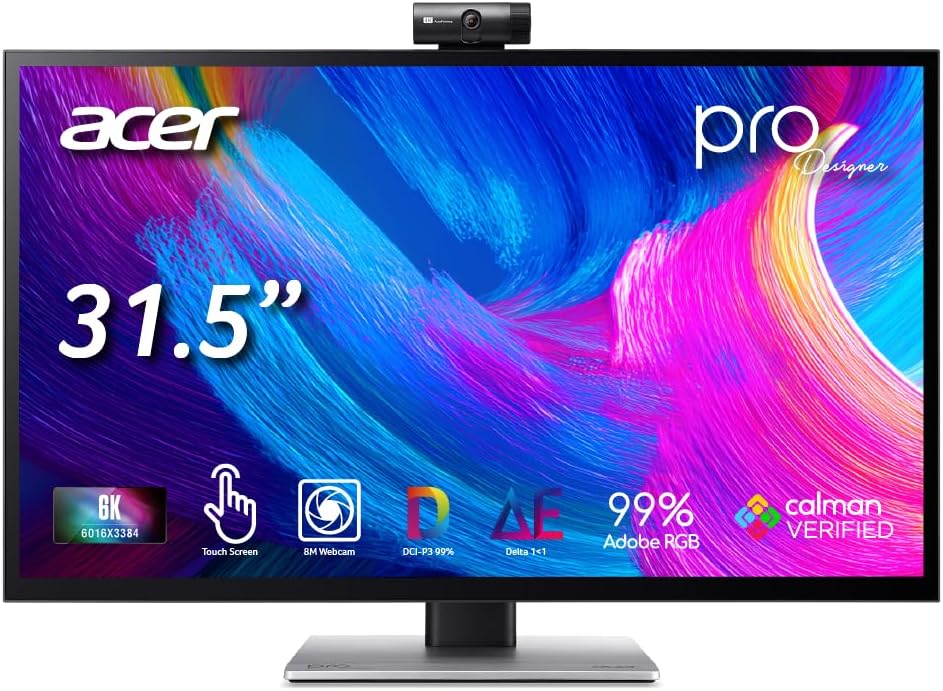
The Acer ProDesigner PE320QXT integrates touch capability directly into a professional 6K monitor which eliminates the need for a separate drawing tablet. It supports 10-point touch and MPP 2.0 stylus for natural input.
We may earn a commission when you buy through this link, at no additional cost to you.
With factory calibration achieving Delta E less than 1 this monitor ensures that every color is exact. This level of precision is critical for photographers and graphic designers.
The built-in 8MP webcam and microphone array simplify video calls by removing the need for external peripherals. This makes the setup cleaner and more streamlined for home offices.
Artists and designers looking for a direct interface to their work will love this touch integration. It combines a high-quality display with interactive capabilities.
Supports 4096 pressure levels for detailed drawing and retouching directly on the screen.
Hardware-level noise reduction and HD video ensure clear communication during client meetings.
We may earn a commission when you buy through this link, at no additional cost to you.
The G32X delivers a clean minimalist design that fits perfectly into modern professional setups. It offers a 6K resolution with strong HDR performance for vibrant visuals without unnecessary extra features.
We may earn a commission when you buy through this link, at no additional cost to you.
Its 5.0 rating indicates high satisfaction among users who appreciate reliability and performance. The anti-glare coating helps minimize reflections making it comfortable for long viewing sessions.
Connectivity includes high-speed ports sufficient for most tasks but it focuses on core quality over extra bells and whistles. The design emphasizes utility and visual purity.
Professionals who value a simple yet effective display will find this monitor appealing. It is a reliable choice for standard creative workflows.
CNC-machined aluminum body ensures premium durability and a sleek look.
Multi-layer anti-reflective coating improves visibility in various lighting conditions.
We may earn a commission when you buy through this link, at no additional cost to you.
This Dell model functions as a central hub with dual Thunderbolt 4 ports and extensive connectivity options. The 52-inch size provides a large workspace for managing multiple applications simultaneously.
We may earn a commission when you buy through this link, at no additional cost to you.
With up to 140W power delivery it can fully charge most high-end laptops through a single connection. The included remote control allows users to adjust settings without reaching for buttons on the display.
It also includes built-in speakers which add convenience for quick audio playback without extra hardware. However the user feedback suggests some software reliance may affect user experience.
Tech-focused professionals who prioritize connectivity and desk organization will appreciate this setup. It simplifies cables significantly with its comprehensive port selection.
High wattage support ensures your laptop stays powered while working on the monitor.
Integrated audio hardware supports basic sound needs without external speakers.
We may earn a commission when you buy through this link, at no additional cost to you.
The LG UltraFine evo stands out with next-gen Thunderbolt 5 connectivity offering data transfer speeds up to 80 gigabits per second. This ensures future-proofing for high-speed storage and display needs.
We may earn a commission when you buy through this link, at no additional cost to you.
Its Nano IPS Black panel provides a high contrast ratio for deeper blacks which improves image realism significantly. The DisplayHDR 600 certification ensures bright highlights and smooth tonal transitions.
It supports KVM functionality allowing control of two computers via one keyboard and mouse for efficient workflows. This makes it ideal for users managing multiple operating systems.
Professionals needing top-tier connectivity and color performance will find this model worth the investment. It represents the cutting edge of 6K monitor technology.
Thunderbolt 5 ensures readiness for upcoming high-bandwidth peripherals and displays.
Includes 99.5 percent Adobe RGB coverage for print professionals.
We may earn a commission when you buy through this link, at no additional cost to you.
This Dell bundle comes with an enhanced protection plan providing peace of mind for extended use. The monitor offers a 31.5-inch screen with 6K resolution for detailed work and media.
We may earn a commission when you buy through this link, at no additional cost to you.
A 5ms response time makes it suitable for occasional gaming and quick interactions. The 450 nit brightness ensures visibility even in well-lit offices without strain.
It connects via USB-C for quick data transmission and power delivery streamlining your cable management. The bundle value makes it attractive for businesses concerned about hardware longevity.
Business users looking for dependable performance with warranty support will benefit from this set. It balances standard professional features with added security.
Two-year premium protection covers potential issues ensuring long-term reliability.
USB-C interface supports fast data transfer for large creative files.
We may earn a commission when you buy through this link, at no additional cost to you.
This renewed option offers the same capabilities as the new model but without a stand and at a lower cost point. It is designed for users who already have a VESA mount or prefer wall mounting.
We may earn a commission when you buy through this link, at no additional cost to you.
The 52-inch curved display provides expansive screen real estate which is ideal for multitasking and immersive content. It supports 120Hz for smooth motion and includes a Thunderbolt 4 hub.
Since it is renewed buyers should inspect the unit upon arrival to ensure it meets their standards. It is a practical solution for those wanting big screen utility at a reduced price.
Budget-conscious professionals needing a large display can consider this option. It retains the core value of the high-end model without the stand cost.
VESA mount only design allows for custom arm setups to save desk space.
Renewed condition offers significant savings while maintaining core performance features.
We may earn a commission when you buy through this link, at no additional cost to you.
Selecting a 6K monitor involves balancing resolution with panel type and connectivity needs to ensure a seamless workflow.
6K resolution provides approximately 20 million pixels which allows for highly detailed graphics and text. Higher pixel density ensures sharp visuals essential for design work and professional content creation.
Look for a monitor with at least 200 PPI for comfortable viewing of fine details without scaling issues.
IPS panels offer wide viewing angles and consistent color which are vital for collaborative environments. OLED or Nano IPS Black options may provide better contrast for cinematic experiences.
Choose IPS for general color accuracy and consider specialized panels if high contrast is a priority for media work.
Professional work requires precise color representation. Look for covers of DCI-P3 or Adobe RGB and low Delta E values to ensure accurate output.
Factory calibration is a significant plus as it ensures the display meets standards right out of the box.
Modern workflows rely heavily on single-cable solutions. Thunderbolt 4 or 5 ports allow for high-speed data transfer and power delivery simultaneously.
Ensure the monitor has the specific ports your laptop or desktop requires to avoid needing adapters.
Long work sessions require a comfortable setup. A stand that allows for height tilt and pivot adjustments helps prevent strain.
VESA mount compatibility adds flexibility if you prefer to use a third-party monitor arm for better positioning.
For general productivity a 60Hz refresh rate is standard. However if you edit video or play games consider models with higher refresh rates for smoother motion.
A low response time reduces motion blur ensuring that fast-moving content remains crisp and clear.
Features like built-in webcams microphones or KVM switches can streamline your workspace significantly. These conveniences reduce clutter and improve efficiency.
Prioritize these additions based on your specific daily tasks to maximize the utility of your setup.
6K monitors vary widely in price depending on features and brand. Determine your core needs before selecting to avoid overpaying for unused capabilities.
Consider renewed options if you want high performance at a lower price point while accepting standard warranties.
Place your monitor at eye level and about arm's length away to maintain good posture during work. Adjust the tilt to reduce glare from overhead lights.
Use a soft microfiber cloth to clean the screen gently. Avoid harsh chemicals that might damage the anti-glare coating or color filters.
Adjust color settings via software to match your specific creative profiles. This ensures consistency across different devices and environments.
Yes driving a native 6K resolution requires significant GPU power to render all pixels effectively. Ensure your graphics card supports the resolution and refresh rate to avoid lag.
Many models like the ProArt and LG UltraFine support Macs with Thunderbolt or USB-C connections. Check specific compatibility lists before purchasing for best integration.
Some systems support tiling or daisy chaining to achieve 6K but it is better to use a single native 6K display for optimal performance. Software solutions may vary.
HDR enhances brightness and contrast allowing for more realistic images and better shadow detail. It is essential for video grading and viewing high dynamic content.
Some models include built-in speakers but their quality varies. For professional audio work external speakers or headphones are recommended for accurate sound reproduction.
Most manufacturers offer a three-year warranty with options to extend coverage. Check the specific product listing for details on support and repairs available.
The ASUS ProArt PA32QCV and LG UltraFine evo offer top-tier performance for professionals who demand precision and connectivity. These models set the standard for 6K displays.
Consider your specific workflow needs when selecting a model. Whether it is touch capability for artists or screen size for productivity the right pick depends on your usage.
Prices and availability fluctuate so always verify current listings before making a purchase. Investing in the right monitor today ensures a smoother creative process for years.