
Power Strips with Surge Protection, Flat Plug Power Strip Tower
4.8Editor score
12 AC outlets plus 4 smart USB ports
Ultra slim flat plug design saves wall space
1080 Joules surge protection rating
This guide compares the top ten desk mounted outlet towers for power organization and safety, helping you choose the best charging station for your space.
Desk mounted outlet towers transform cluttered workspaces into organized hubs. These vertical charging stations offer multiple ports in a compact footprint, keeping cables tidy while ensuring easy access to power for all your devices.
We evaluated ten leading models based on port variety, surge protection, cable management, and build quality. Each product was selected for its ability to handle high-wattage devices and fit seamlessly into modern home offices, dorm rooms, and living areas.
Every pick highlights unique strengths like retractable cords, flat plugs, or heavy-duty construction. Prices fluctuate often, so check current listings before buying. Our goal is to help you find a reliable power solution that matches your specific desktop needs.
4.8Editor score

4.5Editor score

4.8Editor score
The following table offers a side-by-side comparison of all ten products. We highlight key specifications like total outlet count, USB capabilities, cord length, and safety ratings to help you make an informed decision quickly.




The TenTrend Power Strip Tower stands out as a top contender with its impressive 230W total output and 14 ports. It earns our Editor's Choice for delivering fast charging for laptops alongside standard device charging in a single vertical tower.
We may earn a commission when you buy through this link, at no additional cost to you.
Its standout feature is the dual orange USB-C ports capable of 65W output, allowing you to charge laptops without bulky bricks. The tower also includes two 20W USB-C ports and four USB-A ports, covering almost every device you might have on your desk.
While it lacks individual switches per outlet, the single master switch is straightforward. The flat plug design ensures it fits tight against the wall without blocking adjacent sockets, which is a common issue with bulky power strips.
Buy this if you need a high-capacity station that keeps your desk tidy and charges high-power devices efficiently. It balances performance and space-saving design better than many competitors in this price range.
The two 65W USB-C ports eliminate the need for separate laptop chargers, streamlining your desktop setup significantly.
Built-in overcurrent overvoltage short-circuit and overheat protection ensures your electronics remain safe during power fluctuations.
We may earn a commission when you buy through this link, at no additional cost to you.
The Anker Nano Power Strip is a premium solution that mounts directly to your desk edge using a secure clamp. This design is unique because it keeps the power strip entirely off your work surface, freeing up space for monitors and notebooks.
We may earn a commission when you buy through this link, at no additional cost to you.
It features GaN technology allowing a 70W USB-C port to charge laptops quickly. The dual-zone layout separates AC and USB ports, making it easier to manage cables without a tangled mess. The 1500J surge protection adds a layer of safety for expensive electronics.
The main drawback is the price, which is significantly higher than other options. Additionally, the clamp requires a flat edge between 0.6 and 1.8 inches thick, so it may not work with curved or thin desks.
Choose this if you have a high-value workspace and need maximum surface space. The convenience of a clamp-on design combined with top-tier charging speeds makes it the best premium option available.
By mounting under or on the desk edge, the strip disappears from your view and keeps your workspace completely clear.
GaN tech allows smaller, cooler, and more efficient charging than traditional silicon, perfect for high-wattage laptops.
We may earn a commission when you buy through this link, at no additional cost to you.
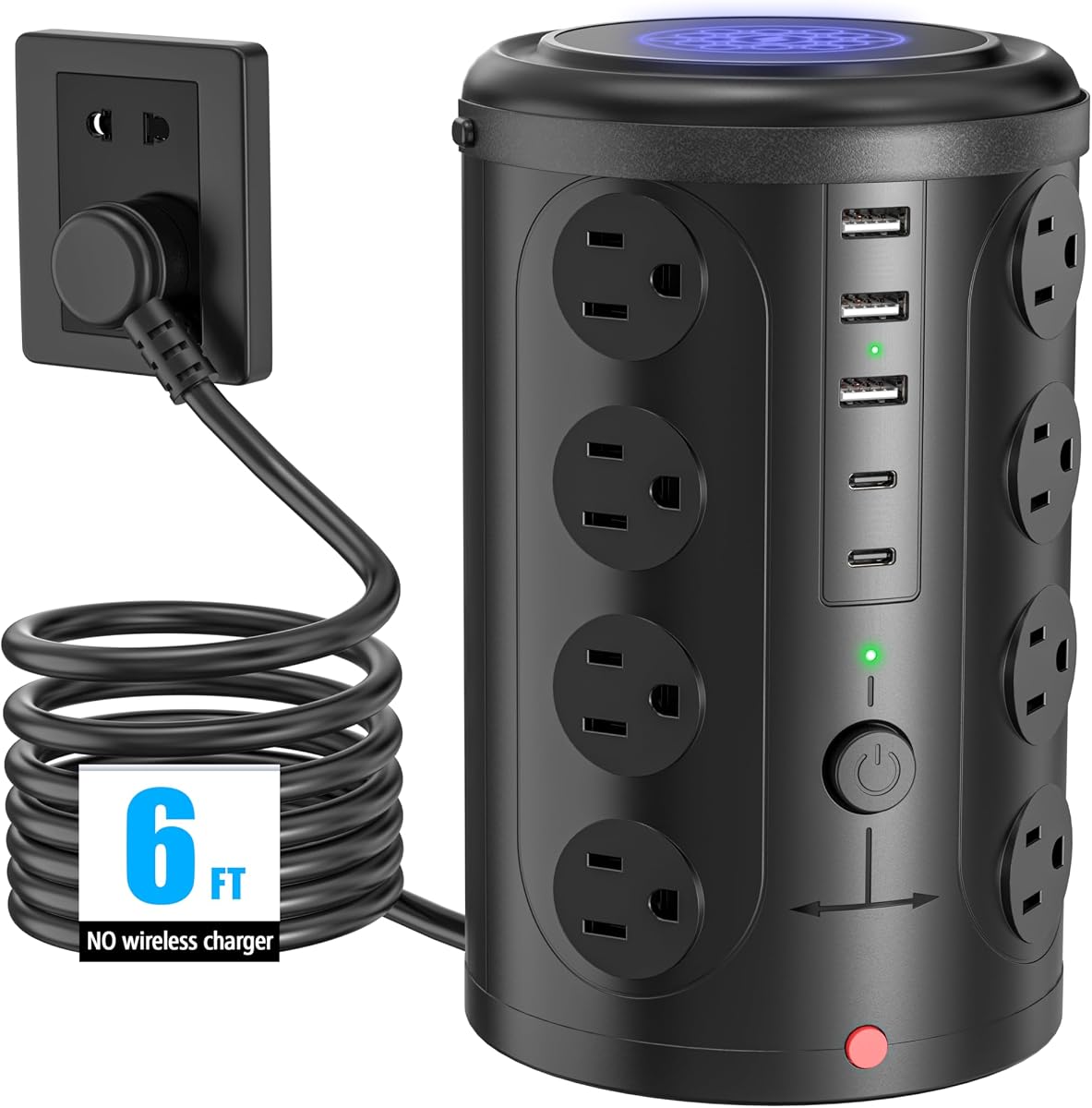
This tower is a solid budget-friendly choice that doesn't skimp on features. With 12 AC outlets and 4 USB ports, it offers 16 total charging spots. It earns our Best Budget badge for its low price and high utility.
We may earn a commission when you buy through this link, at no additional cost to you.
The flat plug design is very thin at 0.35 inches, allowing it to sit flush against the wall. The cord is braided fabric, which adds a nice aesthetic touch and improves durability over standard rubber cords. Wide spacing between AC sockets helps prevent blocking.
While it lacks individual switches, the master switch works well for total power management. The 1080 Joules surge protection is decent for everyday use, though not as high as premium models.
Buy this if you need maximum ports for the lowest price. It is perfect for dorm rooms or shared desks where many people need to charge devices without spending a lot of money.
You get 16 ports for a very competitive price, making it ideal for rooms with many devices needing power.
The fabric sleeve on the cord prevents fraying and adds a stylish look to your power setup.
We may earn a commission when you buy through this link, at no additional cost to you.
The Uncaged Ergonomics tower is unique because of its retractable cord. Instead of a fixed length, the cable pulls out as needed and rewinds automatically when released. This eliminates the clutter of loose cables on the floor.
We may earn a commission when you buy through this link, at no additional cost to you.
It is designed to be mounted on walls or under desks, which keeps it out of sight. The base holds four AC outlets and two USB-C ports, enough for a basic workstation. The 5.0 rating suggests users love the convenience.
The main trade-off is the shorter cord length when extended compared to other towers. Also, it has fewer USB ports, so it might not suit a home full of gadgets. The mountable feet are a great addition for flexibility.
Choose this if you want a clean look without trailing wires. It is perfect for desks where you want to keep the floor clear and have the power strip hidden away.
Pull only the length you need and let go, and the cord winds back into the base automatically.
Mountable feet allow you to fix the tower to a wall or workbench, reclaiming desk space.
We may earn a commission when you buy through this link, at no additional cost to you.
This SMALLRT tower is ideal for users with many devices to plug in. It offers 12 AC outlets and four USB ports in a vertical tower. The 6.5-foot cord is longer than most, giving you more flexibility in placement.
We may earn a commission when you buy through this link, at no additional cost to you.
It features four separated switches, which let you turn off specific sections of the tower without unplugging devices. This is great for saving energy or resetting devices remotely. The construction feels solid and heavy-duty.
The single USB-C port limits fast charging options for laptops, but the USB-A ports cover phones and tablets. The size is larger than compact models, so ensure you have the space.
Buy this if you need multiple switch controls and a long cord. It works well for home offices where you need to manage power for many different electronics simultaneously.
Four separated switches allow you to control different parts of the tower independently for better energy management.
The 6.5-foot extension cord reaches further than average, letting you place the tower where you need it most.
We may earn a commission when you buy through this link, at no additional cost to you.
This model is essentially a 16-in-1 charging hub. It combines 12 AC outlets with four smart USB ports. The focus is on capacity and safety. The pure copper cord and fire-resistant shell add peace of mind for safety.
We may earn a commission when you buy through this link, at no additional cost to you.
The smart USB technology detects devices and delivers the right speed, which can be up to 30% faster than standard chargers. The base has anti-slip mats to prevent wobbling when plugging in heavy plugs.
The design is fairly standard for a tower, but the port count is the highlight. It does not have a clamp or retractable cord, but the standard tower design is reliable.
Choose this for heavy device loads and safety features. It is a good choice for dorm rooms or shared spaces where reliability and high port count are top priorities.
Built-in smart tech detects your device and adjusts output for optimal charging speed automatically.
Fire-resistance PC shell and pure copper wire ensure safe and long-lasting performance under load.
We may earn a commission when you buy through this link, at no additional cost to you.
This tower is built for power. With 16 AC outlets and 5 USB ports, it is one of the most capacious options. The wide spacing between outlets ensures that large plugs do not block each other.
We may earn a commission when you buy through this link, at no additional cost to you.
It supports up to 1875W at 125V, making it suitable for heavy loads. The inclusion of two USB-C ports adds modern convenience. Lightning protection adds extra safety during storms.
The size is large, so it might not fit on small desks. It is better for floor placement or large work surfaces. The 6-foot cord is standard and sufficient for most setups.
Buy this if you need maximum AC outlets. It is ideal for studios or offices with many monitors and peripherals requiring simultaneous power.
Outlets are spaced widely to prevent large adapters from blocking adjacent sockets.
1875W total power capacity allows running multiple high-draw devices at once.
We may earn a commission when you buy through this link, at no additional cost to you.
The TESSAN tower focuses on saving space and fitting into tight corners. Its flat plug is just 0.31 inches thick and has a 45-degree right angle. This allows a second plug to fit below it in a wall outlet.
We may earn a commission when you buy through this link, at no additional cost to you.
It includes 11 AC outlets and 3 USB-A ports. The grey color matches many home decor styles. The tower is compact and includes rubber feet to prevent slipping.
Lack of USB-C is a slight downside for modern laptops, but phones charge fine on USB-A. The cord length is standard but not exceptional.
Buy this if you have limited wall space and need a discreet power strip. It is perfect for nightstands or desks near a wall where space is at a premium.
The 45-degree right angle plug leaves room for another outlet to be used simultaneously.
Designed to take up minimal space on your desk or nightstand while providing plenty of outlets.
We may earn a commission when you buy through this link, at no additional cost to you.
The VILONG tower uses a dual-layer design that can clamp on top of or under a desk. This provides flexibility in how you want to manage cables. It fits desks up to 1.6 inches thick.
We may earn a commission when you buy through this link, at no additional cost to you.
It has 10 AC outlets and three USB ports, including a 20W USB-C port. The two independent switches allow you to manage power for different sections. Installation requires no tools.
The 700J surge protection is lower than some rivals. Also the clamp might not fit very thick desks. But for standard office desks, it is easy to install and use.
Choose this for versatile mounting options. If you want to hide the strip under your desk but keep ports accessible, this dual-layer design is a great solution.
The dual-layer design supports both under-desk and desktop charging options for flexible access.
Simply clamp the strip to your desk and twist to secure without drilling holes.
We may earn a commission when you buy through this link, at no additional cost to you.
This tower balances compact size with functionality. It has 12 AC outlets and 4 USB-A ports in a small 3.15-inch footprint. The flat plug is ultra-thin and sits flush against the wall.
We may earn a commission when you buy through this link, at no additional cost to you.
The 1800J surge protection is higher than average for this size. Wide outlet spacing ensures that even large plugs fit without blocking others. The base is stable with rubber feet.
It lacks USB-C and has a shorter cord. But for basic needs and a clean look, it works well. The reset/off switch allows easy power management.
Buy this for compact desk needs. It is great for small apartments or corners where space is limited but you still need many outlets.
A mini vertical power tower that takes up less space than a traditional strip.
1800J surge protection ensures safety for expensive electronics during voltage spikes.
We may earn a commission when you buy through this link, at no additional cost to you.
Selecting the right outlet tower depends on your specific setup and device count. This guide covers key factors to consider before purchasing.
Count your devices carefully. Look for a mix of AC outlets and USB ports. Modern setups need USB-C for fast laptop charging. Ensure there are enough slots so you do not unplug one device to use another.
Choose a tower with at least one USB-C port if you have a modern laptop. More ports mean less clutter over time.
Surge protection keeps electronics safe from voltage spikes. Look for a rating above 1000 Joules for better safety. Higher ratings offer more protection for sensitive devices like computers and TVs.
A higher Joule rating ensures your equipment lasts longer. Aim for at least 1000 Joules for standard use.
A long cord gives flexibility in placement. Standard lengths are 6 to 6.5 feet. Flat cords lie flush against walls and floor, reducing tripping hazards. Braided cords are often more durable.
Select a cord long enough to reach your outlet comfortably. A flat design is best for tight spaces.
Traditional towers sit on surfaces. Clamp models attach to desks. Retractable models hide cables. Consider your workspace layout. Some desks lack space for a tower, so a clamp might be better.
Choose a form factor that matches your desk. Clamps save surface space; towers offer stability.
Individual switches let you turn off specific devices without unplugging. This saves energy and reduces wear. Some towers group switches; others have one master switch. Consider your need for granular control.
Switches are useful for devices you use frequently. They offer convenience and energy savings.
Fire-resistant materials and overload protection are essential. Look for certifications and robust materials. Plastic build can be fine if fire-resistant. Safety should be a priority for any power device.
Prioritize models with safety certifications. Fire-resistant shells prevent hazards during overloads.
Your desk should look tidy. Towers come in white, black, or grey. A slim profile blends better with modern desks. Consider the design to ensure it matches your workspace theme.
Choose a color that matches your desk or decor. A sleek design hides better than bulky strips.
Prices vary widely. Basic towers are affordable; premium ones cost more. Determine your needs. If you only need basic power, a budget model works. If you need USB-C, look for value.
Set a budget but prioritize safety. A good tower protects expensive gear. Value often comes with warranty.
Place the tower on a flat, stable surface. Ensure the cord is not pinched or twisted. Plug the flat end into a wall outlet to minimize wall blockage.
Turn on the master switch. Connect devices one by one. If your tower has switches, group devices by usage to manage power easily.
Avoid overloading the outlets. Do not plug high-draw appliances like heaters. Check for signs of heat or wear periodically. Clean with a dry cloth to maintain safety.
Many models include surge protection, but check the Joule rating. Higher ratings like 1500J or 1800J offer better protection. Ensure the tower explicitly states surge protection features.
Yes, if the USB-C port supports 60W or higher. Standard USB-A ports are for phones. Check product specs for wattage to confirm laptop compatibility.
Flat plugs are designed to fit tight spaces. Right-angle designs often allow another plug below. This minimizes blockage and saves wall space.
Yes, many meet dorm safety requirements. They consolidate cords and often include fire-resistant materials. Check your dorm policy before buying to confirm compliance.
A six-foot cord is usually ideal for desks. It allows distance from the wall without tangling. Longer cords are helpful for floor placement or large rooms.
Unplug the tower and let it cool. Use a dry cloth to wipe dust. Do not use water or liquids near the electrical contacts.
Some models have switches to cut power when not in use. This eliminates standby power loss. It helps reduce your overall energy bill.
Established brands like Anker offer strong warranties. But budget brands like SMALLRT have high ratings too. Look for customer feedback and warranty terms.
We reviewed ten top towers ranging from retractable designs to high-wattage charging hubs. The TenTrend Power Strip Tower offers a great balance of ports and USB-C speed for most users.
If you want to save surface space, the Anker Nano Power Strip's clamp design is unmatched. For budget shoppers, the 16-in-1 tower from SMALLRT provides incredible value.
Prices and features change often. Always check current listings and reviews before you buy. Choose the model that fits your devices and your desk best.