
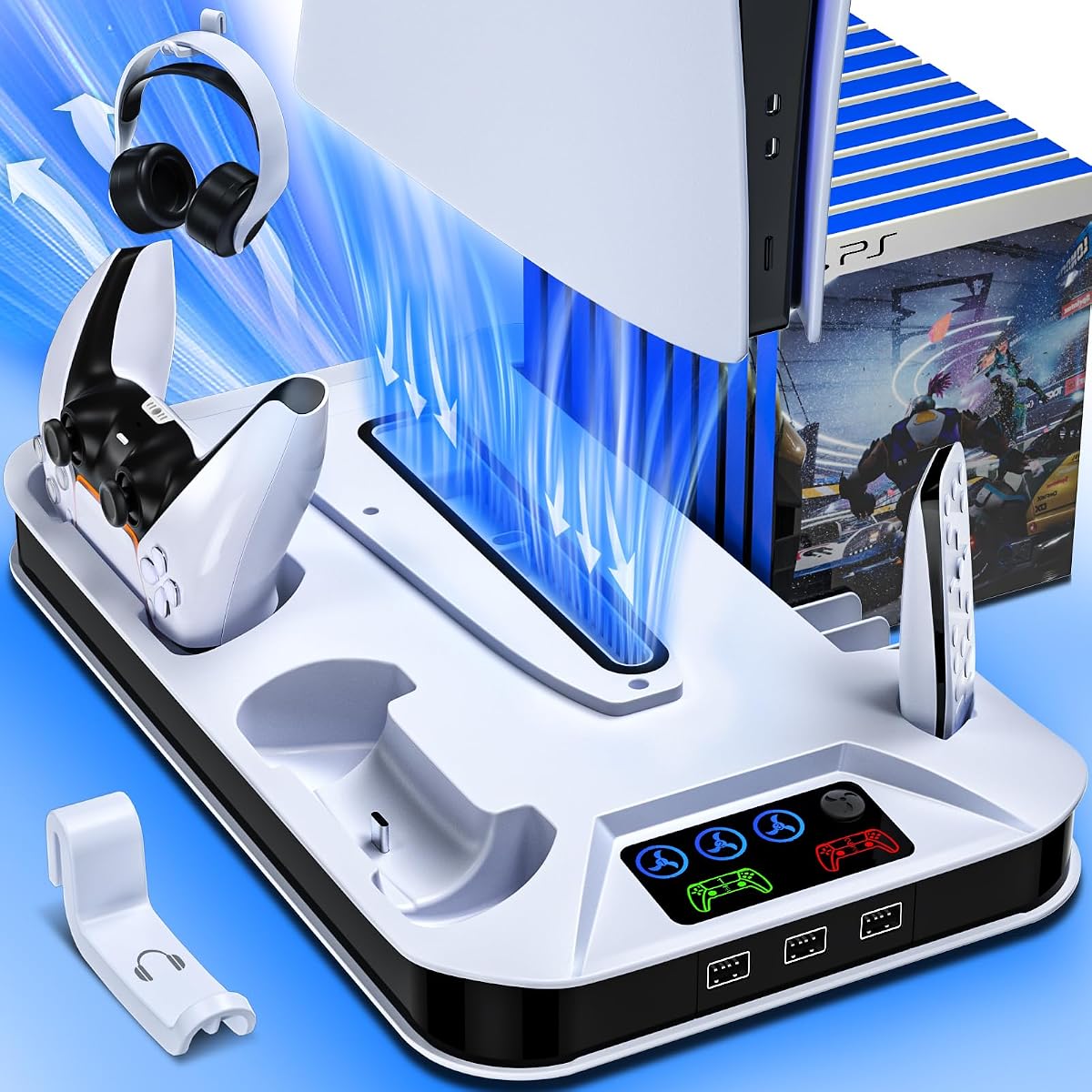
PS5/Slim/Pro Cooling Station with Controller Charging Station White
4.5Editor score
Low noise turbo cooling fan
Dual controller charging in 2.5 hours
Three USB hubs and headset holder
Discover the top cooling stand for PS5 console options compared by experts to keep your system cool and extend its lifespan during intense gaming sessions.
Keeping your gaming console cool is essential for optimal performance and longevity. A dedicated cooling stand for PS5 console helps dissipate heat effectively during long play sessions.
We compared ten top-rated models based on fan speed options, charging capabilities, and overall build quality. Each product was evaluated for compatibility with various PS5 editions including Slim and Pro.
This guide highlights key features and potential trade-offs for every selection. Prices and availability may change so please verify details before making your final purchasing decision online.
4.5Editor score
4.4Editor score

4.5Editor score
This side by side comparison outlines the unique features and specifications of each cooling stand for PS5 console to help you find the perfect match for your setup.


This cooling stand for PS5 console offers a robust solution for thermal management and accessory organization. With a 4.4 rating it stands out for its comprehensive feature set including a three-speed turbo fan.
We may earn a commission when you buy through this link, at no additional cost to you.
The turbo fan dissipates hot air from the bottom effectively during long sessions. It also includes a dual charging dock that fully charges controllers in roughly three hours with clear LED indicators.
While the high speed setting can generate some noise the cooling performance is excellent. Users must remove the panel adapter for Slim models which is a minor inconvenience.
This model is ideal for gamers wanting an all-in-one station. It keeps your area tidy and your console cool making it a top choice for serious players.
The high-efficiency turbo fan significantly reduces operating temperatures to prevent overheating and extend console life.
Extra USB hubs and dedicated slots keep headsets remotes and game discs organized in one secure place.
We may earn a commission when you buy through this link, at no additional cost to you.
This horizontal stand for PS5 console provides a stable base with integrated cooling and charging. It features a scalable design ensuring compatibility with Disc Digital Slim and Pro editions.
We may earn a commission when you buy through this link, at no additional cost to you.
The dual charging dock supports both original and Edge controllers efficiently. You can charge two units in just three to three and a half hours powered by the console connection.
Installation is straightforward with EVA foams for Digital editions. The fan offers three speeds to adjust cooling based on session intensity.
It is perfect for users preferring horizontal placement. It consolidates your setup and eliminates the need for separate charging docks easily.
The scalable structure adapts to various PS5 generations ensuring a secure fit without extra modifications.
The dock holds two controllers securely with clear LED indicators to show charging status at a glance.
We may earn a commission when you buy through this link, at no additional cost to you.
This cooling stand for PS5 console stands out with its automatic fan speed adjustment based on temperature. The built-in probe monitors heat and adjusts speeds from low to high accordingly.
We may earn a commission when you buy through this link, at no additional cost to you.
It supports both Original and Edge controllers with a movable USB port. Charging takes about two and a half hours with clear LED status indicators.
The RGB lighting adds a vibrant atmosphere but can be customized. The memory function retains your last settings which is convenient for daily use.
Ideal for those wanting smart cooling features. The auto mode ensures efficient cooling without constant manual input.
The temperature probe automatically switches fan speeds to match heat levels for efficient and quiet operation.
Nine RGB lighting effects allow you to match your gaming environment with different colors and modes.
We may earn a commission when you buy through this link, at no additional cost to you.
This white cooling stand for PS5 console offers exceptional value for money. It provides a three-speed turbo fan that operates quietly while effectively cooling the console from below.
We may earn a commission when you buy through this link, at no additional cost to you.
Dual controllers charge in roughly two and a half hours with clear LED indicators. The base includes three USB hubs and a headset holder for organized storage.
The fan speed indicator helps you monitor performance easily. It is compatible with all PS5 editions though the edge controller is not supported.
For budget-conscious gamers this is a top pick. It delivers essential cooling and charging features without extra cost.
The low-noise turbo fan ensures effective airflow without disrupting your gaming or conversation.
Multiple USB ports and a headset holder keep your essential gaming accessories tidy and accessible.
We may earn a commission when you buy through this link, at no additional cost to you.
This cooling stand for PS5 console is designed to support Edge controllers alongside the standard DualSense. It features a three-level adjustable turbo fan with memory for your preferred speed.
We may earn a commission when you buy through this link, at no additional cost to you.
The base includes a safety screw to secure the console firmly. It offers three USB ports on the side for charging other accessories efficiently.
Installation is simple with clear instructions provided. The LED indicators show charging status for controllers with color changes from red to green.
It suits owners of Edge controllers seeking stability. The memory function adds convenience for regular cooling fans.
This stand is fully compatible with both original and Edge controllers ensuring versatility for all users.
Three USB ports on the side allow easy charging of headsets and other devices without extra adapters.
We may earn a commission when you buy through this link, at no additional cost to you.
This cooling stand for PS5 console combines smart cooling with aesthetic appeal. It uses a temperature probe for automatic fan speed adjustments across low medium and high settings.
We may earn a commission when you buy through this link, at no additional cost to you.
The charging dock supports two controllers in two and a half hours. RGB honeycomb lighting adds vibrant effects to your gaming area with multiple modes.
Memory function retains settings after restarts for consistent use. The dual controller charging is efficient with clear LED status indicators.
Premium features make it a standout choice. The auto cooling ensures optimal performance without constant manual changes.
Built-in temperature probes adjust fan speeds automatically to keep your console cool efficiently.
Nine RGB honeycomb lighting modes create an immersive gaming atmosphere around your setup.
We may earn a commission when you buy through this link, at no additional cost to you.
This cooling stand for PS5 console features a scalable design for all models. It integrates a dual charging dock that supports both standard and Edge controllers seamlessly.
We may earn a commission when you buy through this link, at no additional cost to you.
The three-speed turbo fan provides customizable cooling for intense or casual sessions. Setup is tool-free and quick with included EVA foam for Digital editions.
It consolidates accessories into one compact unit freeing up desk space. Charging takes around three to three and a half hours via console connection.
Perfect for those who prefer horizontal placement. The scalable structure ensures a perfect fit for any PS5 generation.
No tools are needed to install this stand making it accessible for beginners and quick to assemble.
By consolidating your console and accessories into one unit you save valuable desk space for other gear.
We may earn a commission when you buy through this link, at no additional cost to you.
This cooling stand for PS5 console features an auto adjustable fan that reacts to temperature changes. It offers both touchscreen manual control and automatic modes for precise thermal management.
We may earn a commission when you buy through this link, at no additional cost to you.
The base includes storage for up to 14 game discs. Charging is supported via Type-C cable and can be powered from a wall outlet for continuous charging.
It supports both Disc and Digital editions with a safety screw. The smart chip stops charging at 70 to extend battery life.
Ideal for those needing extensive game storage. The auto fan ensures efficient cooling without user intervention.
This stand holds up to 14 game discs keeping your physical collection organized and easily accessible.
Connect to a wall outlet for continuous charging even when the console is turned off for convenience.
We may earn a commission when you buy through this link, at no additional cost to you.
This cooling stand for PS5 console offers vibrant ring RGB lighting to enhance your setup. The turbo fan provides three silent speed levels for effective cooling without noise.
We may earn a commission when you buy through this link, at no additional cost to you.
Dual controllers charge in three hours with protection features. It holds the console and up to 12 game discs with a headset holder.
The lighting modes include eight colors with breathing effects. It also includes USB A hub ports for powering other devices easily.
Great for those prioritizing visual appeal. The silent fan ensures comfort during extended gaming sessions.
Stunning ring lighting with eight colors enhances the aesthetic appeal of your gaming station significantly.
The powerful fan operates silently to keep your console cool without adding background noise.
We may earn a commission when you buy through this link, at no additional cost to you.
This cooling stand for PS5 console features concealed built-in cables for a clean look. It offers three USB hubs plus a Type-C port for versatile connectivity options.
We may earn a commission when you buy through this link, at no additional cost to you.
Dual controllers charge in three hours with LED indicators. The turbo fan is adjustable across three levels to suit different cooling needs effectively.
The stand ensures stable connection with sturdy screws. It protects against overheating overvoltage and short circuits with a smart chip.
Ideal for those needing many connected devices. The concealed cables improve aesthetics and reduce clutter.
Built-in concealed cables improve the visual appeal by hiding wires and reducing desk clutter effectively.
Three USB hubs and one Type-C port support charging multiple devices simultaneously without extra adapters.
We may earn a commission when you buy through this link, at no additional cost to you.
Selecting the right cooling stand for PS5 console involves evaluating several key factors to ensure compatibility and performance for your specific setup.
Ensure the stand supports your specific PS5 version whether Disc Digital Slim or Pro. Some models require removal of panel adapters while others feature scalable designs.
Always check the product description to confirm it fits your console model before purchasing.
Look for stands with adjustable speed options to balance noise and cooling power. Turbo fans generally offer better airflow than standard models.
High speed modes are essential for long gaming sessions to prevent overheating.
Check if the dock supports both standard and Edge controllers. Fast charging times reduce downtime between play sessions.
Clear LED indicators help you monitor the charging status at a glance.
Consider stands that include USB hubs headset holders or game disc storage. These features help keep your gaming area organized.
Additional ports allow charging of other devices like headsets or phones.
Opt for models with tool-free or simple setup processes. Look for included EVA foam and screws to secure the console.
Ease of installation saves time and ensures safe assembly.
Select stands with sturdy materials to prevent shaking during use. Safety screws and smart chips protect against overcharging or short circuits.
A stable base ensures your console remains secure on your desk.
Some models offer RGB lighting or memory functions for fan speeds. Decide if these extras align with your personal style and needs.
Choose features that enhance your gaming experience without unnecessary complexity.
Begin by securing your console with the included safety screw to ensure stability. Place the stand on a flat surface with enough clearance for airflow.
Plug the stand into your console or power source. Adjust the fan speed settings based on your gaming intensity to balance cooling and noise.
Regularly clean the fan vents with compressed air to maintain optimal performance. Check the status indicators for any charging issues during use.
Yes most models in this guide support the PS5 Pro along with Slim and standard editions. Check specific compatibility notes for adapter requirements before buying.
Some stands support the Edge controller while others do not. Verify the product description for Edge compatibility if you own this specific controller model.
Fan noise varies by model and speed setting. Lower speeds are quieter while high speeds may produce more noise for maximum cooling.
Most stands power directly from the PS5 console. Some may allow wall outlet charging so check the product details for specific power options.
Certain models offer storage for multiple game discs. Look for stands with built-in disc slots if you need to organize physical game copies.
Most stands fully charge two controllers in roughly three hours. Some faster models complete charging in two and a half hours with proper power settings.
Choosing the right cooling stand for PS5 console depends on your specific needs and preferences. The top three picks offer excellent value and performance for different gaming setups.
Prioritize compatibility with your console model and cooling efficiency. Additional features like RGB lighting or storage are optional but enhance the overall experience.
Prices and availability may fluctuate so verify details before purchasing. Investing in a quality stand ensures your console runs cool and extends its lifespan.