
Crucial P310 1TB
4.7Editor score
PCIe Gen4 NVMe performance
Up to 7100MB/s read
Compatible with laptops and consoles
This guide compares ten top Crucial Internal NVME SSD models across speed, capacity, and compatibility to help you find the best storage upgrade for your
Finding the right internal storage is critical for modern computing performance. The Crucial Internal NVME SSD lineup offers a wide range of options tailored to different needs, from casual browsing to high-speed creative work and gaming. Each model brings specific advantages in speed, capacity, and reliability.
We evaluated these drives based on real-world performance metrics, compatibility with current and legacy systems, and value for money. Our analysis includes detailed comparisons of sequential read and write speeds, endurance ratings, and thermal management features. This ensures you understand how each drive performs under typical workloads.
Each pick in this list highlights a specific strength, such as budget-friendliness, peak throughput, or console compatibility. Please note that availability and pricing can fluctuate based on market conditions and regional factors. Always check the latest product details before making your final purchase decision to ensure you get the best deal available today.
4.7Editor score
4.8Editor score

4.6Editor score
This side-by-side comparison outlines the key specifications and unique selling points of every model in our list. By reviewing these details together you can quickly identify which drive aligns with your specific storage requirements and performance expectations.


The Crucial P310 1TB stands out as a top choice for general users seeking a balance of speed and value. It delivers PCIe Gen4 NVMe performance with read speeds up to 7,100MB/s making it significantly faster than previous generations. This drive is rated highly for its reliability and seamless integration across various platforms.
We may earn a commission when you buy through this link, at no additional cost to you.
Its standout quality is the broad compatibility which extends to laptops desktops and handheld gaming consoles like the ROG Ally X and Legion Go. The inclusion of Acronis Data Recovery Software adds peace of mind by simplifying data migration and protection. For everyday tasks like booting Windows or running Adobe apps it offers a smooth experience.
One trade-off is the use of QLC NAND which may not offer the same endurance as TLC alternatives under heavy write workloads. However for typical consumer usage like gaming and media storage this limitation is rarely noticeable. The thermal control features help maintain stable performance during extended use.
We recommend this drive for gamers and home users who want a dependable upgrade without overspending. It provides ample space for AAA titles and applications while keeping costs reasonable. The backward compatibility with Gen3 systems ensures it remains a versatile choice for older hardware.
Read speeds reach 7,100MB/s and write speeds reach 6,000MB/s for fast game load times and multitasking.
Comes with Acronis Data Recovery Software to simplify data transfers and protect your files easily.
We may earn a commission when you buy through this link, at no additional cost to you.
This model of the P310 adds a dedicated heatsink to ensure stable performance in thermally constrained environments. It matches the speed of the standard version with up to 7,100MB/s read speeds but adds a layer of protection against thermal throttling. The heatsink design makes it ideal for PlayStation 5 and compact desktop cases.
We may earn a commission when you buy through this link, at no additional cost to you.
The key strength lies in its console compatibility where proper cooling is essential for sustained gaming sessions. It meets PlayStation 5 specifications seamlessly allowing for quick access to games and applications. The drive maintains Gen4 speeds while preventing overheating which is critical for long playtimes.
A trade-off is the slightly higher cost compared to the non-heatsink variant but it offsets the need for a separate cooling solution. For users building a PC with limited airflow or those upgrading a console this extra cost is justified. It ensures consistent performance without needing extra hardware.
This drive is perfect for gamers who prioritize cooling and convenience. It offers a hassle-free solution for PS5 storage expansion and is equally capable in desktops. The integrated cooling keeps it running cool even under heavy loads.
The integrated heatsink ensures silent and stable operation during heavy gaming or creative workloads.
Meets PlayStation 5 specs for immediate compatibility and easy installation in your console system.
We may earn a commission when you buy through this link, at no additional cost to you.
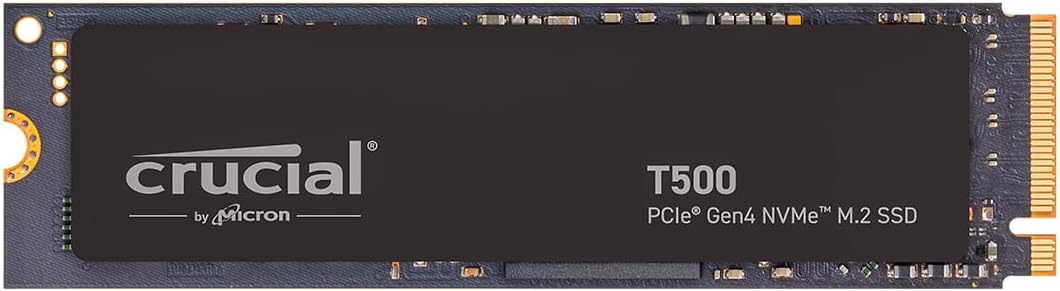
The Crucial T500 1TB is engineered for creative professionals and hardcore gamers who need consistent high performance. It features TLC NAND which offers better endurance than QLC alternatives ensuring reliability over time. With read speeds up to 7,300MB/s and DirectStorage support it accelerates content creation workflows significantly.
We may earn a commission when you buy through this link, at no additional cost to you.
Its standout feature is the bundle including a one-month Adobe Creative Cloud subscription alongside Acronis cloning software. This provides immediate value for designers and video editors who rely on these tools. The drive boosts application performance by up to 42% for tasks like rendering and multitasking.
While priced higher than budget options the added value of software and TLC durability makes it a smart investment. The high IOPS ratings ensure smooth operation even when managing large datasets or multiple projects. It handles the demands of 8K video editing and 3D modeling effectively.
We recommend this drive for creatives and power users who want a premium experience. It balances speed reliability and software benefits perfectly. The included Creative Cloud trial helps you get started with professional tools right away.
Boost creative apps by up to 42% for faster rendering and smoother multitasking on your system.
Includes a one-month Adobe Creative Cloud All-Apps subscription for creative photo and video projects.
We may earn a commission when you buy through this link, at no additional cost to you.
This 2TB version of the P310 offers double the capacity of the standard model for storing extensive libraries. It maintains the same PCIe Gen4 NVMe speeds up to 7,100MB/s ensuring fast access to your files. The 2TB capacity is ideal for users who manage large media collections or game libraries.
We may earn a commission when you buy through this link, at no additional cost to you.
The primary strength is its generous capacity at a competitive price point. It allows you to store AAA games and high-resolution media without worrying about space. The 3D NAND technology ensures reliable performance for everyday tasks and large file transfers.
A trade-off is the initial investment which is higher than 1TB drives but offers better value per gigabyte. For those needing more storage this drive eliminates the need for multiple smaller units. It fits into the same M.2 2280 slot making it a simple upgrade.
We recommend this for users with large storage needs who want Gen4 speeds. It is a practical solution for media editors and heavy gamers. The extra space ensures you can keep everything in one fast and reliable drive.
Provides 2TB of capacity to store AAA games and media without needing multiple drives.
Fits standard M.2 2280 slots for a simple swap in laptops and desktop PCs.
We may earn a commission when you buy through this link, at no additional cost to you.
The Crucial P510 brings PCIe Gen5 performance to a wider audience with speeds up to 11,000MB/s. It uses TLC NAND for reliable endurance and comes with a one-month Adobe Creative Cloud subscription. This drive is designed for users looking to upgrade to Gen5 without breaking the bank.
We may earn a commission when you buy through this link, at no additional cost to you.
Its key strength is offering top-tier Gen5 performance at a competitive price. The speed allows for quicker game load times and faster rendering compared to Gen4. It also supports backward compatibility with Gen4 systems making it a versatile choice for future-proofing.
One trade-off is the requirement for a Gen5 motherboard to achieve peak speeds. If your system only supports Gen4 it will still work but at lower speeds. For new builds this drive provides excellent value and future readiness.
We recommend this for gamers and creatives planning a next-gen system. It balances performance and cost well while offering useful software. The TLC NAND ensures it holds up under demanding workloads.
Delivers up to 11,000MB/s read speeds for quicker game loads and smooth multitasking.
Supports backward compatibility with Gen4 systems for flexible upgrades and long term use.
We may earn a commission when you buy through this link, at no additional cost to you.
The Crucial T710 1TB is engineered for tech enthusiasts and hardcore gamers seeking the fastest storage available. It offers read speeds up to 14,900MB/s and uses Micron G9 TLC NAND for durability. The drive also features AES-256-bit hardware encryption to protect sensitive data.
We may earn a commission when you buy through this link, at no additional cost to you.
Its standout feature is the platform-optimized compatibility with Intel 13th/14th Gen and AMD Ryzen 7000 processors. This ensures it works seamlessly in the latest high-performance systems. The encryption support adds an extra layer of security for your personal files.
A trade-off is the need for a compatible heatsink to manage heat during sustained workloads. Without proper cooling performance may throttle under heavy stress. For users building high-end PCs this is a minor consideration given the massive speed gains.
We recommend this for hardcore gamers and power users who need top-tier performance. The combination of speed security and TLC NAND makes it ideal for demanding applications. It ensures your system keeps up with the most intensive workloads.
Delivers up to 14,900MB/s read for the fastest possible storage performance available.
Features AES-256-bit hardware encryption to help protect sensitive data and keep files secure.
We may earn a commission when you buy through this link, at no additional cost to you.
The Crucial E100 480GB offers a budget-friendly entry into Gen4 NVMe performance. With speeds up to 4,700MB/s it is significantly faster than traditional hard drives and SATA SSDs. This makes it perfect for refreshing older systems with limited M.2 slots.
We may earn a commission when you buy through this link, at no additional cost to you.
Its key strength is affordability without sacrificing modern performance. It generates less noise and heat than HDDs while offering more durability. For users needing a primary boot drive or additional storage for essential files it is an excellent choice.
A trade-off is the 480GB capacity which may be tight for large libraries. However it works well as a secondary drive or for systems that do not need massive storage. The 3-year warranty adds reliability to this budget option.
We recommend this for budget-conscious users or basic home office setups. It provides a substantial speed boost without a high cost. The easy installation instructions make it a simple upgrade for most users.
Gen4 performance is 8x faster than SATA and 33x faster than hard disk drives.
Follow step-by-step instructions for easy installation and cloning to get started quickly.
We may earn a commission when you buy through this link, at no additional cost to you.
This P310 variant uses 232L Micron QLC NAND to deliver Gen4 speeds in a compact form factor. It offers read speeds up to 7,100MB/s ideal for light computing and general storage needs. The QLC NAND technology provides a balance of capacity and performance for typical daily use.
We may earn a commission when you buy through this link, at no additional cost to you.
The main strength is its ability to deliver high speeds while maintaining low thermal output. It fits easily into laptops and small form factor PCs without requiring additional cooling. For basic gaming and office work it performs admirably.
A trade-off is lower endurance compared to TLC NAND under heavy write workloads. This is acceptable for users who do not transfer massive files daily. For those focused on capacity and speed it remains a reliable choice.
We recommend this for light users needing a reliable secondary drive. It offers a solid balance of price and performance. The low heat generation ensures stable operation in constrained environments.
Uses 232L Micron QLC NAND for reliable Gen4 performance in a compact M.2 form factor.
Fits M.2 2280 slots making it perfect for laptops and small form factor builds.
We may earn a commission when you buy through this link, at no additional cost to you.
This T500 model is designed specifically for PS5 storage expansion with an integrated heatsink. It offers read speeds up to 7,300MB/s using TLC NAND for better endurance. The heatsink ensures stable performance during extended gaming sessions without the need for extra cooling.
We may earn a commission when you buy through this link, at no additional cost to you.
The primary strength is its high endurance TLC NAND which outlasts QLC options. This is crucial for gamers who frequently install and uninstall large titles. The included Adobe Creative Cloud and Acronis cloning software add value for versatile use.
A trade-off is the premium price but the combination of speed cooling and TLC endurance justifies it. It meets PlayStation 5 specs perfectly ensuring seamless installation and operation. This makes it a top choice for serious console players.
We recommend this for PS5 users wanting the best storage experience. It guarantees fast load times and reliable performance. The included heatsink and TLC NAND make it a complete package.
Meets PlayStation 5 specs and installs easily in desktops and consoles with M.2 slots.
Engineered for content creators with TLC NAND for better reliability under heavy use.
We may earn a commission when you buy through this link, at no additional cost to you.
The Crucial T700 1TB is built for hardcore gaming and high-speed storage needs. It delivers read speeds up to 11,700MB/s and uses TLC NAND for durability. Designed for Intel 13th/14th Gen and AMD Ryzen 7000 it ensures optimal compatibility with top platforms.
We may earn a commission when you buy through this link, at no additional cost to you.
Its key strength is its platform optimization which leverages the full power of modern CPUs. The speed allows for rapid game loading and file access. It also includes Acronis cloning software and a one-month Adobe Creative Cloud subscription.
A trade-off is the requirement for a Gen5 slot to realize full speeds. If used on a Gen4 system it will run but at lower rates. For enthusiasts building new systems this is the ideal choice.
We recommend this for users needing the fastest storage available. It is a perfect fit for high-performance PCs and gaming rigs. The TLC NAND and Gen5 speeds make it a future-proof investment.
Delivers up to 11,700MB/s read and 9,500MB/s write for quicker game load times.
Designed for Intel and AMD processors in M.2 Gen5 slots for maximum performance.
We may earn a commission when you buy through this link, at no additional cost to you.
Choosing the right Crucial Internal NVME SSD requires understanding your system's capabilities and your specific storage needs. This guide breaks down the key factors to consider before making a purchase.
Check your motherboard or console for PCIe Gen4 or Gen5 support. Gen5 drives offer faster speeds but require specific slots while Gen4 drives work across more platforms. Ensure the drive matches your system to achieve the rated speeds.
Always verify PCIe generation support before buying to avoid performance bottlenecks.
Determine how much storage you need based on your game library or media files. The P310 and E100 offer smaller capacities for budget upgrades while the P310 2TB provides ample space for extensive libraries. Larger capacities often come at a better cost per gigabyte.
Select a capacity that fits your current needs and allows room for future growth.
TLC NAND offers better endurance and speed consistency compared to QLC NAND. For heavy workloads or frequent file transfers TLC drives like the T500 are preferable. QLC drives are excellent for general use and media storage where writes are less frequent.
Choose TLC for heavy use and QLC for budget-friendly general storage needs.
NVMe drives generate heat during operation which can affect performance. Models with integrated heatsinks like the P310 PS5 version prevent thermal throttling. If your system has limited airflow consider a drive with a heatsink or plan to add one.
Prioritize drives with cooling features if you run sustained heavy workloads.
Ensure compatibility with your specific console or PC model. Some drives are specifically designed for PlayStation 5 while others are universal. Console-compatible drives meet strict requirements for size and speed to work seamlessly.
Confirm platform compatibility to ensure a smooth installation process.
Many Crucial drives include software like Acronis cloning or Adobe Creative Cloud subscriptions. These bundles add value by simplifying data transfers or providing creative tools. Check what software is included to determine overall value.
Look for bundles that match your workflow needs to get the most out of your drive.
Most M.2 NVMe drives use the standard 2280 form factor. Ensure your device has an available M.2 slot with the correct length clearance. Some laptops or consoles may have restrictions on height especially with heatsinks.
Verify physical dimensions to ensure the drive fits inside your case.
Evaluate the balance between performance and cost. While Gen5 drives offer top speeds Gen4 drives provide excellent value for most users. Consider your actual speed needs before investing in premium features.
Match the drive tier to your budget and actual performance requirements.
To install your new Crucial Internal NVME SSD start by shutting down your system and unplugging power. Open the case and locate the M.2 slot on your motherboard. Align the notch on the drive with the slot and insert it gently at an angle. Secure it with the provided screw.
After installation boot your system and initialize the drive through your operating system settings. Use Acronis software included with many models to clone your old drive or transfer data. This ensures a smooth transition without reinstalling your OS or apps manually.
To maintain performance keep your drive drivers updated and avoid filling it completely. Leave some free space for optimal performance and wear leveling. Monitor temperatures using system tools to ensure the heatsink or airflow is adequate. Regular backups are essential to protect your data.
Yes certain models like the P310 2280 1TB and T500 1TB are specifically designed for PlayStation 5. They meet the console's size and speed requirements for seamless expansion. Always check the product description for confirmed PS5 compatibility before purchasing.
Not necessarily as some drives like the P310 with Heatsink include integrated cooling. If your system has good airflow a non-heatsink drive may work fine. For thermally constrained builds consoles we recommend using a model with a heatsink.
Yes most of these drives are backward compatible with PCIe Gen3 systems. You will experience stable speeds but not the full Gen4 or Gen5 performance. It is a flexible option for upgrading older laptops or desktops.
TLC NAND offers better endurance and speed consistency for heavy workloads while QLC provides higher density at a lower cost. QLC is great for general storage and media while TLC is ideal for creative tasks and frequent writing.
Many models include Acronis cloning or recovery software to simplify data transfers. Some also come with a one-month Adobe Creative Cloud subscription for creatives. Check the specific product details to see which bundle is included.
Crucial typically offers limited warranties that vary by region. Most models come with a 3-year or 5-year limited warranty covering defects. Refer to the official warranty terms provided with your purchase for specific regional coverage details.
Check your motherboard manual or console specs to see if it supports PCIe Gen4 or Gen5. You can also use system diagnostic tools to identify available slots. Ensuring compatibility will help you get the maximum performance out of your drive.
Yes all listed models are suitable for daily office work and general productivity. They offer fast boot times and quick application launches. The E100 and P310 provide great value for everyday tasks.
We have reviewed ten top Crucial Internal NVME SSDs ranging from budget-friendly options to high-speed Gen5 models. Whether you need storage for a console or a PC there is a drive here for you. The P310 series offers excellent value while the T500 and T710 deliver premium performance.
Prioritize compatibility and your specific workload when selecting a drive. If you need fast rendering speeds look for TLC NAND and Gen4 or Gen5 support. For gaming consider options with integrated heatsinks to ensure stable performance during long sessions.
Remember that prices and availability change regularly so check current details before you buy. Use the included software bundles to make your transition easier. We hope this guide helps you find the perfect Crucial Internal NVME SSD for your needs.