
Thames & Kosmos My Robotic Pet: Coding Chameleon STEM Building & Experiment Kit
4.1Editor score
Screen free color sensor coding
Realistic robotic reptile design
Three distinct interactive play modes
This expert guide compares the top rated coding toys for kids in October 2026 helping parents choose the best educational robot and screen free programming kit
Coding toys have transformed how children engage with technology by turning abstract programming concepts into tangible play experiences that spark creativity and logical thinking from a young age.
We evaluated ten leading educational robotics kits based on build quality coding depth age appropriateness and engagement potential to ensure every recommendation delivers real learning value without unnecessary complexity.
Each pick showcases unique strengths from screen free coding to app enabled challenges so you can find the right fit while noting that retail pricing fluctuates frequently so verify current offers before purchasing.
4.1Editor score

4.6Editor score

4.6Editor score
This side by side comparison highlights the core capabilities of every ranked product so you can quickly assess which robot or kit aligns best with your child's current skill level and learning goals.





The Thames and Kosmos My Robotic Pet stands out as a top tier screen free coding toy that transforms a simple reptile into an interactive programmable companion using physical action cards.
We may earn a commission when you buy through this link, at no additional cost to you.
Its innovative engineering allows kids to assemble a detailed 15 inch chameleon that reacts to touch changes color and moves based on coded sequences teaching fundamental robotics without any digital distraction.
While assembly takes time and parental guidance is suggested for younger users the reward is a tangible learning tool that encourages exploration of biological engineering and programmable logic.
This kit is ideal for children eight and older who want a hands on introduction to coding mechanics without needing a tablet or computer for their educational play sessions.
Using colored cards instead of code blocks lets kids visualize logic flows instantly making abstract programming concepts concrete and easier to grasp through tactile interaction.
The articulated joints and sensor systems mimic real world robotics giving children a sneak peek into how engineers design adaptive machines that respond to environmental inputs like light or touch.
We may earn a commission when you buy through this link, at no additional cost to you.
Makeblock mBot offers a robust platform for kids to grow from basic block coding to complex Arduino projects while building a functional robot car that responds to sensors and remote inputs.
We may earn a commission when you buy through this link, at no additional cost to you.
Its open source architecture means children can expand functionality with additional electronic modules making it a long term investment that evolves as their technical skills mature over time.
Although it requires battery purchases and software setup the educational payoff is substantial with structured lessons and challenges that keep learners engaged through increasingly difficult robotics tasks.
This kit suits kids aged eight to twelve seeking a serious yet accessible entry into electronics and programming that balances fun gameplay with genuine engineering education.
Starting with visual blocks and advancing to text based code ensures kids don't outgrow the toy quickly allowing them to deepen their knowledge of real programming languages gradually.
Compatibility with over a hundred electronic modules invites users to customize mBot into countless configurations fostering creativity and problem solving as they design unique robotic solutions.
We may earn a commission when you buy through this link, at no additional cost to you.
Dash delivers a polished user experience with immediate functionality after unboxing making it one of the most accessible premium robots for teaching complex coding logic through playful challenges.
We may earn a commission when you buy through this link, at no additional cost to you.
Its app ecosystem supports multiple skill levels and programming languages from visual blocks to text based scripts ensuring kids can challenge themselves as their confidence and knowledge grow.
While the cost is higher than many entry level toys the build quality and educational value justify the investment especially for families prioritizing long term STEM engagement and skill building.
This robot is perfect for children six and up who want a sophisticated interactive companion that supports voice commands dancing and obstacle navigation without requiring any construction work.
Eliminating assembly time means kids spend less time waiting and more time experimenting with code loops and variables which accelerates their understanding of programming fundamentals significantly.
Compatible apps like Blockly and Wonder provide structured learning paths that align with school standards offering teachers and parents a reliable way to track progress and introduce new concepts.
We may earn a commission when you buy through this link, at no additional cost to you.
The Code and Go Robot Mouse introduces fundamental sequencing and logic skills through a simple tactile interface that young children can grasp immediately without reading or complex commands.
We may earn a commission when you buy through this link, at no additional cost to you.
It features a maze grid system and color coded cards that encourage trial and error learning while kids guide the mouse through tunnels and walls to reach a cheese target.
While it lacks advanced features like sensors or screen connectivity its strength lies in making early programming concepts approachable and enjoyable for toddlers and kindergarteners.
This set is ideal for families looking to spark an interest in logic and planning with a toy designed specifically for the youngest aspiring coders in the household.
Children learn to plan paths by pressing directional arrows before pressing go which builds memory and sequential thinking skills essential for understanding program flow later.
Physical mazes turn abstract coding into spatial problem solving where kids see immediate cause and effect as the mouse moves based on their specific button sequence commands.
We may earn a commission when you buy through this link, at no additional cost to you.
Mech-5 distinguishes itself by focusing heavily on mechanical engineering principles allowing kids to snap coding buttons onto a wheel to execute actions like throwing kicking or drawing.
We may earn a commission when you buy through this link, at no additional cost to you.
It requires significant assembly time which reinforces the value of construction and gives children a deep understanding of how mechanical parts interact to produce specific programmed behaviors.
While not as versatile as app based robots it excels in teaching the physical side of robotics making it a great choice for hands on learners interested in mechanics.
This kit is best suited for children ten and older who enjoy building complex models and want to see how coding translates directly into mechanical motion and physical tasks.
The unique wheel interface replaces digital screens with physical buttons that trigger mechanical movements teaching kids that code often controls real world physical machinery directly.
Spending hours on assembly teaches patience and precision while providing a rewarding sense of accomplishment when the finished robot performs actions exactly as built and programmed.
We may earn a commission when you buy through this link, at no additional cost to you.
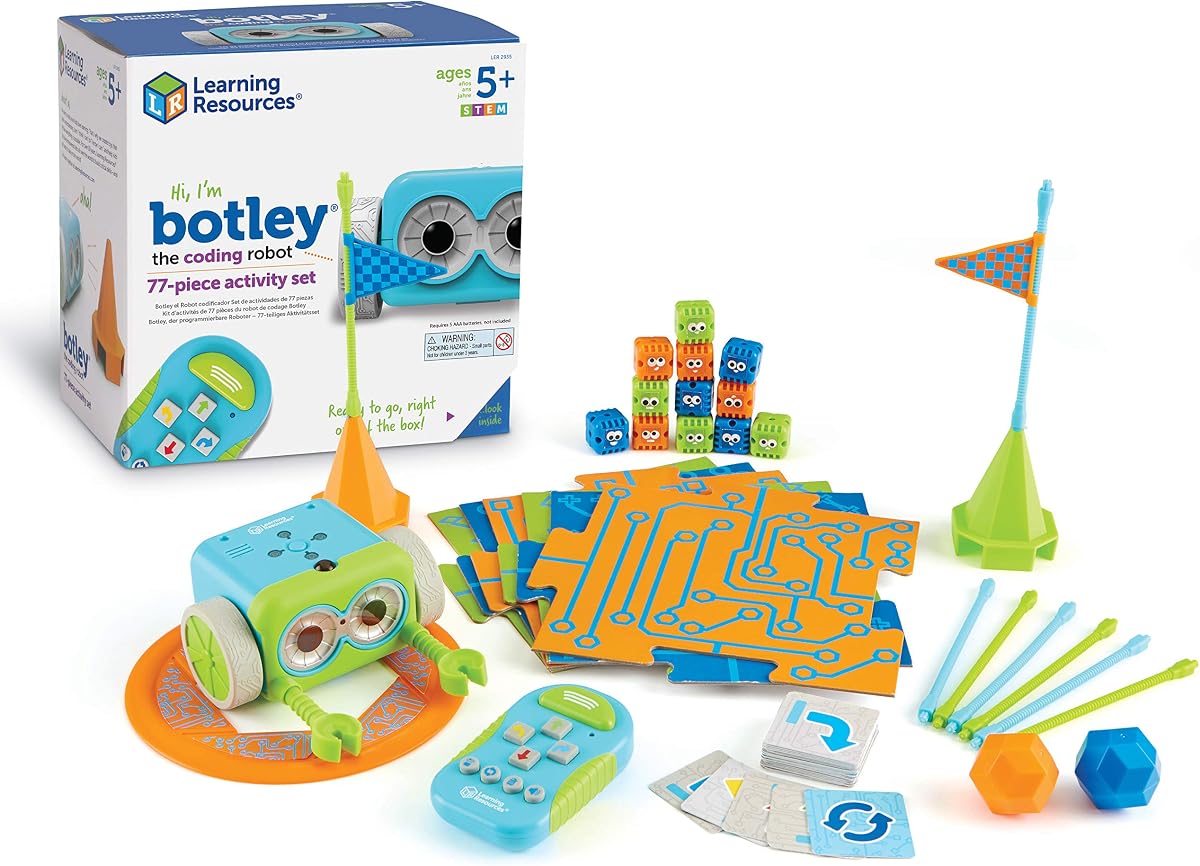
Botley offers a robust screen free coding experience where children use a dedicated remote to program complex sequences that include loops obstacle avoidance and line following tasks.
We may earn a commission when you buy through this link, at no additional cost to you.
Its object detection capabilities allow for interactive play where the robot reacts to physical barriers making it engaging for kids who enjoy navigating challenges rather than just watching movement.
The 77 piece set provides ample accessories for creating custom mazes and challenges which extends play value significantly beyond basic forward and turn commands.
This kit is highly recommended for families wanting a reliable autonomous robot that encourages independent planning and logical reasoning without needing any screen time or external devices.
Botley's ability to sense objects and adjust its path introduces dynamic problem solving helping kids understand how robots can react to changing environments automatically.
The dedicated remote unit ensures that coding happens directly between child and robot keeping the experience focused and free from digital distractions like notifications or apps.
We may earn a commission when you buy through this link, at no additional cost to you.
Ozobot Evo bridges the gap between physical drawing and digital programming by allowing kids to draw color coded paths that the robot reads and executes instantly.
We may earn a commission when you buy through this link, at no additional cost to you.
It offers five distinct skill levels ensuring that the toy remains relevant as children progress from basic line following to advanced coding tasks using Blockly or other apps.
The included color markers and protective case make it practical for classroom use or long term home learning supporting teachers with over 700 free resources.
This kit is ideal for educators and families wanting a versatile tool that combines art and technology while supporting a wide range of learning styles and skill levels.
Kids draw lines on paper or maps using markers which turns coding into an art project making the learning process visually engaging and easy to understand.
With five skill levels and hundreds of lessons this kit grows with the child providing a consistent learning resource that remains useful through elementary and middle school years.
We may earn a commission when you buy through this link, at no additional cost to you.
Botley 2.0 builds on the original's success with advanced sensors and 45 degree turning capabilities allowing for much more complex and nuanced coding paths.
We may earn a commission when you buy through this link, at no additional cost to you.
It includes multi step coding and secret code combinations that encourage deeper experimentation and provide rewards for mastering sophisticated sequencing and logical reasoning skills.
The multi sensory feedback through lights and sounds keeps children engaged while the robust accessory set supports endless maze building and story driven coding adventures.
This model is perfect for kids ready to move past basic commands and explore more precise navigation and logic challenges that mirror real world robotics scenarios.
Adding 45 degree turns and object sensing allows kids to write more complex programs that require spatial awareness and careful planning of movement paths.
Lights and sounds provide immediate feedback on code success or failure making debugging an interactive and fun part of the learning process.
We may earn a commission when you buy through this link, at no additional cost to you.
TaleBot Pro is tailored for the youngest learners offering voice feedback and storytelling features that make learning basic sequences and loops fun and language focused.
We may earn a commission when you buy through this link, at no additional cost to you.
It supports recording voice commands and imaginative tales which helps children develop language skills while understanding cause and effect through playful interactive maps.
The robot is compatible with Lego blocks encouraging creative building and extending play options beyond the provided map for even more engagement at home.
This toy is best for parents of toddlers who want a screen free introduction to programming concepts that feels like a storytime play session rather than a tech lesson.
By combining storytelling with command buttons TaleBot reinforces language and logic together helping preschoolers connect verbal concepts with physical actions and sequences.
Recording and playing back voice commands makes the robot feel responsive to the child's voice fostering confidence and a sense of control over the technology.
We may earn a commission when you buy through this link, at no additional cost to you.
Sphero Mini packs powerful sensors and coding capabilities into a tiny ball that fits in your palm making it an ideal portable coding companion for on the go fun.
We may earn a commission when you buy through this link, at no additional cost to you.
Kids can drive it with tilts draw paths or use block based coding making it accessible for beginners while offering enough depth for more advanced scripting with JavaScript.
The built in arcade games add a competitive element that keeps kids engaged while subtly reinforcing programming logic as they tweak code to beat high scores.
This ball is perfect for tech savvy children who want a cool compact toy that doubles as a game controller and a serious learning tool for coding basics.
Multiple drive modes like tilt and joystick let kids interact with code through movement and touch which is more intuitive than just typing or clicking buttons.
The small size means it fits easily in a backpack for travel yet the build is robust enough to withstand accidental drops and rough play over time.
We may earn a commission when you buy through this link, at no additional cost to you.
Selecting the right coding toy involves balancing age appropriateness programming depth and whether your child prefers screen free or digital interfaces.
Most coding toys are designed for specific developmental stages so always check the manufacturer's age recommendation to ensure the interface and concepts match your child's cognitive ability.
Younger kids benefit from simple button-based systems while older children can handle complex block coding or text-based scripting that challenges their logical thinking.
Screen free options use physical cards or remotes which reduce digital fatigue and keep focus on physical building and logic whereas screen-based apps offer more visual feedback and complex features.
If you want to limit screen time look for robots that operate independently with physical inputs but if you want rich visuals choose one with a dedicated app ecosystem.
Some kits require extensive assembly which can be a rewarding educational experience for older kids but might overwhelm younger ones who just want immediate play functionality.
Decide if you want a plug-and-play experience or a project that teaches engineering and patience through the building process before the coding starts.
Entry level robots teach basic sequences while advanced ones introduce loops variables and object detection which are crucial for future software development and engineering careers.
Choose a robot that can grow with your child or offers upgrades so you don't have to replace it as their skills rapidly improve over a few years.
Robots are often subjected to vigorous play so look for reinforced parts durable plastics and sturdy sensors that can withstand drops and daily use without breaking easily.
Metal components or reinforced joints are common in higher end models that promise longevity and reliability through multiple years of educational and recreational use.
Many kits include online lessons curriculums or community challenges that provide structure and keep kids engaged long term rather than just initial novelty play.
Look for resources like free lesson plans or app-based challenges that help children progress systematically and understand why specific coding steps work.
Some robots support add-on packs or are compatible with third-party modules like LEGO which allows for endless customization and creative engineering projects.
If your child is a tinkerer choose a system with an open architecture that encourages experimentation with different motors sensors and physical structures.
Check whether the toy uses rechargeable batteries or disposable ones since frequent battery changes can add to the overall cost and inconvenience over time.
Rechargeable models often provide better play value and are more eco-friendly but may require charging cables that could get lost or broken by curious hands.
Begin by reading the included guide or watching the manufacturer's tutorial videos to understand the specific coding interface and mechanics unique to your robot before starting any coding lessons.
Store your robot and its accessories in a dedicated box or container to prevent lost parts and protect small components from dust moisture or accidental damage during idle times.
Keep firmware and app updates up to date by checking the official website periodically since manufacturers often release new features or bug fixes that enhance the coding experience.
Yes most coding toys are specifically designed as entry points for beginners using visual blocks or physical buttons that introduce core concepts without requiring prior technical knowledge. They provide a gentle learning curve so kids can experiment and learn through play rather than complex syntax.
It depends on the model as many offer screen-free options using physical cards or remotes while others rely on an app for programming and feedback. Always check if your selected robot is fully independent before buying.
Battery life varies by model and usage intensity but most offer one to three hours of continuous play. Some premium models have rechargeable batteries that provide extended play sessions and faster charging times.
While one child can operate a robot at a time many kits encourage collaborative play where one programs and the other builds obstacles or designs challenges. This shared interaction helps improve communication and teamwork.
Costs range widely from affordable entry kits to premium advanced models. Budget-friendly options often focus on basic logic while higher priced ones offer more features but value varies based on long-term educational goals.
Most use visual block-based languages similar to Scratch for younger kids but advanced models support JavaScript or Python for older learners. This flexibility ensures children transition smoothly to professional-grade coding languages.
Many of these robots include structured curriculums and lesson plans designed for classroom environments. They support group work and align with STEM standards making them practical tools for teachers and homeschoolers.
Some manufacturers offer spare parts or detailed repair guides especially for modular robots but others are not designed for user repair. Check the warranty and support options before assuming you can fix issues on your own.
This guide highlights ten standout options from budget friendly screen free kits to advanced premium robots ensuring you have a range of choices that fit different ages and learning styles.
Prioritize toys that match your child's current skill level while offering room to grow so their interest in technology and engineering remains engaging and challenging over the long term.
Remember that retail prices and availability fluctuate frequently so verify the latest offers and stock before making your final purchase to ensure you get the best value available today.