10 Best Computer Fan Stand (November 2026) Expert Guide
Written by Nora · Updated November 2026
Keeping your devices cool is essential for performance and longevity. A quality computer fan stand helps dissipate heat effectively. It ensures your laptop or PC runs smoothly during demanding tasks without overheating.
We evaluated ten top-rated models based on cooling efficiency, build quality, and user feedback. Our comparison covers adjustable stands, heavy-duty mounts, and ergonomic designs. Each option serves different needs from gaming to office work.
Every pick highlights key strengths and potential trade-offs to guide your decision. Prices and availability may change over time, so verify details before purchasing. Use this guide to find the ideal cooling solution for your setup.
Top 3 Picks for Best Computer Fan Stand
Best Budget
Computer Fan Stand – 120mm 140mm PC Fan Desk Stand, Heavy Duty Metal Adjustable Mount with 360° Rotation, Desktop Cooling Stand for PC, Router & Electronics (Fan Not Included)
As an Amazon Associate we earn from qualifying purchases.
Top 10 Best Computer Fan Stand in 2026 Compared
Explore our side-by-side comparison of the top ten computer fan stands available today. Each model offers unique features for cooling laptops, desktops, or electronic devices effectively.
Kootek Laptop Cooling Pad Cooler Stand with 5 Quiet Fans for 12"-17" Laptop
Five quiet fans total
Dual USB hub ports
Six adjustable height settings
Ergonomic design included
The Kootek Laptop Cooling Pad Cooler Stand is a highly rated solution for laptop users seeking effective cooling. With a rating of 4.4 stars, it stands out for its five quiet fans and ergonomic design.
Pros
Whisper-quiet operation
Enhanced cooling performance
Dual USB hub connectivity
Six ergonomic height settings
Secure universal compatibility
Cons
Type C requires adapter
Fan noise at max
We may earn a commission when you buy through this link, at no additional cost to you.
This stand features a large fan plus four smaller ones, all controllable via two switches for flexible airflow. The dual USB hub adds convenience for peripherals, while six height settings ensure comfortable viewing angles.
While the fans are quiet, some users note that Type-C connections require an extra adapter. The fan speed at maximum might produce slight noise during high-load tasks, but overall performance remains reliable.
Ideal for students and professionals who need stable cooling during extended use. Its universal compatibility makes it suitable for most laptops, ensuring your device stays cool and secure.
Enhanced Cooling Performance
Five built-in fans with LED lights provide targeted airflow to prevent overheating during intense sessions.
Ergonomic Design Benefits
Six adjustable height settings let you customize the angle for optimal comfort and posture during use.
YICOSUN Adjustable Laptop Cooling Stand with 2 Quiet Fans & RGB Lighting
Two ultra-quiet fans
RGB lighting effects
Aluminum alloy construction
Foldable portable design
The YICOSUN Adjustable Laptop Cooling Stand combines cooling efficiency with style. Rated at 4.4 stars, it features two ultra-quiet fans and vibrant RGB lighting suitable for gaming or creative setups.
Pros
Advanced cooling with fans
RGB lighting customization
Adjustable ergonomic height
Foldable and portable
Durable aluminum build
Cons
Fits up to 16 inches
Remove laptop before adjust
We may earn a commission when you buy through this link, at no additional cost to you.
Its aluminum alloy construction ensures durability while remaining lightweight for portability. The foldable design makes it easy to carry, and the adjustable height supports better posture during work or play.
Users note that the device must be removed before adjusting the stand to prevent damage. Compatibility is limited to laptops up to 16 inches, which may exclude larger models.
This stand is perfect for users who value aesthetics alongside functionality. It provides effective cooling and a sleek look for small desks or mobile workstations.
Cooling with Style
Two quiet fans paired with RGB lighting deliver both performance and visual appeal for gaming setups.
Portable Design
Foldable and lightweight construction ensures easy transport and storage for on-the-go use.
Laptop Stand for Desk, Laptop Riser with Active Cooling Fan
Active cooling fan open-frame
Screw adjustment tool
Foldable lightweight design
Phone mount included
This laptop stand for desk is a versatile solution with an active cooling fan to prevent overheating. Rated 4.5 stars, it offers a universal fit for various laptop sizes and accessories.
Pros
Universal fit compatibility
Active cooling fan
Lightweight and durable
Adjustable load capacity
Foldable design
Cons
Limited size options
Accessory compatibility varies
We may earn a commission when you buy through this link, at no additional cost to you.
The open-frame design promotes airflow, while the included screw adjustment tool allows users to modify load capacity up to 5kg. Its lightweight build makes it easy to carry between locations.
While highly portable, the stand may have limited options for different screen sizes. Accessories like phone mounts add utility but might not fit all devices perfectly.
Ideal for users seeking a compact, efficient cooling solution. The adjustable load capacity and foldable design make it practical for both home and travel use.
Active Cooling Efficiency
Open-frame active cooling fan ensures your device stays cool during extended sessions without overheating.
Adjustable Load Capacity
Includes screw adjustment tool to modify load range for compatible laptops from 14 to 18 inches.
Laptop Cooling Pad with 3 Quiet Fans, 5-Level Height Adjustable Ergonomic Stand
Three ultra-silent fans
Five-level height adjustable
Two USB ports
Phone holder included
This laptop cooling pad is a family-friendly accessory designed for various users. Rated 4.3 stars, it features three ultra-silent fans and a five-level height adjustment for ergonomic comfort.
Pros
Powerful cooling fans
Ergonomic design
Durable material
Extra USB ports
Family-friendly compatibility
Cons
Fan noise max speed
Type C needs adapter
We may earn a commission when you buy through this link, at no additional cost to you.
Built with heat-resistant ABS material and a stainless steel mesh, it ensures durability. The extra USB ports and phone holder add convenience for multitasking at home or work.
At maximum speed, fan noise might be noticeable, and Type-C devices require an adapter. However, the sturdy build and flexible design make it a reliable choice for everyday use.
Perfect for families with multiple devices needing cooling. Its ergonomic design and extra connectivity options make it a practical addition to any workspace.
Family-Friendly Features
Sturdy front anti-slip pads and phone holder ensure secure placement and convenience for all family members.
Ergonomic Design
Five-level height adjustment lets you tweak angles to match any sitting posture comfortably.
Computer Fan Stand – 120mm 140mm PC Fan Desk Stand
Fits 120mm and 140mm
360-degree rotation
Heavy-duty metal build
Tool-free installation
The Computer Fan Stand is a robust solution for cooling PCs and electronics. Rated 4.4 stars, it supports 120mm and 140mm fans with a heavy-duty metal construction.
Pros
Fits standard PC fans
360-degree adjustable airflow
Heavy-duty metal construction
Tool-free installation
Permanent desktop use
Cons
Fan not included
Sharp metal edges
We may earn a commission when you buy through this link, at no additional cost to you.
Its 360-degree rotation allows precise airflow control, while tool-free installation makes setup easy. The weighted base ensures stability, ideal for permanent desktop use without wobbling.
Note that the fan is not included, and precision-cut metal edges may require care during assembly. Gloves are recommended for safety when handling the mount.
This stand is perfect for DIY cooling projects and targeted cooling needs. Its durable build and flexible placement make it a reliable choice for enthusiasts.
Targeted Cooling
Adjustable fan angle directs airflow toward GPUs or other heat-generating components effectively.
Permanent Stability
Heavy-duty all-metal construction with weighted base ensures excellent stability during use.
Multi-Purpose Desk Fan Stand Mount for 120mm PC Computer Fans
Fits 120mm fans
360-degree vertical rotation
Full-aluminum build
Tool-free installation
This Multi-Purpose Desk Fan Stand Mount is designed for 120mm PC fans. Rated 4.3 stars, it features full-aluminum construction for durability and rust-proof performance.
Pros
Compatible with 120mm fans
360-degree vertical rotation
Full-aluminum construction
Heavy-duty stability
Tool-free installation
Cons
No 140mm support
Fan not included
We may earn a commission when you buy through this link, at no additional cost to you.
The 360-degree vertical rotation allows flexible airflow direction. Its heavy-duty build ensures stability at high fan speeds, while tool-free installation simplifies setup.
Compatibility is limited to 120mm fans, excluding larger sizes. Fans are not included, requiring separate purchase for full functionality.
Ideal for users needing a durable, lightweight stand. Its aluminum build and flexibility make it a practical choice for targeted cooling projects.
Durable Aluminum Build
Full-aluminum construction ensures rust-proof and long-lasting performance even during high-speed fan operation.
Flexible Airflow
360-degree vertical rotation channels airflow wherever needed for maximum cooling flexibility.
This black desk fan stand mount supports both 120mm and 140mm PC fans. Rated 4.3 stars, it offers a heavy-duty metal construction for stability.
Pros
Compatible with multiple fans
360-degree vertical rotation
Heavy-duty metal build
Tool-free installation
Universal compatibility
Cons
Fan not included
Black color shows dust
We may earn a commission when you buy through this link, at no additional cost to you.
The 360-degree vertical rotation provides ultimate flexibility for airflow direction. Its tool-free installation ensures quick setup without needing extra hardware.
While compatible with multiple fan sizes, the black finish may show dust easily. Fans are sold separately, so factor in additional costs.
Great for users seeking a simple yet effective cooling stand. Its versatility and sturdy build make it suitable for various desktop configurations.
Universal Fan Compatibility
Compatible with most square frame 120 and 140mm PC Fans for versatile use.
Ultimate Cooling Flexibility
360-degree vertical rotation enables airflow in any direction for optimal placement.
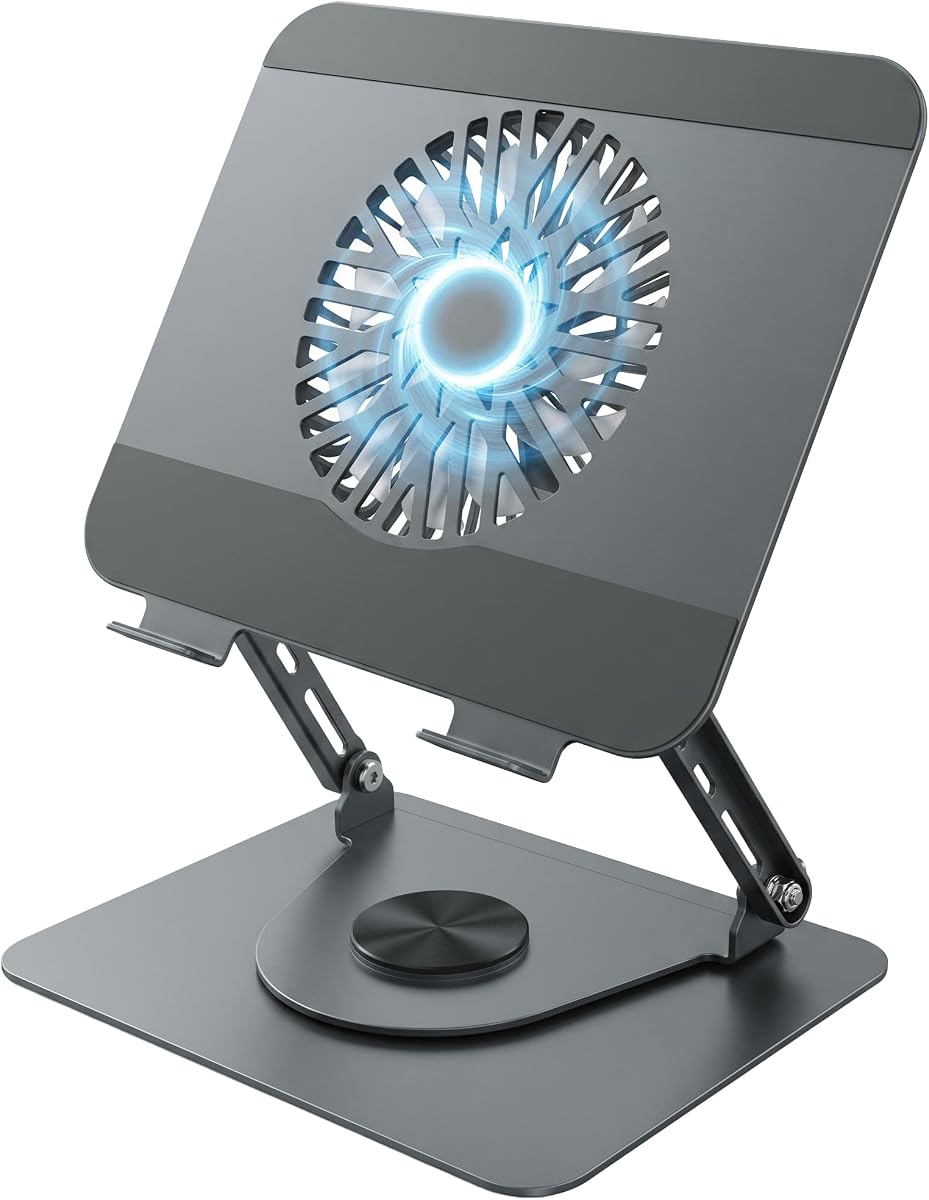
This laptop stand features an integrated cooling fan to prevent heat buildup. Rated 4.6 stars, it includes a smooth 360-degree rotating base for effortless screen sharing.
Pros
Integrated cooling fan
360-degree rotation
Adjustable height and angle
Non-slip protection
Ergonomic design
Cons
Fan noise possible
Limited compatibility
We may earn a commission when you buy through this link, at no additional cost to you.
Adjustable height and angle settings help find a comfortable eye-level position. Non-slip silicone pads protect your device, while the elevated platform organizes your desk space.
Users may notice slight fan noise during operation. Compatibility is optimized for specific laptop sizes, so verify dimensions before purchase.
Perfect for professionals needing ergonomic and cooling features. Its rotation and adjustability make it ideal for collaborative work environments.
Heat Management
Integrated central fan keeps air moving under your device to help it stay cooler.
Smooth 360° Rotation
Turn the screen toward clients or colleagues without moving the entire stand for collaborative work.
Aluminum Multi-Purpose Desk Fan Stand Mount, Black
Fits 120 140 180mm
CNC precision machining
Multi-angle pivot hinges
Tool-free installation
This premium fan stand supports 120mm, 140mm, and 180mm fans. Rated 4.0 stars, it features CNC precision machining for a refined, corrosion-resistant finish.
Pros
Fits multiple fan sizes
Multi-angle adjustment
Premium aluminum build
Tool-free installation
Corrosion resistant
Cons
Higher price point
Fan not included
We may earn a commission when you buy through this link, at no additional cost to you.
Three precision damped pivot hinges allow flexible multi-angle adjustment. The wide base with anti-slip pads ensures stability during use.
While highly versatile, it comes at a higher price. Fans are not included, which may increase the total investment.
Ideal for enthusiasts needing premium materials and flexible mounting. Its elegant design and precision engineering make it a standout choice.
Premium Aluminum Build
CNC machining delivers a smooth matte finish with excellent corrosion resistance.
Flexible Multi-Angle Adjustment
Three precision damped pivot hinges allow 360 horizontal and 180 vertical rotation.
YAODHAOD Multi-Purpose Desk Fan Stand Mount for 120mm PC Computer Fans
Fits 120mm and 140mm
360-degree full rotation
Solid metal construction
Quick assembly
This YAODHAOD stand offers full vertical 360-degree rotation for unlimited airflow control. Rated 5.0 stars, it features an all-metal build to eliminate vibration and shaking.
Pros
Full vertical rotation
All-metal construction
Quick assembly
Universal compatibility
Multi-scene cooling
Cons
Fan not included
Specific size focus
We may earn a commission when you buy through this link, at no additional cost to you.
Quick assembly with textured thumb knobs allows easy adjustments. Universal compatibility with standard PC fans makes it versatile for laptops, routers, and electronics.
It is limited to 120mm and 140mm fans, and units are sold separately. The solid metal design ensures long-term durability and reliability.
Excellent for users needing robust cooling for multiple devices. Its stability and rotation flexibility make it a top choice for diverse setups.
Sturdy All-Metal Construction
Thick solid metal frame eliminates vibration and shaking even with high-RPM fans.
Quick Assembly
Large textured thumb tightening knobs let you mount and lock fans without extra hardware.
We may earn a commission when you buy through this link, at no additional cost to you.
Buying Guide – How to Choose the Best Computer Fan Stand
Choosing the right computer fan stand involves considering several key factors. This guide breaks down what to look for to ensure optimal cooling and comfort.
Cooling Efficiency
Cooling efficiency is crucial for preventing overheating during extended use. Look for stands with multiple fans or active cooling systems to ensure consistent airflow. This helps maintain performance during demanding tasks like gaming or video editing.
Prioritize stands with adjustable fan speeds to control noise and airflow. Check for reviews confirming temperature reduction.
Build Quality
Build quality determines the longevity of your stand. Opt for models made from durable materials like aluminum or steel. These materials resist wear and provide stability, ensuring the stand supports your device securely over time.
Look for solid construction with minimal wobble. Metal builds often offer better heat dissipation.
Ergonomics
Ergonomics are essential for maintaining comfort during long sessions. Choose stands with adjustable height and angle settings. This helps align your screen to eye level, reducing strain on your neck and back.
Adjustable stands allow customization to your workspace needs. Prioritize flexibility for comfort.
Portability
Portability matters if you move between locations. Foldable designs are lightweight and easy to transport. Compact stands save desk space and can fit easily into bags for travel or remote work.
Check if the stand folds neatly. Weight is also a key factor for portability.
Compatibility
Compatibility ensures the stand fits your specific devices. Verify the size range supported, such as laptop dimensions or fan sizes. Universal designs accommodate various brands and models, increasing versatility.
Always check weight limits. Ensure the stand securely holds your device without slipping.
Additional Features
Additional features enhance functionality and convenience. USB hubs, phone holders, and RGB lighting offer extra utility. These features can reduce cable clutter and improve your overall workspace setup.
Consider what extra benefits align with your workflow. Not all features may be necessary for everyone.
Noise Levels
Noise levels impact your environment, especially in shared spaces. Look for stands with whisper-quiet fans or low-decibel ratings. Quiet operation ensures you can focus without distraction during work or relaxation.
Read reviews for user feedback on noise. Lower noise is better for quiet environments.
Price and Value
Price and value help balance budget with functionality. High-end models offer premium features, while budget options cover basics. Determine which features matter most to avoid overspending.
Compare options against your needs. Value is about getting what you require without excess.
How to Use and Care for Your Computer Fan Stand
Place the stand on a flat surface to ensure stability. Position your laptop or device securely on the surface. Verify that all locking mechanisms or stops are engaged to prevent slipping during use.
Connect the stand to a power source using the included cables. Turn on the fans and adjust the speed settings based on your cooling needs. Experiment with angles to find the most comfortable posture.
Regularly clean the fans and mesh surfaces to prevent dust buildup. Use compressed air or a soft cloth to remove debris. Proper maintenance ensures consistent cooling performance and extends the lifespan of the stand.
Frequently Asked Questions
Do computer fan stands reduce laptop temperature?
Yes, computer fan stands are designed to dissipate heat effectively. By lifting your device and directing airflow underneath, they help reduce internal temperatures. This can improve performance and prevent overheating during long sessions.
Are these stands compatible with all laptop sizes?
Most stands support a range of sizes, but compatibility varies. Check the product specifications for supported dimensions. Some models work best with laptops between 12 to 17 inches.
How loud are the cooling fans?
Noise levels vary by model. High-quality stands feature whisper-quiet fans designed for minimal disturbance. Always check decibel ratings or user reviews for accurate noise assessments before purchasing.
Can I use these stands with gaming laptops?
Yes, many stands are specifically designed for gaming laptops. They provide robust cooling to handle high-performance tasks. Ensure the stand supports the weight and size of your gaming laptop.
Do I need to assemble the stand?
Most stands require minimal or no assembly. Look for tool-free installation options for quick setup. Some models come pre-assembled to save you time and effort.
Can I adjust the height after setup?
Many models allow post-setup height adjustments. Check for adjustable hinges or locking mechanisms. This flexibility lets you change angles as needed throughout the day.
Are these stands suitable for portable use?
Yes, foldable designs are ideal for portable use. They are lightweight and easy to transport. Ensure the stand locks securely when unfolded for safe use on the go.
Final Thoughts on Choosing the Best Computer Fan Stand
Our guide highlights the top computer fan stands for various needs. From budget-friendly options to premium models, each pick offers unique benefits. Consider your priorities like cooling power, ergonomics, or portability.
Prioritize compatibility and build quality to ensure long-term value. Stands with adjustable features provide better comfort over time. Investing in the right stand protects your device and enhances productivity.
Remember that prices and availability may change. Always check current listings and reviews before purchasing. Use this guide as a starting point for finding the perfect cooling solution.