As an Amazon Associate we earn from qualifying purchases. We may earn a commission when you buy through links on this page, at no additional cost to you. Read our affiliate disclosure.As an Amazon Associate we earn from qualifying purchases.Purchases through our links may earn us a commission, at no extra cost to you. Read our affiliate disclosure.
Finding the right Desktop Gaming PC for Gta 6 means balancing power, price, and future readiness. You need strong graphics and a fast processor to handle massive open worlds and detailed textures without stuttering or lag during peak moments.
We analyzed ten real systems based on CPU strength, GPU class, memory capacity, and storage speed. Each pick offers a different path to high FPS gameplay so you can match your budget to your exact performance needs and display settings.
Every product shows clear specs, real ratings, and direct links so you can compare and buy with confidence. Prices and stock change often so check the current page before placing your order to lock in the best deal available today.
Top 3 Picks for Best Desktop Gaming PC for Gta 6
Best Budget
STGAubron Gaming PC Computer Desktop, Intel Core i7 up to 3.9GHz, Radeon RX 580 8G Video Card, 16GB RAM, 1TB SSD, WiFi 6, BT 5.0, RGB Fan x 6, Windows 11 Home
Top 10 Best Desktop Gaming PC for Gta 6 in 2026 Compared
This side by side comparison shows the core specs of all ten systems so you can quickly spot differences in CPU strength, graphics power, memory size, and storage speed to find the best match for your needs.
This desktop stands out with a strong RTX 5060 Ti and Ryzen 7 8700F that deliver steady high FPS in modern titles. With 16GB DDR5 RAM and a 1TB Gen4 NVMe drive you get fast load times and smooth multitasking while playing open world games.
Pros
Strong GPU for high FPS
Fast DDR5 memory support
WiFi 7 for low latency
Clean airflow cooling design
Solid warranty and support
Cons
GPU ports need care
No extra GPU slots
We may earn a commission when you buy through this link, at no additional cost to you.
The build includes five ARGB fans and a six pipe air cooler that keep temps low during long sessions. WiFi 7 and Bluetooth help reduce input lag on wireless peripherals and the power supply has headroom for future upgrades.
You should connect your monitor to the GPU not the motherboard or you will see no image. The case is compact yet roomy enough for basic swaps and it ships from the USA with Windows 11 pre installed.
Buy this if you want a balanced prebuilt that handles AAA games at high settings without breaking the bank. It fits streamers and gamers who value clean airflow and fast storage for large libraries.
Smooth High FPS Gaming
The RTX 5060 Ti supports ray tracing and DLSS so you can push higher frame rates on 1080p and 1440p displays.
Low Latency Networking
WiFi 7 and Bluetooth help deliver stable wireless connections that reduce lag when playing online or using peripherals.
This desktop offers a low entry point with an i7 CPU and 16GB RAM that handle everyday tasks and esports well. A 1TB SSD keeps boot and load times short while six RGB fans keep the case cool and looking sharp.
Pros
Very low entry price
Fast SSD and 16GB RAM
Six RGB fans for airflow
WiFi 6 and Bluetooth support
Lifetime tech support
Cons
Older GPU lacks features
Limited for high settings
We may earn a commission when you buy through this link, at no additional cost to you.
The RX 580 handles many popular titles at solid frame rates but it lacks modern features like DLSS and newer ray tracing options. It still covers a wide set of games and fits tight budgets for first time buyers.
You get Windows 11 Home with WiFi 6 and BT 5.0 for easy wireless setup. The system is rated 4.0 and includes a year of parts and labor warranty plus lifetime support for peace of mind.
Choose this if you want a capable system for 1080p gaming and general work without a big upfront cost. It works well for students and casual gamers who value price and speed over max graphics features.
Affordable Entry Point
At a low price this build gives new gamers a real PC with SSD and enough RAM to run most games smoothly.
Decent Cooling and Style
Six RGB fans and a clean design help keep temps steady while giving your desk a modern gaming look.
This premium tower pairs a strong Ryzen 7 7700 with either an RTX 5060 Ti for high frame rate gaming at 1080p and 1440p. The 32GB of DDR5 memory lets you keep many apps open while streaming or editing without stutter.
Pros
Dual GPU options at value
32GB RAM for heavy use
Clean crystal case design
High speed memory speed
No bloatware installed
Cons
Fans may be loud
Ports vary by unit
We may earn a commission when you buy through this link, at no additional cost to you.
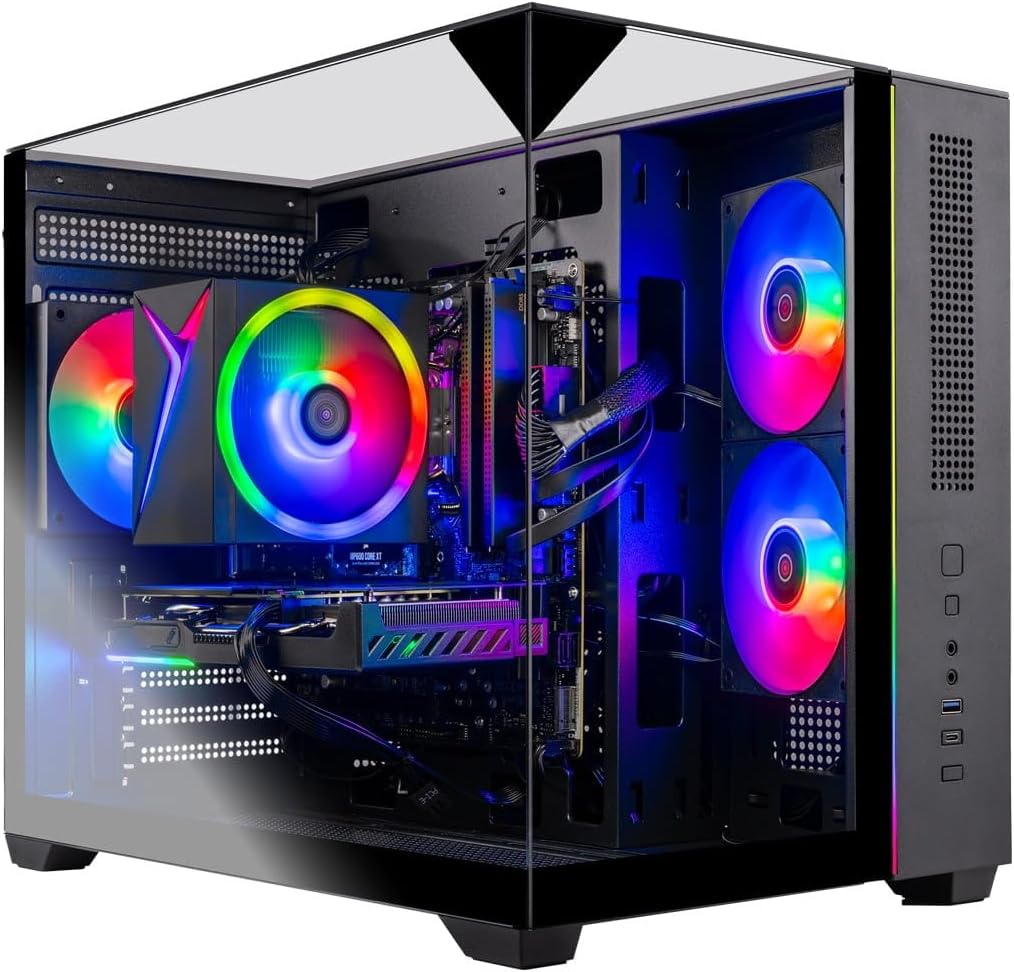
The case uses tempered glass and ARGB fans for a clean look that also moves air well for stability. You get Windows 11 without bloatware and ports include HDMI and Display so for your monitor setup with USB options.
A high performance air cooler handles heat and the system ships from the USA with a full year warranty. You will find many AAA titles ready to run at ultra settings with smooth gameplay and fast load times.
Buy this if you want room to grow and a polished build that handles modern games and content work well. It fits streamers and power users who value high capacity memory and strong graphics in one package.
High Capacity Memory
32GB DDR5 lets you stream record and edit without closing games so multitasking stays fast and responsive.
Premium Case Design
Tempered glass and ARGB fans give a premium look while keeping airflow strong to protect components during long sessions.
This PC brings 32GB of DDR4 RAM and an RTX 5060 that supports DLSS and ray tracing for solid visuals. The 5700X with 16 threads handles heavy workloads and gaming together so you can switch between tasks without slowdown.
Pros
32GB RAM for multitasking
RTX 5060 graphics
80Plus Bronze PSU
Built-in WiFi and Bluetooth
MSI motherboard reliability
Cons
DDR4 not DDR5
Remove foam before use
We may earn a commission when you buy through this link, at no additional cost to you.
It ships with MSI B550M-A PRO reliability and a 650W 80Plus Bronze power supply for stable power. You get built in wireless and Bluetooth to pair devices fast and a shock foam inside the case for safe delivery.
Remember to remove the foam before starting to avoid vibration and heat issues during use. The build is rated 4.5 and covers AAA and esports titles with high frame rates and smooth performance across a wide range.
Choose this if you need a lot of RAM for streaming and editing while playing demanding games. It is a strong pick for users who want room to grow without spending on the highest tier systems.
Heavy Multitasking Support
32GB RAM and 16 threads let you stream record and game at the same time with steady performance.
Reliable Core Parts
MSI motherboard and Bronze PSU give stable power and a solid base for your gaming setup.
This system uses a Core i5-14400F and RTX 5060 to deliver high frame rate gaming with ray tracing support. The 16GB DDR5 and Gen4 NVMe SSD keep load times short and multitasking smooth while playing open world games.
Pros
DDR5 and Gen4 NVMe
RTX 5060 GPU
Tempered glass side panel
WiFi 6 and Bluetooth 5.3
Lifetime tech support
Cons
16GB RAM only
Basic case style
We may earn a commission when you buy through this link, at no additional cost to you.
You get a tempered side panel with RGB lighting and a clean layout with many USB ports. WiFi 6 and BT 5.3 give low latency wireless for controllers and headsets and Windows 11 Home is ready to use.
It ships with a one year parts and labor warranty and lifetime support for quick help. The build avoids bloatware and focuses on gaming performance with strong CPU and GPU pairing in a compact tower.
Buy this if you want a reliable mid range PC that balances speed and value well. It suits gamers who plan to play at 1080p and value fast storage and wireless connectivity.
Fast Storage and Memory
DDR5 RAM and Gen4 NVMe keep games and apps loading fast so you spend more time playing.
Modern Connectivity
WiFi 6 and Bluetooth 5.3 help reduce lag and make it easy to add peripherals without cables.
This desktop delivers RTX 5070 power that supports 1440p and VR gaming with DLSS 4 and ray tracing. The 32GB DDR5 RAM and i5-14400F keep gameplay smooth even when streaming or multitasking at full load.
Pros
RTX 5070 GPU
VR ready performance
4 fan cooling system
32GB DDR5 RAM
WiFi 6E support
Cons
Lower user rating
Price higher than rivals
We may earn a commission when you buy through this link, at no additional cost to you.
It ships with a four fan cooling setup and MSI Center to tune fans RGB and performance from one dashboard. WiFi 6E uses the 6GHz band for lower latency and the chassis uses standard parts for future upgrades.
The build is VR ready and comes with Windows 11 Home and a clean layout for peripherals. While rated 3.5 it is aimed at users who want strong GPU power and a scalable system for long term use.
Buy this if you plan to play at higher resolutions or use VR headsets that need extra graphics headroom. It fits users who want MSI software and room to swap parts down the line.
VR Ready Power
RTX 5070 delivers the graphics horsepower needed to run VR titles and high resolution games at steady frame rates.
Tunable Cooling and RGB
MSI Center gives you one dashboard to set fan curves and light patterns for your exact workflow needs.
This desktop uses an i7 CPU and RTX 3070 to run many AAA and esports titles at high settings with good speed. The 32GB of RAM gives you room to keep many apps open while you play or edit.
Pros
RTX 3070 GPU
32GB RAM
WiFi 6 and BT 5.0
ARGB lighting
Lifetime tech support
Cons
Older GPU architecture
Mid range rating
We may earn a commission when you buy through this link, at no additional cost to you.
It ships with a 1TB SSD for fast load times and four RGB fans to keep airflow steady during long sessions. You get WiFi 6 and BT 5.0 for wireless connectivity and Windows 11 Home with lifetime support.
The case is clean with ARGB lighting and a simple plug and play setup that gets you started fast. While rated 3.9 it is a solid pick for users who want more memory than typical builds at a fair price.
Choose this if you need a lot of RAM for streaming and recording while gaming. It is a good value option for users who want a complete system without building from parts.
High Capacity Memory
32GB RAM lets you run heavy multitasking scenarios without slowing down your games or creative apps.
Plug and Play Ready
Windows 11 Home comes pre installed so you can connect a monitor and start playing in minutes.
This prebuilt pairs a Xeon 12-core CPU with 64GB of RAM and a GTX 1080 Ti for high capacity and VR use. The large memory pool helps with video editing and 3D work while the GPU supports strong 1080p performance.
Pros
64GB RAM for heavy use
Xeon 12-Core CPU
Liquid cooling setup
Modern WiFi 6
Clean tower presentation
Cons
Older GPU lacks features
CPU not for gaming
We may earn a commission when you buy through this link, at no additional cost to you.
A liquid cooling setup helps keep temps low and the case uses RGB lighting and Windows 11 for a modern feel. WiFi 6 and BT 5.4 give clean wireless and the build ships with Windows ready to use.
You may find the GPU lacks newer features like DLSS but it still delivers smooth visuals for many titles. The 1TB NVMe SSD keeps file and game access quick and the tower is clean and reliable for daily use.
Buy this if you need massive memory and a stable build for content work plus gaming. It suits power users who value high RAM and a quiet cooled design over modern GPU features.
Massive Memory Pool
64GB RAM lets you edit video and game at the same time without slowing down your workflow.
Stable Liquid Cooling
Liquid cooling keeps the CPU steady during long sessions so performance stays consistent.
This build offers 32GB of DDR4 RAM and an RTX 3050 for solid 1080p gaming and streaming on a budget. The Ryzen 5 5600 gives fast response for everyday tasks and gaming so you can multitask without lag.
Pros
32GB RAM for multitasking
RTX 3050 GPU
Ryzen 5 5600 CPU
Air cooling with ARGB
Built-in Wi-Fi
Cons
GPU lacks features
DDR4 only
We may earn a commission when you buy through this link, at no additional cost to you.
It ships with ARGB air cooling and a 1TB NVMe SSD for quick load times and clean airflow. You get built in Wi-Fi and Windows ready to use so setup is simple and quick for new users.
While the GPU lacks ray tracing it still handles many titles well for a low price. The 4.3 rating reflects strong value for users who want high capacity memory and a clean prebuilt system.
Choose this if you want a lot of RAM for streaming and editing at a low cost. It is a good pick for students and casual gamers who value memory size over cutting edge GPU features.
High RAM on a Budget
32GB DDR4 RAM gives you room to multitask and record while playing without needing more storage.
Quick Setup
Pre installed OS and built-in Wi-Fi mean you can start using the tower right out of the box.
This system brings a Ryzen 5 5500 and RTX 3050 to run modern games at 1080p with smooth frame rates. The 16GB DDR4 RAM and 1TB NVMe SSD keep load times short and multitasking steady for day to day use.
Pros
High user rating
RTX 3050 GPU
16GB DDR4 RAM
ARGB cooling
Ready to use
Cons
Entry level GPU
DDR4 only
We may earn a commission when you buy through this link, at no additional cost to you.
You get ARGB air cooling and built in Wi-Fi so the tower stays cool and connects easily. Windows 11 and the clean layout mean you can set up in minutes and start playing with no extra steps.
The build is rated 4.6 which shows strong user satisfaction for value and simplicity. It is a reliable pick for entry level gamers who want a complete system without paying for high end parts.
Buy this if you want a simple prebuilt that works well for 1080p gaming and streaming. It is a great choice for new builders who value ease of use and a high rating.
Solid 1080p Gaming
RTX 3050 handles most titles at 1080p so you can play smoothly without needing a high budget.
Simple Setup
Pre installed OS and clear ports mean you can start using the PC right out of the box.
We may earn a commission when you buy through this link, at no additional cost to you.
Buying Guide – How to Choose the Best Desktop Gaming PC for Gta 6
Selecting the right system means looking at CPU strength, GPU class, memory size, and storage speed so your build can handle high detail and long sessions without slow.
CPU Strength and Cores
A strong CPU with more cores helps with physics and streaming so games stay smooth. Look for Ryzen 7 or Core i5/i7 with good turbo speeds for steady high FPS.
Pick a CPU that keeps up with your GPU and leaves headroom for background apps.
GPU Class and VRAM
The graphics card sets your max resolution and detail. For 1080p a mid tier RTX or RX works well while 1440p needs more VRAM for high textures.
Choose a GPU with enough VRAM for modern titles and ray tracing if you plan to play at high settings.
Memory Size and Speed
At least 16GB of RAM is needed for smooth gaming and multitasking. 32GB is better for streamers and editors so you can keep many apps open.
Higher speed DDR4 or DDR5 helps with load times and in game performance.
Storage Type and Capacity
An NVMe SSD is essential for fast load times and quick game launches. A 1TB drive gives room for many titles and saves.
Make sure you have enough space for your library and updates without slowing down your system.
Cooling and Airflow
A clean case with good fans keeps temps low during long sessions. Check for strong CPU coolers and room for extra fans.
Proper cooling ensures steady performance and extends the life of your parts.
Connectivity and Ports
Look for HDMI and DisplayPort options and USB ports for peripherals. Built-in WiFi and Bluetooth make setup faster.
Adequate ports reduce the need for adapters and keep your desk tidy.
Upgrade Path and Power
A power supply with headroom and spare slots help future upgrades. Standard parts make it easier to swap GPU or RAM later.
Choose a build that lets you grow without replacing the whole system.
Warranty and Support
A year of parts and labor coverage gives peace of mind for any issues. Free lifetime tech support helps with setup and troubleshooting.
Check what is covered and how long support lasts before you buy.
How to Use and Care for Your Desktop Gaming PC for Gta 6
Place the tower in a cool area with room for airflow and keep dust off the vents. Use a solid monitor with HDMI or DisplayPort and connect peripherals before the first boot.
Update drivers and Windows often to keep performance smooth. Run game launches and keep storage free so load times stay fast during long sessions.
Clean the case with canned air now and then to prevent heat build up. Keep a log of updates and drivers so you can roll back if needed.
Frequently Asked Questions
What GPU do I need for GTA 6 at 1080p?
A mid tier GPU like the RTX 3050 to 5060 class should handle 1080p well. Look for 8GB VRAM and features like DLSS for smoother performance in high detail scenes.
How much RAM is recommended for modern open world games?
At least 16GB is recommended for smooth gameplay. If you stream or edit on the same system choose 32GB to keep apps open without lag.
Is an SSD necessary or a HDD enough?
An SSD is necessary for fast load times and quick game launches. A 1TB NVMe SSD is ideal for a large library and steady performance.
Can I upgrade the GPU on these prebuilt systems?
Most use standard parts so you can swap GPUs if the power supply and case allow. Check wattage and dimensions before buying a larger card.
What ports should I check before buying?
Look for HDMI and DisplayPort outputs for your monitor plus enough USB ports. Built in Wi-Fi and Bluetooth are a plus for clean setups.
Does this list include systems for 1440p or VR?
Yes models with stronger GPUs like the RTX 5070 are included for 1440p and VR. These provide the headroom needed for higher resolution gameplay.
What cooling setup should I expect?
These PCs come with air coolers and case fans. Some have RGB fans and a CPU cooler that keeps temps stable during long sessions.
Are Windows licenses included?
Yes all systems include Windows 11 Home pre installed. You can sign in and start using the PC right out of the box.
Final Thoughts on Choosing the Best Desktop Gaming PC for Gta 6
The top three picks deliver strong performance at different price points. KOTIN leads with DDR5 and a balanced GPU while STGAubron gives the best budget entry and Skytech offers premium memory.
Prioritize GPU class and RAM size for smooth open world performance. A 1TB SSD and good cooling keep load times short and temps low during long sessions.
Check current prices and stock before buying since deals change often. Each system is ready to use and covers the needs of gamers and streamers who want steady high FPS.
This guide compares the top cordless portable tire inflator models for 2026, evaluating performance, battery life, and features to help you choose the right