
Switch 2 Pro Controller Charging Station
3.5Editor score
Dual charging for Pro controllers
Compact space-saving desktop design
LED status indicators for monitoring
We compare the top 10 controller charging docks for Switch 2 Joycons and Pro controllers based on speed, features, RGB lighting, and safety protection.
Keeping your gaming setup organized and powered is essential for seamless play sessions. A reliable controller charging dock for Switch 2 ensures your Joycons and Pro controllers stay ready without cluttering your desk with loose cables or random adapters.
This guide evaluates ten top-rated charging stations using detailed specifications and user feedback. We analyzed charging speed, compatibility, design, and safety features to help you find the perfect match for your gaming station and budget.
Each pick highlights unique strengths like magnetic alignment, RGB lighting, or multi-device support. Prices fluctuate frequently, so verify current costs before buying. Our goal is to simplify your decision and keep your controllers charged efficiently.
3.5Editor score

4.7Editor score
4.3Editor score
This side-by-side comparison summarizes key specifications across all ten products to help you quickly identify which dock fits your specific needs regarding capacity, design, and extra features.



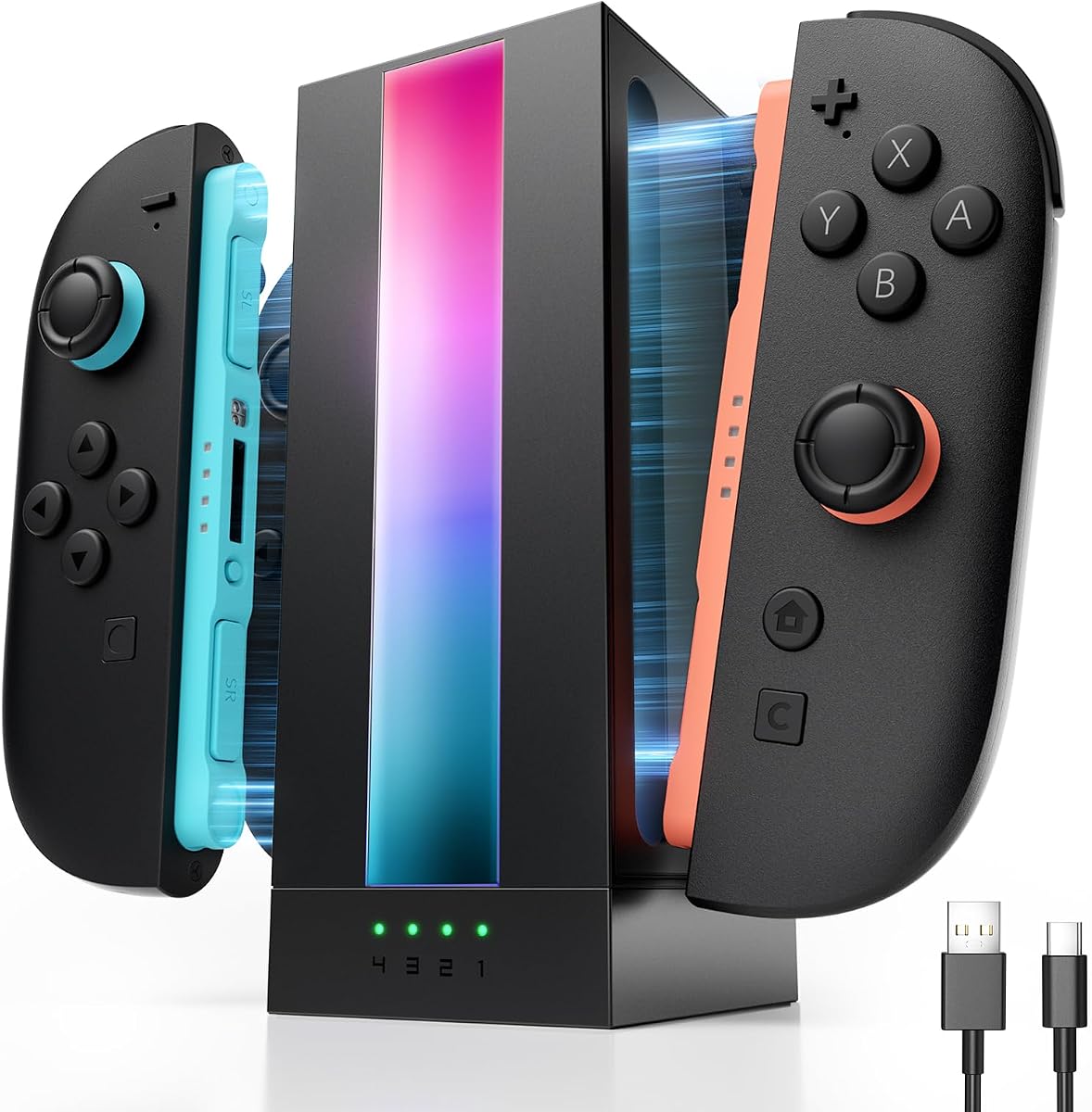
This magnetic charging dock stands out as the top choice for Switch 2 owners seeking efficiency and style. With a high rating of 4.7 stars, it delivers reliable performance while offering versatile features like simultaneous charging for four Joycons.
We may earn a commission when you buy through this link, at no additional cost to you.
The magnetic alignment feature eliminates the need to distinguish between plus and minus Joycons, making charging effortless even during late-night gaming sessions. It supports up to four controllers at once, ensuring you never run out of battery during multiplayer marathons.
While the customizable RGB lights add a vibrant touch to your setup, they might be too bright for some users who prefer a minimalist look. The system offers nine distinct modes, but turning them off requires a three-second touch hold which takes some getting used to.
Ideal for gamers who value organization and visual flair, this dock combines practicality with aesthetics. Its safety features ensure long-term battery health, making it a solid investment for anyone wanting a premium charging experience.
The dual-direction magnetic design lets you drop Joycons in without worrying about orientation, reducing wear on ports.
Nine lighting modes including static and dynamic effects let you match the dock to your room decor or mood.
We may earn a commission when you buy through this link, at no additional cost to you.
The JSAUX EnergyFlow dock brings a premium feel with its immersive RGB light bar and fast charging capabilities. It earns a 4.3 rating by delivering efficient performance specifically tailored for the 2025 Switch 2 JoyCons.
We may earn a commission when you buy through this link, at no additional cost to you.
Its exclusive design ensures perfect fit and compatibility for new controllers, avoiding the confusion of mixed generations. Charging all four JoyCons in just 2.5 hours is significantly faster than many competitors, keeping you in the game longer.
The lack of a power adapter might inconvenience some users who expect everything needed in the package. Additionally, if you still use older Switch JoyCons, this dock won't work for them, limiting its utility for households with multiple console generations.
For those invested in the Switch 2 ecosystem, this dock offers a stylish and efficient charging solution. The clear independent indicators make it easy to see which controllers need power at a glance.
Designed specifically for 2025 JoyCons, this dock avoids compatibility issues common with older models.
Reduced charging time means less downtime between gaming sessions compared to standard charging methods.
We may earn a commission when you buy through this link, at no additional cost to you.
This compact station offers an affordable solution for those needing to charge two Pro controllers at once. Despite a lower rating of 3.5, it provides reliable performance for users prioritizing budget and desk space efficiency.
We may earn a commission when you buy through this link, at no additional cost to you.
The 5V2A power input ensures stable charging without excessive heat, helping maintain controller health over time. Its small footprint makes it ideal for tight gaming setups where every inch of space counts.
However, the lower rating suggests some users may have experienced durability or charging consistency issues. It is also limited to Pro controllers, so it won't charge JoyCons which limits versatility for many players.
Ideal for casual gamers with limited budgets, this dock fulfills basic charging needs without frills. It is a functional choice if you primarily use Pro controllers and want a simple, no-fuss setup.
Save money while keeping two controllers ready for play with this cost-effective dual station.
Simple LED indicators provide immediate feedback on charge progress without complexity.
We may earn a commission when you buy through this link, at no additional cost to you.
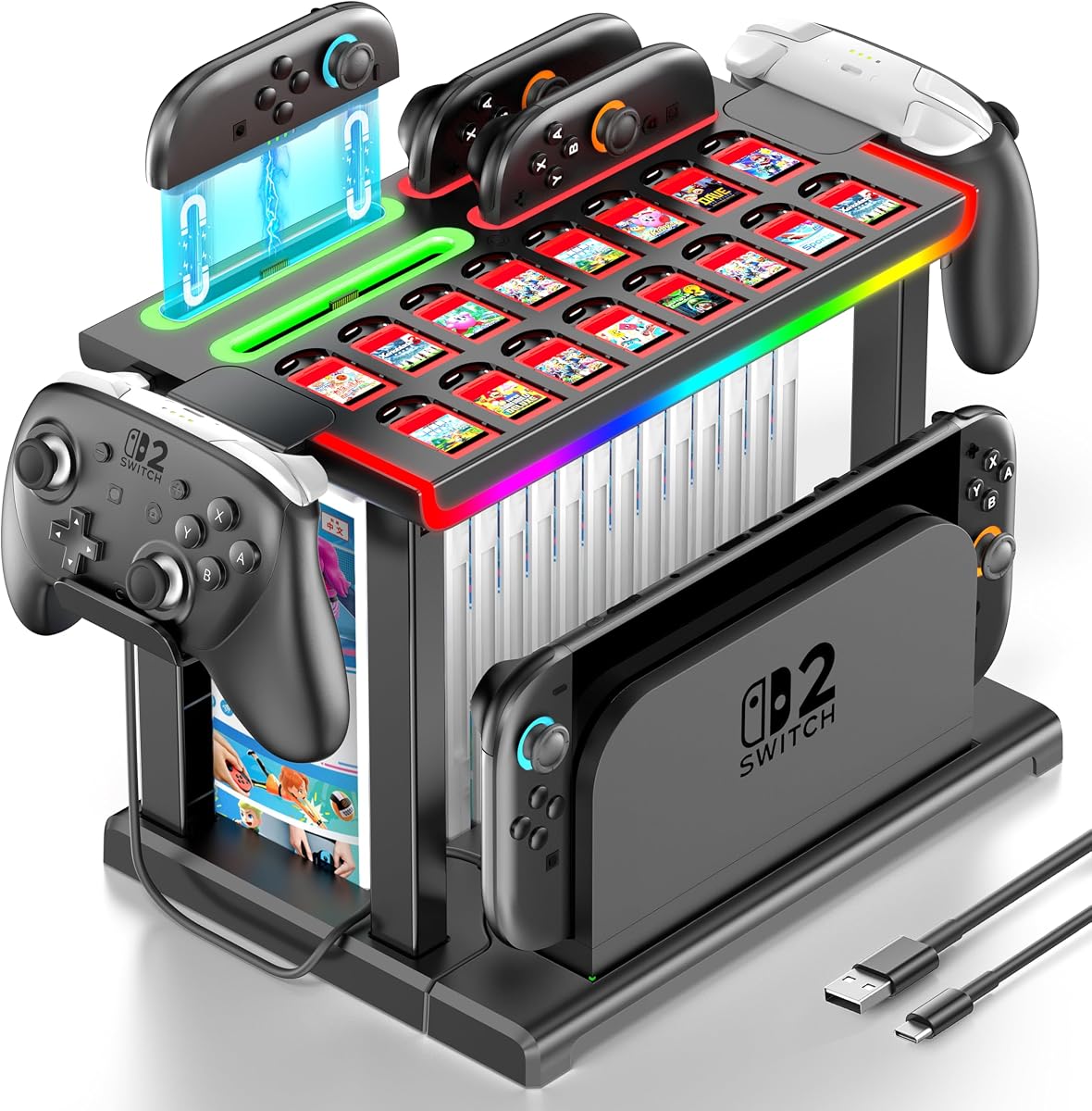
This organizer station combines charging with massive storage capacity for games and accessories. With a 4.6 rating, it appeals to gamers who want to reduce clutter while keeping everything within reach on their desk.
We may earn a commission when you buy through this link, at no additional cost to you.
The ability to hold 16 game cases and 16 game cards alongside charging for four Joycons makes it a central hub for your gaming gear. RGB lighting modes add style, and the 2-hour fast charging keeps controllers ready.
The sheer size of this unit means it demands a large desk area, which might not suit smaller setups. Also, the TV dock is not included, so you still need a separate stand for your console if needed.
Best for avid collectors who need organization and style, this station keeps your space neat and vibrant. It is a comprehensive solution for those who prioritize having all accessories accessible in one place.
Hold dozens of game cases and cards to keep your collection tidy and easily accessible.
Combine charging and storage in one unit to reduce cables and separate stands on your desk.
We may earn a commission when you buy through this link, at no additional cost to you.
PowerA is a known name in Nintendo accessories, and this base delivers dependable charging performance. With a 4.6 rating, it satisfies users looking for a no-nonsense solution from a reputable manufacturer.
We may earn a commission when you buy through this link, at no additional cost to you.
It handles both JoyCons and wireless controllers simultaneously, offering flexibility for different play styles. The simple LED indicators make it easy to track charging progress without complicated touch controls or lights.
While reliable, it lacks the visual flair of RGB docks or advanced organizers, which might disappoint those seeking style. It focuses purely on function, so if you want more than charging, you may need separate accessories.
Best for users who prioritize reliability and brand trust, this base ensures your controllers stay charged without issues. It is a practical choice for everyday use where style is secondary to function.
Works with both JoyCons and wireless controllers to serve different needs without extra hardware.
Trust a manufacturer known for quality Nintendo accessories to ensure safe and stable charging.
We may earn a commission when you buy through this link, at no additional cost to you.
This versatile dock supports multiple platforms including PS5, making it a smart pick for multi-console households. A 4.7 rating reflects its efficiency and ease of use for various controller types.
We may earn a commission when you buy through this link, at no additional cost to you.
It can charge four Joycons or two Pro controllers at once, providing great flexibility. The inclusion of an 80cm USB Type-C cable ensures you have the necessary connectivity without buying extra adapters.
The basic design lacks RGB lights or storage, which might not appeal to those wanting an immersive setup. Additionally, the cable length might require careful placement to avoid tangles or reaching distant power sources.
Ideal for gamers with multiple consoles, this dock simplifies charging with universal compatibility. Its simplicity and strong performance make it a reliable option for functional charging.
Charge Switch and PS5 controllers with one dock to save space and simplify your setup.
No complex setup required; simply plug in and start charging your devices immediately.
We may earn a commission when you buy through this link, at no additional cost to you.
This dock uses USB-C adapters for drop-in charging, reducing wear on your controller ports. With a 3.9 rating, it offers a straightforward charging solution compatible with various controllers including Xbox Series.
We may earn a commission when you buy through this link, at no additional cost to you.
The inclusion of adapters means you don't need to plug cables directly into the controller, preserving port integrity. Its compact design fits neatly on desks without taking up much room.
Users have noted it does not work with PowerA controllers, which might limit compatibility for some third-party users. Additionally, lower ratings imply some may experience charging inconsistency or durability concerns.
Best for users prioritizing port safety and simplicity, this dock offers efficient dual charging. It is a practical tool for those who want to minimize cable plugging and unplugging.
Use removable adapters to charge without inserting cables into the controller port to reduce damage.
Charge two controllers at once to keep gaming sessions uninterrupted with always-ready power.
We may earn a commission when you buy through this link, at no additional cost to you.
SUPCASE delivers a high-performing dock with dual-side charging for easy placement regardless of orientation. With a 4.7 rating, it combines magnetic alignment and four charging slots for a seamless experience.
We may earn a commission when you buy through this link, at no additional cost to you.
The dual-side feature means you can drop Joycons in without worrying about left or right sides, enhancing convenience. It also includes nine RGB modes to customize your gaming ambiance according to your mood.
Its size might make it too bulky for smaller spaces, and it is limited to Switch 2 JoyCons which restricts versatility. Users with older consoles might need a different solution for their controllers.
Best for Switch 2 owners seeking flexibility and style, this dock ensures controllers charge efficiently. The safety features add peace of mind, ensuring your controllers stay healthy over time.
Dual-side charging lets you drop Joycons in from either side without worrying about orientation.
Magnets hold Joycons in place securely, preventing accidental dislodges during gameplay or movement.
We may earn a commission when you buy through this link, at no additional cost to you.
This multi-functional dock supports Switch 2, 1, and OLED models, making it ideal for households with multiple consoles. A 4.2 rating highlights its versatility and generous feature set for serious gamers.
We may earn a commission when you buy through this link, at no additional cost to you.
With up to ten charging slots and extra USB ports, you can charge many devices at once. The Y-Type cable connection to your dock ensures stable power delivery for consistent charging performance.
However, the large footprint might clutter smaller desks, and reliance on the official dock for power can be limiting. Users without the official dock might need alternative power solutions to get full functionality.
Best for multi-console households needing maximum capacity, this dock keeps all devices charged. The RGB modes and clear indicators add usability and style to your gaming station.
Charge JoyCons from different Switch generations in one place to save time and resources.
Utilize the extra USB 2.0 ports for charging other accessories or data transfer convenience.
We may earn a commission when you buy through this link, at no additional cost to you.
This dock offers broad compatibility across Switch and Xbox controllers, making it a versatile choice. With a 4.0 rating, it provides straightforward dual charging with simple indicators and included adapters.
We may earn a commission when you buy through this link, at no additional cost to you.
The inclusion of Type-C adapters helps protect your controllers by allowing drop-in charging without plugging directly. It also supports Xbox Series X|S and PS5 controllers, expanding its utility beyond just Nintendo devices.
It is limited to two controllers at once, which may not be enough for larger groups. Additionally, using a specific 5V2A adapter is recommended for optimal performance, which might be an extra step.
Best for multi-platform gamers needing reliable dual charging, this dock offers flexibility and safety. It is a solid choice for those who want a universal station without excessive complexity or bulk.
Charge Nintendo, PlayStation, and Xbox controllers with one dock to unify your setup.
Included Type-C adapters reduce wear on controller ports by avoiding repeated cable insertions.
We may earn a commission when you buy through this link, at no additional cost to you.
Selecting the right charging dock involves considering factors like capacity, charging speed, safety features, and design to ensure it meets your specific gaming needs.
Ensure the dock supports your specific controllers. Some docks are exclusive to Switch 2 JoyCons while others work with Pro or third-party controllers. Always check product descriptions to confirm compatibility with JoyCon 2025 or earlier models.
Verify compatibility with your controller types before purchasing to avoid returns or unusable hardware for your setup.
Determine how many controllers you need to charge simultaneously. Docks range from 2 to 4 Joycon slots or include Pro controller ports. Look for fast charging claims like 2.5 to 3 hours for a full charge to minimize wait times.
Choose a dock with enough slots and speed to keep your team ready without long delays between game sessions.
Check if the dock requires a separate USB adapter or if it can be powered by the console dock. Some models recommend 5V2A adapters for stability. Power cables and adapters are sometimes included, but others require you to supply your own.
Confirm power requirements match your available USB ports to ensure stable charging performance without interruptions.
Look for built-in smart chips that offer overcharge, short-circuit, and overvoltage protection. These features prevent damage to controller batteries and ensure safety during long charging periods. Reviews often mention safety features to judge reliability.
Prioritize docks with certified safety chips to protect your controllers from potential electrical damage or overheating.
Decide if you want RGB lighting to enhance your setup or prefer a minimalist look. Some docks include multiple lighting modes with memory functions, while others stay plain. Consider desk space and whether the dock fits your aesthetic.
Select a design that balances visual appeal with desk space constraints to maintain a clean gaming environment.
Some models combine charging with storage for games cards or consoles. If you need to keep your desk tidy, look for docks with game card slots or game case holders. This adds utility beyond simple charging.
Consider storage features if you want a centralized hub for all your gaming accessories on your desk.
Docks with magnetic alignment or drop-in adapters reduce wear on controller ports. Others require precise alignment of plus and minus JoyCons. Choose a method that feels intuitive and prevents accidental drops during charging.
Opt for magnetic or adapter-based docks to extend the lifespan of your controller charging ports.
Established brands often provide better customer support and reliable quality. Check reviews for durability feedback and see if the seller offers a warranty or return policy. Good support helps if you face issues with charging performance.
Choose reputable brands with positive user feedback to ensure long-term reliability and access to customer service.
Place the dock on a flat stable surface near your gaming area. Ensure it is within reach of a power outlet or USB port. Plug in the power adapter or cable securely to start charging your controllers.
Insert your JoyCons or Pro controllers into the designated slots. For magnetic docks, simply drop them in until they click into place. If using adapter docks, ensure the adapters are fully inserted for good contact.
Monitor LED indicators to check charging progress. Red usually means charging and green means fully charged. Keep the dock clean and dry to avoid moisture damage. Remove controllers once fully charged to preserve battery health over time.
Some docks support older JoyCons while others are exclusive to Switch 2 models. Always check product details for compatibility. Many newer docks are designed specifically for JoyCon 2025 and might not fit older sizes.
Charging time varies by dock but typically ranges from 2.5 to 3 hours for a full charge. Using a 5V2A power adapter helps ensure fast and stable charging without interruptions.
Most premium docks offer multiple RGB modes including static and dynamic effects. You can often toggle modes with a touch button or hold to turn them off. Some features memory to retain your last setting.
Some docks include the USB Type-C cable but not the wall adapter. Others include both. Check the product description carefully to see if a 5V2A adapter is included with the purchase.
It depends on the dock model. Some have separate slots for Pro controllers while others are JoyCon only. Multi-slot models often support both so verify the specifications before buying.
Yes most modern docks include smart chips that stop charging when full. This prevents overcharging and overheating. Always choose docks with built-in safety protections for long-term controller health.
Ensure you are using the correct JoyCon model for the dock. Some docks are designed specifically for Switch 2 JoyCons. If they do not fit, check compatibility or consider a dock with adjustable or magnetic slots.
We reviewed ten top charging docks with unique strengths from magnetic alignment to massive storage. The FASTSNAIL Magnetic Dock stands out for ease of use while JSAUX offers premium visual flair.
Prioritize capacity and safety features based on how many controllers you own. If you value design look for RGB options. For pure utility consider simpler models with robust power support.
Prices and availability change frequently so check current listings before purchasing. Use this guide to find a dock that keeps your Switch 2 controllers powered and your setup organized.