
Fosmon Fast Charging for Xbox Controller Charger Station Dock
4.5Editor score
Dual charging slots included
Long battery life capacity
Certified by safety standards
This guide compares the top ten controller charging stations for Xbox including battery capacity charging speed and build quality to help you choose the best
Finding the right charging solution keeps your gaming sessions uninterrupted and your setup looking clean. A good station offers fast power delivery plus secure storage for your controllers between matches.
We evaluated ten top-rated models based on battery capacity, charging speed, build quality, and compatibility across Xbox generations. Our analysis highlights key features that matter most for serious gamers today.
Each pick showcases unique strengths like extended playtime or sleek design so you can match your needs and budget. Please note that prices and availability may change over time.
4.5Editor score

4.6Editor score

4.6Editor score
The following table presents a side-by-side comparison of the ten best controller charging stations for Xbox available this month to help you compare specs quickly.



This dual charging dock earns its spot as the top pick by pairing high capacity batteries with thoughtful design features. It holds two controllers securely while their rechargeable packs cycle to full charge without requiring constant attention from the player.
We may earn a commission when you buy through this link, at no additional cost to you.
The standout feature here is the 6200mWh capacity per battery which translates to eighteen to twenty five hours of gameplay per charge. The unique X shaped LED indicators provide clear status updates without being distracting during low light gaming sessions.
The system includes four battery covers which ensures fit across Xbox One and Series X S models. While it does not support third-party controllers this limitation is acceptable given the focus on official hardware performance and durability over time.
Buyers who prioritize uninterrupted long sessions will find this kit invaluable for their setup. The combination of safety certifications and extended runtime makes it the most reliable choice for daily gamers looking for a solid investment.
The high capacity batteries allow for significantly longer gameplay sessions compared to standard disposable AA alternatives.
The unique LED indicators make it easy to monitor charge status at a glance.
We may earn a commission when you buy through this link, at no additional cost to you.
For gamers seeking a reliable solution without breaking the bank this Fosmon dock delivers impressive value. It supports dual charging and includes robust batteries that last for days of typical use. The SGS certification provides peace of mind regarding electrical safety standards.
We may earn a commission when you buy through this link, at no additional cost to you.
Key strengths include the 5280mWh battery capacity that supports forty to forty five hours of play per charge. The smart charging board ensures that the system stops charging when full which helps preserve battery health over the long term.
The main limitation is that it does not support the Xbox Elite 2 controller which might be a dealbreaker for some owners. However for most standard Xbox One and Series X S owners the price and performance balance is hard to beat.
If you need a straightforward affordable dock with a warranty this is an excellent choice for your home entertainment setup. It removes the hassle of disposable batteries while offering consistent performance for multiplayer sessions.
Pricing is competitive while still delivering high capacity batteries and safety certifications.
SGS certification ensures the product meets rigorous safety guidelines for consumer electronics.
We may earn a commission when you buy through this link, at no additional cost to you.
This 8BitDo dock stands out for its premium finish and official licensing which ensures a perfect match with your Xbox controllers. The magnetic secure charging system makes docking effortless and provides a satisfying connection every time you set your controller down.
We may earn a commission when you buy through this link, at no additional cost to you.
The design focuses on seamless integration with your existing Xbox aesthetic offering a minimalist look that complements any console setup. The LED indicators use amber and white to show charging states clearly without being distracting during gameplay.
It includes one 1100 mAh battery and two battery doors which is standard for single dock units. The price is higher than basic plastic docks but the build quality and official licensing justify the investment for enthusiasts who value appearance.
Buyers who want a controller station that matches their console's look will love this option. It is perfect for those who appreciate premium materials and official partnerships over raw capacity or multi-dock features.
As an officially licensed product it guarantees compatibility and design alignment with Xbox hardware.
The magnetic system ensures the controller stays aligned for efficient power transfer.
We may earn a commission when you buy through this link, at no additional cost to you.
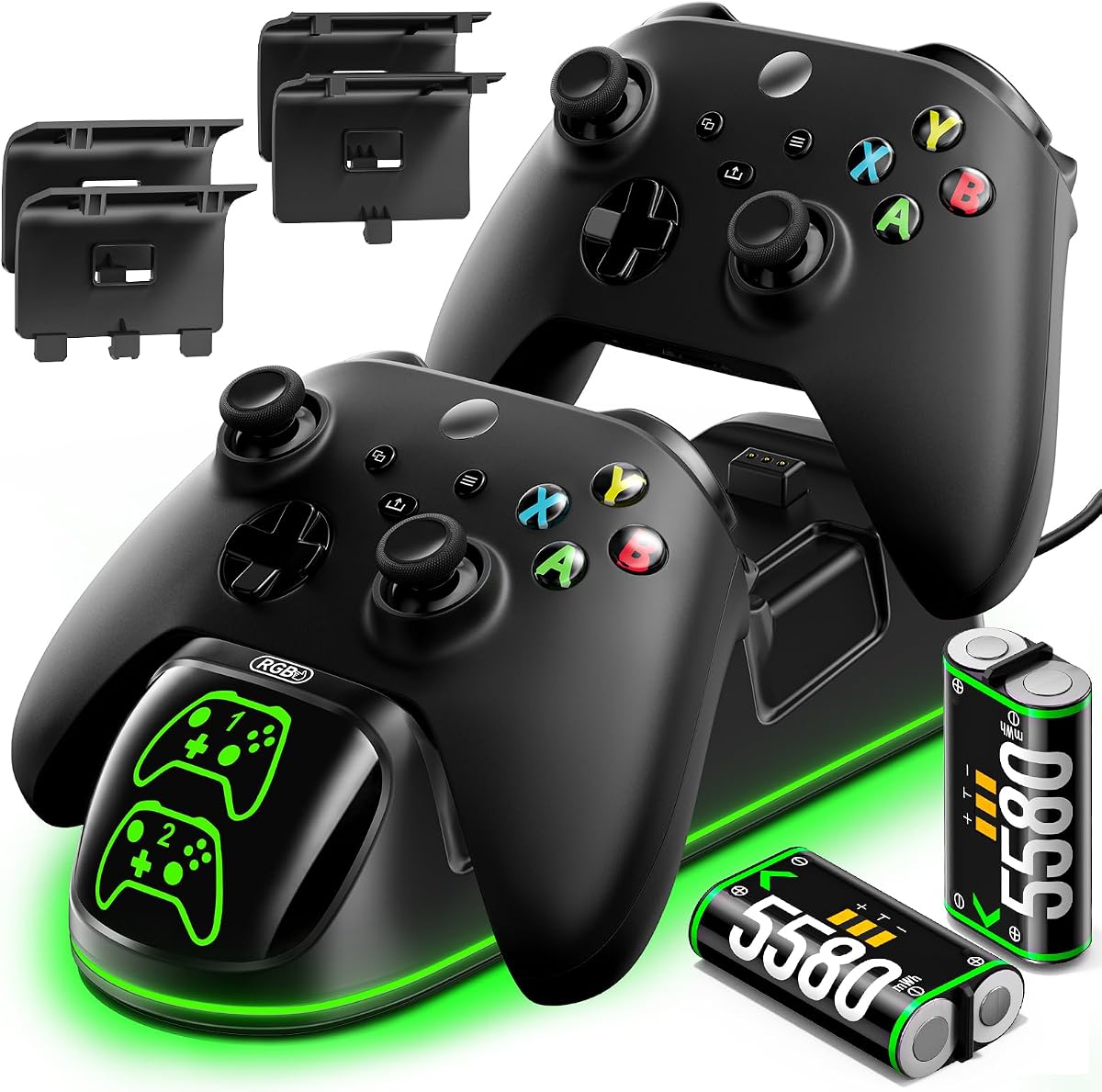
This OlVO charging station earns a perfect rating for its speed and capacity combination. The 5580mWh batteries are fully charged in under 2.5 hours which is faster than many competitors. The clear LED indicators use red and green to show status instantly for users.
We may earn a commission when you buy through this link, at no additional cost to you.
It supports both standard and Elite controllers which makes it versatile for users with multiple devices. The package includes four covers ensuring you can switch between Series X S and One models without issue. The high capacity also supports twenty hours of continuous play per charge.
While it lacks third-party controller support it covers all official Microsoft hardware effectively. The speed of recharge is the main draw here especially for gamers who need to get back online quickly between matches.
Users who prioritize speed and Elite controller compatibility will find this model ideal. It balances fast turnaround times with high capacity packs to keep your gaming routine smooth and uninterrupted.
The under 2.5 hour charge time minimizes wait periods when swapping batteries.
Supports Elite controllers which many standard docks do not accommodate easily.
We may earn a commission when you buy through this link, at no additional cost to you.
This PowerA stand provides a straightforward official solution for charging your Xbox Series X S or One controller. It displays your controller upright while charging which saves desk space and keeps your setup organized. The included 1100 mAh battery offers decent runtime for casual sessions.
We may earn a commission when you buy through this link, at no additional cost to you.
As an officially licensed product it is built to last and fits your controller precisely. The two year limited warranty adds peace of mind for long-term use. It effectively eliminates the need for disposable batteries which saves money over time.
The lower battery capacity means it will not match high-capacity third-party options but the price is very reasonable for a single slot dock. Users looking for a reliable stand that does not clutter their desk will appreciate this design.
If you only need to charge one controller at a time this is a solid choice. The official branding and simple operation make it ideal for gamers who want minimal fuss and maximum reliability.
The stand focuses on basic functionality with no complex settings or indicators.
Official licensing ensures support from PowerA for any manufacturing defects.
We may earn a commission when you buy through this link, at no additional cost to you.
This charger station offers a distinct aesthetic with a robot helmet inspired front design that stands out among standard docks. The 5520mWh batteries provide reliable performance for extended gaming sessions and the USB C cable ensures modern connectivity standards are met easily.
We may earn a commission when you buy through this link, at no additional cost to you.
The intelligent LED indicators inform users of charging status with red and green lights that can be toggled on or off via a button on top. The package includes four covers which ensures compatibility across multiple Xbox controller generations without needing extra purchases.
Advanced protection features like overcharge and short-circuit protection ensure your controllers remain safe during the charging process. While the design might not appeal to everyone who prefers minimalism it adds a fun personality to your gaming setup.
Buyers who want a unique look alongside solid performance will find this model appealing. The combination of battery covers and safe charging tech makes it a versatile option for diverse controller collections.
The robot helmet design adds personality to your console area without cluttering space.
Included USB-C cable ensures compatibility with modern power adapters and ports.
We may earn a commission when you buy through this link, at no additional cost to you.
Nyko has a long history in gaming accessories and this station delivers a practical multi-device solution. It charges two controllers at once which is perfect for multiplayer households. The extra USB port allows you to charge other peripherals like a headset simultaneously.
We may earn a commission when you buy through this link, at no additional cost to you.
The green LED lights provide clear status indicators for each dock slot so you know when your controllers are ready. The drop and charge design removes the need for cables which keeps your setup neat. The 1100 mAh batteries offer around fifteen hours of playtime each.
While the build quality is solid it is not as premium as some higher-end options. The battery capacity is standard which is fine for casual gamers but might not satisfy marathon players who want longer runtimes without recharging.
If you need to charge two controllers and a headset at the same time this station fits the bill. The extra USB port and simple operation make it a functional choice for shared living spaces.
The additional USB port allows charging of a headset or other device simultaneously.
Dual slots ensure both controllers are powered up for local multiplayer games.
We may earn a commission when you buy through this link, at no additional cost to you.
This stand is designed to perfectly match the Pulse Red controller making it an aesthetic choice for fans of that colorway. The magnetic contact system ensures a secure and precise charge connection without needing to align ports manually. The one-hand navigation design allows you to use the controller while it sits on the stand.
We may earn a commission when you buy through this link, at no additional cost to you.
Official licensing guarantees that the colors and materials match Microsoft's standards which is a premium feature not found in generic options. The material quality is high and it feels solid when placed on your desk. The 1100 mAh battery provides standard runtime for the dock.
It is best suited for those who prioritize visual consistency over raw capacity or multiple slots. The single slot design means you cannot charge two controllers at once but for collectors or enthusiasts who care about setup aesthetics this is ideal.
Buyers who want their accessories to match their console perfectly will appreciate this stand. It bridges the gap between functionality and design making it a top choice for style-conscious gamers.
Designed to match specific controller colors for a seamless look on your desk.
Ergonomic design allows you to use the controller without removing it from the stand.
We may earn a commission when you buy through this link, at no additional cost to you.
This Razer stand leverages the brand's reputation for quality peripherals to deliver a reliable charging solution. It features a magnetic contact system that ensures your controller is secure during charging. The design matches the color of your controller which keeps your setup cohesive and professional.
We may earn a commission when you buy through this link, at no additional cost to you.
Universal compatibility means it works with almost any Xbox controller including next-gen and last-gen models. The overcharge protection prevents overheating which extends the life of both your controller and the battery. Quick charge capability gets you back to gaming quickly after a short rest.
The main trade-off is the higher price compared to standard docks. For Razer fans who prioritize brand synergy and build quality this is a premium option worth considering. The blue color variant looks great with matching controllers.
Buyers who appreciate Razer quality and want a premium single-slot dock will find this model appealing. It offers reliable performance and aesthetic consistency that matches your console hardware.
Built with the same standards as Razer peripherals for consistent performance.
Designed to minimize downtime so you can get back to playing faster.
We may earn a commission when you buy through this link, at no additional cost to you.
This charger station stands out for its customizable RGB lighting which adds a vibrant touch to your gaming setup. The nine lighting modes include both single colors and cycling options so you can match your room decor or mood. The two 6200mWh batteries provide strong performance for marathon sessions.
We may earn a commission when you buy through this link, at no additional cost to you.
The charging dock automatically adjusts output power to ensure safety for your controllers. It supports both One and Series X S controllers and includes covers for both generations. The storage capability when not in use keeps your controllers neat and organized for easy access.
While the RGB might be too flashy for some setups it is a fun feature for those who love dynamic lighting. The battery capacity is excellent and comparable to more expensive options on the market making it a strong value proposition.
Buyers who want to add visual flair to their desk will appreciate this dock. It combines high capacity batteries with affordable RGB features to create a unique and functional gaming accessory.
Nine distinct lighting modes allow for customization of your setup look.
Automatic power adjustment prevents overcharge and ensures safe long-term use.
We may earn a commission when you buy through this link, at no additional cost to you.
Choosing the right charging station involves balancing battery capacity, charging speed, and compatibility with your specific controller models.
Battery capacity determines how long you can play on a single charge. Models with higher milliwatt-hour ratings provide extended gaming sessions which is crucial for marathon players.
Prioritize docks with higher capacity packs to reduce the frequency of recharges during gameplay.
Fast charging features allow you to get back to play quickly after a break. Look for docks that fully recharge batteries in under three hours for optimal convenience.
Faster recharge times minimize downtime so you never have to wait too long between sessions.
Ensure the dock supports your specific controller models including Xbox One, Series X, or Elite variants. Some docks lack support for newer or specialized controllers which limits their usefulness.
Always check the compatibility list to confirm it matches your current and future controller needs.
Durable materials ensure the dock withstands daily handling and long-term use. Quality builds resist wear and tear which keeps the charging ports functional over time.
Invest in sturdy docks to avoid frequent replacements and ensure reliable performance.
Visual indicators help you monitor charging status without needing to guess if batteries are full. Clear LEDs provide feedback on whether a dock is charging or ready to use.
Simple and clear indicators improve user experience by reducing confusion about battery status.
Docks that include battery covers for different generations offer greater flexibility for mixed setups. These covers ensure a snug fit for various controller shapes and sizes.
Look for kits that include covers for both Series X and One models to future-proof your purchase.
Safety certifications and built-in protection systems prevent overcharging and overheating which could damage your controller. These features are essential for long-term device safety and peace of mind.
Choose docks with safety certifications to ensure your controllers remain protected during all charging cycles.
The look of the dock should complement your existing setup whether you prefer sleek minimalism or vibrant RGB lighting. Design choices affect how your station fits into your gaming environment.
Select a design that matches your console or controller colors to create a cohesive look.
Place the charging station on a flat stable surface near your console to ensure easy access during gaming sessions. This setup minimizes cable clutter and keeps the controllers within reach.
Insert the rechargeable batteries into the dock slots carefully aligning the metal contacts to ensure a secure connection. Proper alignment ensures the charging process starts immediately and efficiently.
Allow the batteries to fully charge as indicated by the status lights before using them for extended play. Regularly cleaning the contact points with a dry cloth prevents buildup and maintains optimal charging performance.
Yes charging stations typically include rechargeable battery packs that replace the need for AA batteries entirely. This saves money and reduces waste over time as you never need to buy disposables again.
Most modern docks have automatic stop charging features that prevent overcharging when the battery is full. This means it is safe to leave your controller on the dock for extended periods without damage.
Many dual-purpose docks support both Xbox Series X and One controllers. However you should verify if the dock includes battery covers for both generations to ensure a perfect fit.
Charging times vary by model but most high-capacity packs fully charge within two to three hours. Some faster models may charge batteries in under two and a half hours for quick turnaround.
Most stations connect directly to a USB port on your console or PC using the included cable. You do not need a special wall adapter unless you prefer to power it via a dedicated outlet.
Over time rechargeable batteries may lose capacity due to wear. Most manufacturers offer warranties for the batteries so you should contact support if they degrade faster than expected.
Many docks are designed specifically for official Xbox controllers and may not work with third-party models. Always check the compatibility section of the product listing before purchasing to ensure fit.
Yes most certified docks include overcharge protection systems that stop power delivery once the battery is full. This makes them safe to leave plugged in overnight without risk of overheating.
We have reviewed ten top-rated charging stations ranging from budget-friendly options to premium models that match your controller perfectly. Our top picks highlight the best balance of battery life charging speed and build quality for gamers today.
When choosing consider what matters most to you whether it is raw battery capacity or a sleek design that matches your console. Prioritize docks that offer safety features and compatibility with your current controller lineup.
Remember that prices and availability may change so always check the current listings before making your final decision. Investing in a reliable charging station will keep your gaming setup organized and free from battery anxiety.