
ASRock DeskMini X300 2.5G Series 1.92L Mini PC Barebone Kit
4.2Editor score
Ultra Compact 1.92L Form Factor
Supports AMD AM4 Socket CPUs
Triple Display Output Capability
This guide compares the top barebone PCs with AMD processors for performance, versatility, and value to help you build the perfect compact desktop system today.
Barebone PCs with AMD processors offer a versatile foundation for building custom mini desktops tailored to specific needs like gaming, office work, or home servers. These compact systems provide powerful integrated graphics and expandability without the cost of pre-installed components, allowing you to choose the exact RAM and storage you require for optimal performance and efficiency.
We evaluated ten leading barebone models featuring AMD Ryzen processors across various form factors and capabilities. Our analysis considers processing power, connectivity options, thermal design, and overall build quality to identify systems that deliver reliable performance for diverse use cases. Each entry highlights key specifications that matter most when assembling your own compact computing solution.
Every recommendation in this roundup showcases unique strengths suited for different scenarios whether you prioritize raw performance, multi-display support, or energy efficiency. Keep in mind that pricing and availability can fluctuate frequently so checking current listings ensures you secure the best deal for your specific configuration needs and budget constraints today.
4.2Editor score

4.0Editor score

3.1Editor score
The following table provides a side-by-side comparison of all ten barebone PCs to help you quickly identify key specifications and features that align with your specific computing requirements and deployment scenarios.





This barebone mini PC stands out for its powerful AMD Ryzen 7 PRO 8845HS processor paired with Radeon 780M graphics. It earns Editor's Choice due to its exceptional connectivity including OCuLink for low latency external GPUs and dual USB4 ports supporting 8K displays.
We may earn a commission when you buy through this link, at no additional cost to you.
The system supports up to 128GB of DDR5 RAM and offers two M.2 slots for massive storage expansion. Its advanced cooling with VC heat spreader keeps temperatures low during sustained workloads making it ideal for heavy multitasking and creative tasks.
While it lacks included RAM and storage the flexibility to choose your components can lead to cost savings or higher quality parts. The eco friendly aluminum chassis adds durability without compromising on sleek design or thermal efficiency.
Buyers seeking a high performance compact desktop for gaming or professional workflows will find this system highly capable. Its connectivity options future proof the platform against evolving peripheral standards while delivering excellent value through expandability.
OCuLink offers significantly lower latency than USB4 enabling near native external GPU performance for gaming or rendering tasks.
Built with recycled aluminum and featuring fingerprint unlock this PC combines security with sustainable materials for modern office environments.
We may earn a commission when you buy through this link, at no additional cost to you.
The AOOSTAR GEM12+ shines for users needing multiple displays with its ability to drive four 4K screens simultaneously. This capability is supported by robust HDMI and USB4 ports making it perfect for traders designers or multitaskers requiring extensive screen real estate.
We may earn a commission when you buy through this link, at no additional cost to you.
Powered by the same high end Ryzen 7 PRO 8845HS this unit delivers consistent performance under load. The vapor chamber cooling ensures sustained high performance without throttling while the OCuLink port provides bandwidth optimized for external GPUs.
Although it requires separate RAM and SSD installation the flexibility allows customization based on workload needs. The independent channel for OCuLink prevents storage bottlenecks ensuring maximum performance when using external graphics solutions.
If your priority is visual output and expandable performance this model delivers exceptional value. It bridges the gap between compact office PCs and gaming capable desktops while maintaining low power consumption and quiet operation.
The vapor chamber spreads heat evenly across the sink allowing the system to stay cool under heavy sustained workloads.
Dual DDR5 and M.2 slots let you tailor storage and RAM capacity to match professional or creative workload demands.
We may earn a commission when you buy through this link, at no additional cost to you.
This variant enhances the GEM12+ with a fingerprint scanner and customizable display settings for added convenience and personalization. It maintains the same powerful Ryzen 7 PRO 8845HS processor ensuring top tier performance for both work and entertainment use cases.
We may earn a commission when you buy through this link, at no additional cost to you.
The built-in fingerprint recognition simplifies access while the dedicated software allows monitoring real-time system stats and background customization. This feature set appeals to users who prioritize security and personalized desktop experiences in a compact form.
Like other barebone models it requires separate RAM and SSD purchase but includes comprehensive accessories. The vapor chamber cooling continues to deliver efficient thermal management ensuring stable operation even during demanding creative or gaming tasks.
For professionals seeking secure quick access alongside high performance this PRO version is worth considering. Its blend of advanced security features with powerful AMD silicon makes it a compelling choice for modern hybrid work setups.
The fingerprint sensor allows quick secure login without typing passwords protecting sensitive data while speeding up daily access.
Dedicated software enables personalized monitoring and branding for both professional monitoring or aesthetic preferences on the display.
We may earn a commission when you buy through this link, at no additional cost to you.
The DeskMeet X300 offers a cost effective barebone solution ideal for budget conscious users wanting a compact AMD based system. It supports a wide range of Ryzen 5000 and 4000 series processors delivering solid performance without requiring a new CPU generation.
We may earn a commission when you buy through this link, at no additional cost to you.
Unlike many mini PCs this unit includes a 500W power supply and a PCIe 3.0 x16 slot for discrete GPU or other add-on cards. This flexibility allows upgrades to dedicated graphics or specialized hardware without external enclosures or adapters.
Memory and storage are expandable with support for DDR4 up to 128GB and dual M.2 NVMe slots. While it lacks USB4 the USB 3.2 Gen2 Type-C provides high speed connectivity for modern peripherals and charging devices.
This system is perfect for home office or light gaming build where budget matters more than cutting edge connectivity. Its included PSU simplifies assembly and reduces total cost making it accessible for DIY builders seeking reliability.
Support for older Ryzen CPUs means lower CPU costs while still delivering strong performance for most productivity tasks.
The PCIe slot enables discrete graphics cards or expansion cards offering more hardware versatility than typical mini PCs.
We may earn a commission when you buy through this link, at no additional cost to you.
The X1 Lite delivers strong multimedia performance with its triple display support and full USB4 connectivity for high speed data and video transfer. It features the Ryzen 7 255 processor which paired with Radeon 780M graphics handles gaming and video editing efficiently.
We may earn a commission when you buy through this link, at no additional cost to you.
OCuLink support is included though it requires an adapter plate to enable external GPU connections. The cooling design uses PCM phase change material on the CPU fan ensuring memory and SSD remain cool during extended operation.
Its compact chassis uses strategic airflow to keep temperatures low while supporting large capacity SSDs up to 4TB each. Wi-Fi 6e and 2.5G LAN ensure fast reliable wireless and wired connections for streaming or file transfers.
Ideal for home theater or multi-monitor setups this unit combines performance with extensive port selection. Its efficient thermal system and flexible expansion make it suitable for users prioritizing connectivity and visual performance in a small case.
Full USB4 supports 40Gbps data transfer and power delivery making it versatile for daisy-chained displays or fast storage.
PCM phase change material absorbs and releases heat efficiently maintaining performance under heavy continuous workloads.
We may earn a commission when you buy through this link, at no additional cost to you.
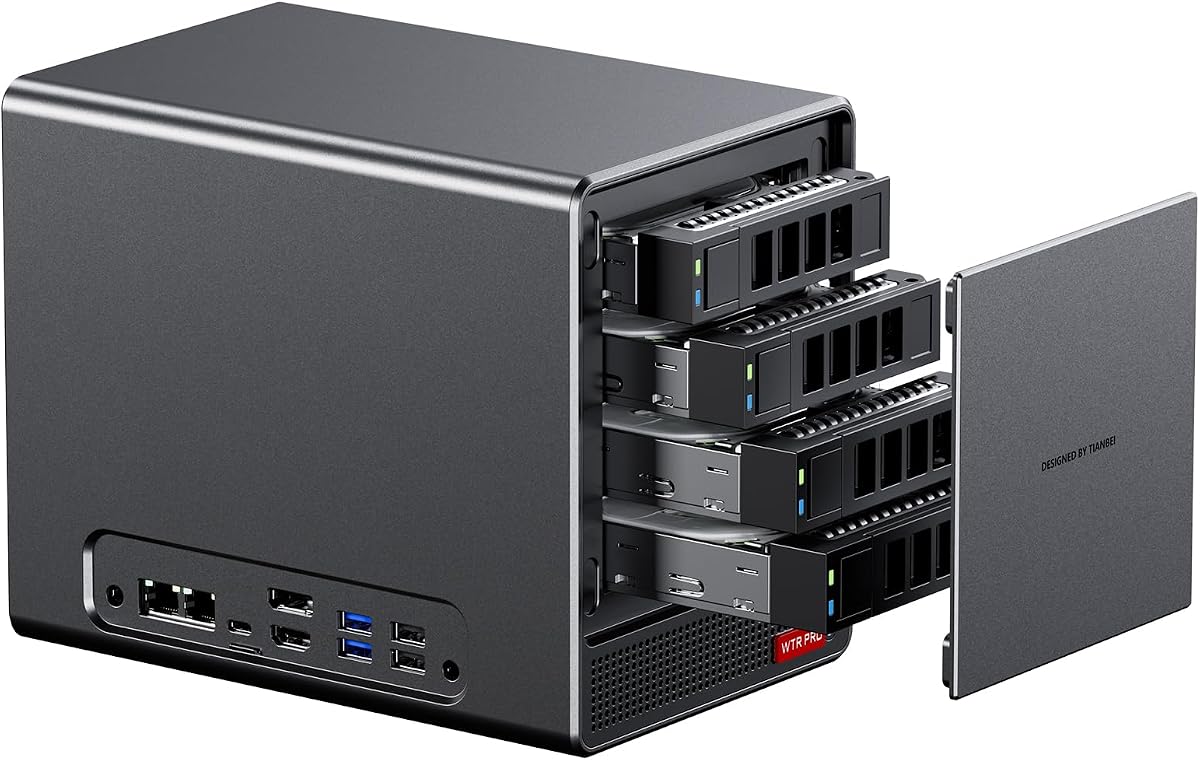
The WTR PRO targets users wanting a compact home NAS server with four 3.5 inch drive bays and two M.2 NVMe slots for caching. Its AMD Ryzen 7 5825U processor delivers efficient performance while keeping power draw between 15W and 25W for 24/7 operation.
We may earn a commission when you buy through this link, at no additional cost to you.
Through-the-wall cooling with a large 12cm fan ensures heat dissipation without excessive noise. The system supports triple 4K displays making it versatile for media playback or multi-tasking environments beyond just file serving.
With support for up to 88TB of SATA storage and flexible RAID options it serves as a reliable central storage hub. Dual 2.5G LAN ports provide fast network throughput for file transfers or streaming multiple high definition video streams.
This model excels for DIY server enthusiasts needing expandable storage in a small footprint. Its low power usage and robust build make it suitable for always-on home labs or small office file serving applications.
Low power consumption ensures cost effective 24/7 operation while maintaining stable performance under light to moderate server workloads.
Support for four 3.5 inch drives enables massive storage capacity ideal for media libraries and backup systems.
We may earn a commission when you buy through this link, at no additional cost to you.
At just 1.92 liters this is one of the smallest AMD barebone mini PCs available offering powerful performance without taking up desk space. It supports Ryzen 5000 and older AM4 CPUs providing flexible upgrade paths for budget and performance conscious builders.
We may earn a commission when you buy through this link, at no additional cost to you.
Triple display support allows multiple monitor setups via HDMI DisplayPort and D-Sub which is rare in such a compact chassis. The inclusion of an internal M.2 Key-E slot enables adding Wi-Fi and Bluetooth without occupying other USB ports.
Dual M.2 and 2.5 inch bays provide flexible storage options while the 2.5G LAN ensures fast network performance. The system is designed for clean cable management making it suitable for living room or office setups where space is limited.
Best for users needing a discreet powerful PC for general computing or media centers this kit simplifies building a custom machine. Its small footprint and broad compatibility make it an excellent choice for minimalist setups.
The 1.92L chassis fits on small shelves or under desks without compromising on core performance features or connectivity options.
Support for multiple Ryzen generations allows users to upgrade to newer or cheaper CPUs based on current market availability.
We may earn a commission when you buy through this link, at no additional cost to you.
The ASUS ExpertCenter PN54 represents a premium forward-looking platform with Ryzen AI 300 Series processors and XDNA2 NPU delivering up to 50 TOPS for AI tasks. It supports Wi-Fi 7 and Bluetooth 5.4 for next-gen wireless speeds and connectivity.
We may earn a commission when you buy through this link, at no additional cost to you.
Its ultra-thin 0.6L chassis is tool-free making upgrades quick and simple without tools. The system can drive up to four 4K displays ensuring it meets demanding visual workloads in creative or professional environments.
With a sleek durable design this unit aims to set new standards for compact computing power. The toolless design allows easy component changes while maintaining reliability for continuous 24/7 operation in business or home settings.
Ideal for early adopters and professionals needing AI acceleration this model offers future-proof specs. While premium priced it provides unmatched capabilities in AI processing and connectivity for next generation desktop computing.
The XDNA2 NPU boosts AI performance by five times compared to previous generations enabling faster dynamic computing tasks.
Wi-Fi 7 support ensures high-speed wireless connectivity ready for next-gen networks and bandwidth-heavy applications.
We may earn a commission when you buy through this link, at no additional cost to you.
This NAS variant expands storage flexibility with four 3.5 inch bays plus two M.2 NVMe slots allowing up to 96TB total capacity. It runs Ryzen 7 5825U providing strong multitasking power for running multiple virtual machines alongside storage services.
We may earn a commission when you buy through this link, at no additional cost to you.
Triple-screen 4K output lets users monitor multiple systems or manage media workflows efficiently. It supports Windows Linux and specialized OSes like OpenWrt making it a versatile platform for home labs or advanced routing setups.
Intelligent fan control and dustproof construction ensure stable long-duration operation while keeping power consumption low. Dual 2.5G LAN ports provide redundancy or high throughput essential for heavy file transfers or video streaming.
For users needing maximum local storage with server capabilities this model delivers unmatched flexibility. Its robust feature set suits advanced users comfortable managing complex OS configurations and storage arrays.
The six bay design supports huge storage pools ideal for media libraries backups or data centers requiring high capacity.
Dual LAN and multi OS support make it suitable for virtual routers or home server clusters running multiple services.
We may earn a commission when you buy through this link, at no additional cost to you.
The PN54-S1 offers a reliable business-class mini PC with tool-free access for easy component upgrades and maintenance. It supports Ryzen 700 Series processors and Radeon 740M graphics delivering solid performance for office tasks and light multimedia needs.
We may earn a commission when you buy through this link, at no additional cost to you.
With a sleek 0.34mm chassis designed for 24/7 operation it prioritizes durability and compactness. Support for Wi-Fi 7 and Bluetooth 5.4 ensures modern connectivity speeds essential for cloud collaboration and wireless peripherals.
Four 4K display support allows extended workspaces while the durable eco-conscious build meets environmental standards. It balances portability with performance making it suitable for mobile office professionals needing a robust and expandable desktop solution.
Buyers needing a business-ready mini PC with modern connectivity and easy maintenance will find this model appealing. Its combination of durability upgradeability and four display support offers practical advantages for professional environments.
Eco-conscious chassis materials and thin profile allow reliable deployment across office desks and mobile workspaces without compromising performance.
Wi-Fi 7 and Bluetooth 5.4 deliver high speed connections essential for cloud services and modern wireless device support.
We may earn a commission when you buy through this link, at no additional cost to you.
Selecting the right barebone AMD mini PC involves evaluating processor generation cooling design connectivity options and expansion capabilities.
Focus on Ryzen 7 PRO 8845HS for top performance with Radeon 780M integrated graphics. For budget builds Ryzen 5000 series provides solid capability. Ensure TDP matches your workload to balance speed and heat.
Prioritize models with 8 cores and 16 threads for multitasking and creative workloads.
Look for dual DDR5 SO-DIMM slots supporting up to 128GB RAM for future proofing. M.2 PCIe 4.0 slots provide fast storage speeds. Check maximum supported capacity before purchasing.
Ensure the model offers at least two M.2 slots for flexible storage configurations.
Dual 2.5G LAN ports improve network throughput for NAS or gaming. USB4 and OCuLink enable high speed external GPU or display connections. Verify HDMI DP and USB Type-C availability.
Choose models with OCuLink for the best external GPU performance.
Advanced cooling like vapor chambers or VC heat spreaders prevent thermal throttling under sustained load. Check fan noise levels for quiet operation. Effective cooling prolongs hardware lifespan and ensures stable speeds.
Prioritize vapor chamber cooling for high performance workloads.
Triple or quad 4K output is crucial for multi-monitor setups. Ensure HDMI and DP versions support high refresh rates. USB4 can also drive high resolution displays if supported.
Select systems with HDMI 2.1 and DP 1.4 for maximum display compatibility.
Efficient power usage reduces heat and noise while saving energy costs. Some models include PSUs others require separate purchase. Check wattage and voltage requirements for compatibility.
Opt for models with included power supplies to simplify assembly.
Aluminum or metal chassis improves durability and heat dissipation. Recycled materials add eco-friendly value. Tool-free designs enable easy maintenance and upgrades without screws.
Choose robust builds for long-term reliability in daily use.
Most support Windows 11 Pro or Linux including Ubuntu OpenWrt. Verify firmware support for virtualization technologies. Linux users may need config tweaks for optimal performance.
Confirm OS support for your intended applications before purchasing.
Install compatible DDR5 memory modules into the SO-DIMM slots ensuring they are fully seated before securing. Add NVMe SSDs into the M.2 slots using provided screws or levers to ensure stable data transfer speeds.
Connect power adapter HDMI DP or USB4 cables and turn on the system. Install operating system using USB or network boot methods. Update BIOS and drivers to latest versions for stability and performance.
Ensure proper airflow by placing the mini PC in a ventilated area. Use cleaning tools to remove dust from fans and vents periodically. Keep firmware updated to optimize power and thermal management over time.
Barebone AMD PCs allow you to select components matching your budget and performance needs. This flexibility can save money compared to prebuilt systems. However you must handle assembly and OS installation yourself which requires technical knowledge.
Most models support DDR5 SO-DIMM speeds up to 5600MT/s for the latest Ryzen 8000 series. Older AM4 models use DDR4 up to 3200MT/s. Always check product specifications before purchasing memory to ensure compatibility.
Yes barebone models provide dual RAM slots and M.2 expansion slots allowing easy future upgrades. This modularity ensures you can scale storage and memory as your needs grow without replacing the entire system.
Several models feature OCuLink or USB4 ports enabling external GPU connections for better graphics performance. OCuLink provides near native PCIe speed while USB4 offers convenience with some performance trade-off.
Power usage ranges from 15W idle to 65W under load depending on CPU and workload. Models optimized for NAS or office tasks tend to use less power ensuring efficient 24/7 operation without excessive energy costs.
Create a bootable USB drive with Windows or Linux ISO. Enter BIOS to select USB boot device. Follow installation prompts. Some models include a Windows license key if mentioned in package details.
Most AMD barebone PCs work well with Linux but some may require firmware tweaks for storage power management. Check community forums or product pages for specific instructions to resolve known Linux driver issues.
Warranty terms vary by brand and may cover only motherboard and chassis not components you install. Check product listings for warranty duration and support policies. Business oriented models often offer longer coverage.
This guide highlights ten versatile AMD barebone PCs delivering power expandability and connectivity for diverse needs. Top picks include the AOOSTAR MACO for overall capability and the ASRock DeskMini for budget conscious buyers.
Prioritize processor speed cooling efficiency and port selection based on your use case. Whether you need multi-display support external GPU compatibility or NAS storage these systems offer flexible customization options.
Prices and availability may change so verify current specifications and deals before purchasing. Investing in a high quality barebone AMD PC ensures you build a tailored system that meets your computing demands.