
4K AI-Powered Conference Webcam
4.1Editor score
120 degree wide angle
AI auto framing support
Physical lens cover included
This guide compares the top auto tracking conference camera models for seamless video conferencing, highlighting AI features and optical zoom capabilities for
Modern video conferencing demands tools that keep participants in focus without manual intervention. An auto tracking conference camera uses intelligent algorithms to follow speakers automatically, ensuring remote attendees see who is speaking clearly.
We evaluated ten leading models based on resolution, zoom range, connectivity options, and AI tracking accuracy. Our comparison focuses on how each system handles room coverage, audio quality, and compatibility with major platforms like Zoom and Teams.
Each pick details specific strengths and ideal use cases for your meeting space. Note that product availability and technical specifications may vary over time, so verify current details before purchasing your ideal conferencing solution.
4.1Editor score

4.8Editor score

4.6Editor score
The following table provides a side-by-side comparison of the ten leading auto tracking conference camera systems available today, detailing their key specifications and connectivity options.




This TONGVEO system combines a 4K PTZ camera with a wireless Bluetooth speakerphone, delivering a complete video conferencing solution. With a high rating of 4.8, it stands out for its clarity and AI tracking accuracy.
We may earn a commission when you buy through this link, at no additional cost to you.
The camera features a 1/2.8 advanced CMOS sensor supporting 4K 30fps output through HDMI and 1080P via USB3.0. Its AI algorithm tracks speakers using both facial and humanoid recognition, keeping subjects centered smoothly.
While the audio system is robust with 16.4ft pickup range, users should note the speakerphone requires separate connection via USB, Bluetooth, or dongle. The setup is straightforward for most environments.
Ideal for small to medium conference rooms, this kit simplifies hybrid meetings by ensuring every participant is seen and heard clearly. Its universal compatibility makes it a reliable choice for diverse settings.
The system uses advanced algorithms to track speakers precisely, adjusting the frame automatically as people move around the room.
The included Bluetooth speakerphone offers flexible connection options and long battery life, enhancing audio quality without extra hardware.
We may earn a commission when you buy through this link, at no additional cost to you.
This webcam is designed specifically for small conference rooms, offering a budget-friendly entry into AI tracking technology. It features a wide angle lens to capture everyone in the frame effectively.
We may earn a commission when you buy through this link, at no additional cost to you.
AI auto framing detects and frames all attendees, which is ideal for team meetings where multiple people are active. The physical lens cover adds a layer of privacy essential for office environments.
While it may not match the zoom capabilities of PTZ models, its simplicity and plug-and-play setup make it attractive for quick deployment. The audio pickup is decent for smaller spaces.
Buyers seeking an affordable solution that integrates seamlessly with Zoom and Teams should consider this model. It balances cost and functionality well for smaller meeting spaces.
A built-in physical lens cover ensures privacy when the camera is not in use, a critical feature for shared office environments.
No IT setup is required; connecting via USB allows users to start meetings instantly on popular conferencing platforms.
We may earn a commission when you buy through this link, at no additional cost to you.
This TONGVEO system offers a solid video conferencing experience with 1080p at 60fps for smooth motion clarity. It pairs an AI auto-tracking PTZ camera with a versatile Bluetooth speakerphone.
We may earn a commission when you buy through this link, at no additional cost to you.
The camera supports HDMI and USB3.0 outputs, providing flexibility for various connection setups. Its AI algorithm locks onto speakers precisely, ensuring seamless tracking during presentations or discussions.
While it operates at HD resolution, the 60fps refresh rate delivers fluid video that is often preferred for active meetings. The speakerphone battery lasts 6-8 hours, suitable for long sessions.
For organizations that value smooth video over maximum resolution, this model provides excellent value. It is particularly useful for educational or training environments where clarity is key.
Delivering 1080p video at 60fps ensures smoother motion and clearer details during fast-paced meetings compared to standard frame rates.
The speakerphone supports multiple connection methods, allowing users to switch between USB and Bluetooth easily based on their setup needs.
We may earn a commission when you buy through this link, at no additional cost to you.
This camera stands out with its unique gesture control feature, allowing users to trigger AI tracking or zoom functions using hand signs. It is ideal for environments where hands-free interaction is preferred.
We may earn a commission when you buy through this link, at no additional cost to you.
The 4K resolution ensures sharp image quality, while the 5x digital zoom provides flexibility for focusing on details. It works with major platforms including Zoom and Teams seamlessly.
Although digital zoom may not match optical quality, the convenience of gesture control is significant. The system is compact, making it suitable for desk or wall mounting in various rooms.
Users looking for innovative control methods will appreciate this model. It combines professional features with user-friendly interaction, enhancing the overall meeting experience.
Hand gestures allow users to toggle tracking or zoom without touching a remote, improving convenience during active presentations.
The camera fits easily on desks or walls, offering multiple installation options that adapt to different room layouts.
We may earn a commission when you buy through this link, at no additional cost to you.
This model is designed for larger environments, offering a 20x optical zoom that captures details from far distances. It supports LAN and PoE, which simplifies cabling in professional installations.
We may earn a commission when you buy through this link, at no additional cost to you.
The AI auto-tracking system is optimized for speakers and presenters, making it perfect for worship services or large meetings. The Bluetooth speakerphone adds flexible audio capabilities without extra wires.
While it is more complex to set up, the connectivity options allow for robust streaming setups. The camera ensures clear close-ups even from the back of large rooms.
Buyers needing to cover large spaces with high fidelity should choose this system. Its reliability and advanced features make it a top choice for professional broadcast needs.
The 20x optical zoom allows users to capture clear details from the back of large venues without losing image quality.
Support for PoE and LAN ensures streamlined installation for professional setups requiring networked power and data.
We may earn a commission when you buy through this link, at no additional cost to you.
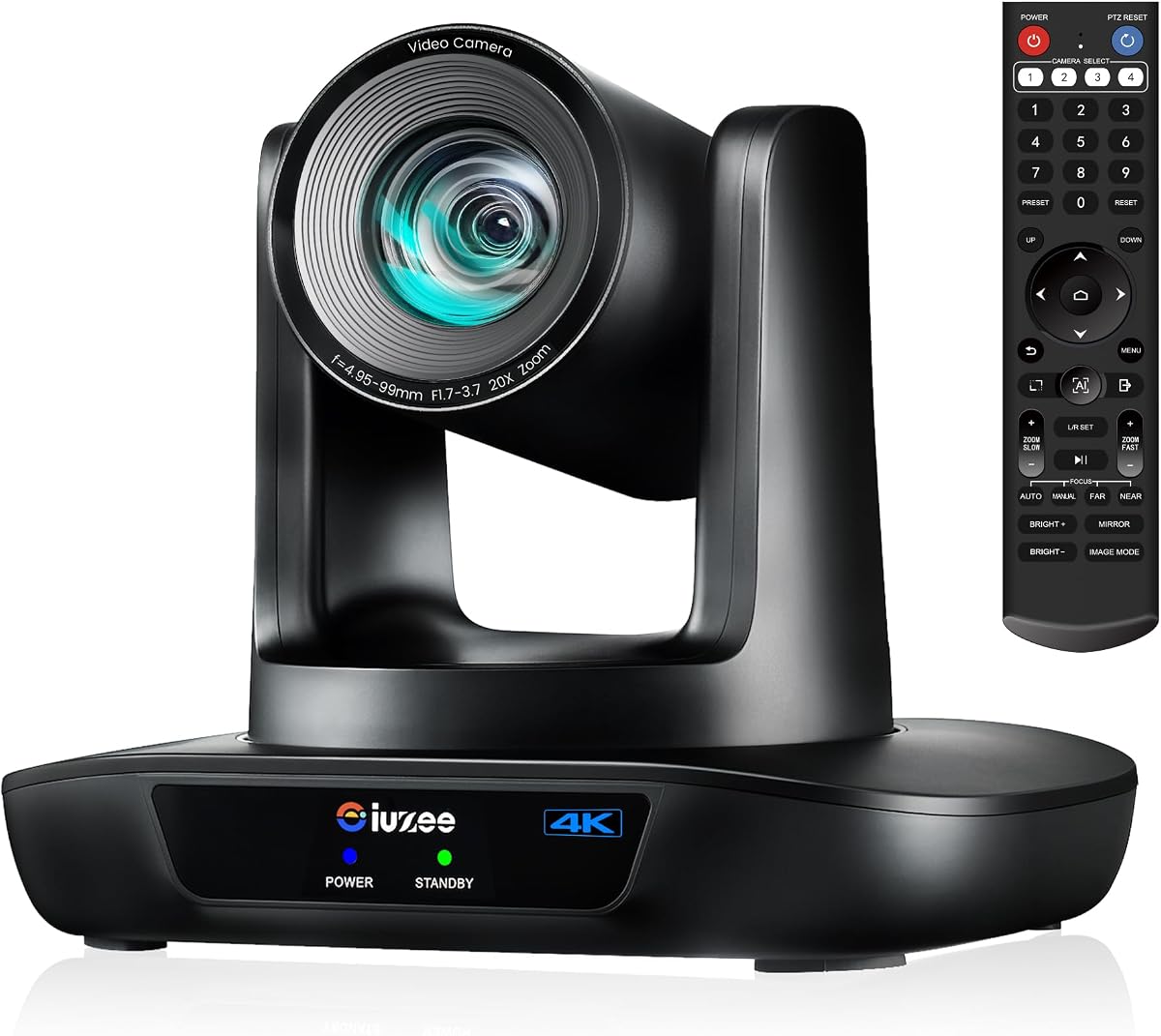
This iuZee model is engineered for professional live streaming, offering multiple outputs like USB, HDMI, and LAN simultaneously. It supports various encoding formats for smooth performance on different networks.
We may earn a commission when you buy through this link, at no additional cost to you.
With 20x optical zoom, it captures detailed shots from a distance, ideal for stages or large meeting halls. The AI tracking ensures the subject remains in focus even when moving.
However, users should note that the camera lacks a built-in microphone, requiring an external audio source. This trade-off is acceptable for setups where audio is managed separately.
For organizations focused on broadcasting to platforms like YouTube or Facebook, this camera provides the necessary tools. Its flexibility and high rating make it a solid investment for production quality.
Support for multiple streaming protocols like RTMP and RTSP ensures compatibility with various broadcasting platforms and software.
The 20x optical zoom maintains image quality even at maximum magnification, allowing detailed views of distant subjects.
We may earn a commission when you buy through this link, at no additional cost to you.
This camera is a premium solution offering NDI and SDI outputs, which are essential for professional broadcast environments. It delivers stunning 4K resolution and reliable AI tracking for complex productions.
We may earn a commission when you buy through this link, at no additional cost to you.
The NDI integration allows seamless compatibility with software like vMix and OBS, while SDI ensures signal integrity over long distances. It is designed for serious content creation.
While the cost is high, the features justify the investment for professional studios or large organizations. The advanced control options allow precise adjustments for specific production needs.
Buyers looking for top-tier video quality and professional connectivity will find this model unmatched. It is the definitive choice for high-end streaming and conferencing applications.
NDI and SDI outputs allow the camera to integrate directly into professional video production workflows and switchers.
Stunning 4K resolution ensures that every detail is captured clearly, elevating the visual quality of any production.
We may earn a commission when you buy through this link, at no additional cost to you.
This PTZ camera combines high resolution with flexible connectivity, making it ideal for educational environments. It supports multiple inputs including PoE, which simplifies installation in classrooms.
We may earn a commission when you buy through this link, at no additional cost to you.
The 20x zoom ensures that instructors or presenters are always visible, regardless of room size. The AI tracking follows speakers smoothly, reducing the need for manual adjustments.
Users may need to adjust output settings on older monitors, but the system generally offers reliable performance. The after-sales support provides additional reassurance for institutional buyers.
For schools or training centers, this model balances performance and ease of use. It is a versatile tool for delivering clear and engaging video content.
With strong zoom and tracking, the camera captures instructors clearly from any angle, enhancing the learning experience for remote students.
Robust build quality and responsive customer service make it a dependable choice for schools and organizations needing stability.
We may earn a commission when you buy through this link, at no additional cost to you.
This system integrates camera, microphones, and speakers into one device, simplifying setup for medium and large rooms. It features a strong microphone array to ensure clear audio across the table.
We may earn a commission when you buy through this link, at no additional cost to you.
The AI auto framing detects participants and adjusts the view dynamically, ensuring everyone is seen. The built-in dual speakers eliminate the need for external audio hardware in most cases.
While it lacks the physical movement of PTZ cameras, its wide angle lens covers most meeting scenarios effectively. This makes it a great choice for hybrid work environments.
Buyers seeking a plug-and-play solution that minimizes hardware complexity will appreciate this model. It is designed to streamline meetings and improve communication efficiency.
Built-in speakers and a 4-mic array provide clear sound without needing separate audio devices, reducing setup time.
By combining multiple functions into one unit, the system significantly reduces cable clutter in the meeting room.
We may earn a commission when you buy through this link, at no additional cost to you.
This compact webcam offers a simple solution for desktop setups, combining video, microphone, and speaker in one unit. It is ideal for individual workspaces or small huddle rooms.
We may earn a commission when you buy through this link, at no additional cost to you.
The adjustable field of view allows users to switch between wide and narrow angles using a remote control. The 5x digital zoom provides additional flexibility for focusing on details.
While it may not match the performance of larger PTZ cameras, its convenience and affordability make it attractive. The privacy cover adds a necessary touch for security.
Users needing a reliable and simple webcam for daily meetings should consider this model. It offers good value for those prioritizing ease of use and space savings.
The remote control allows users to switch between three different viewing angles to suit solo presentations or group calls.
Its small footprint makes it perfect for personal desks or smaller workspaces where space is limited.
We may earn a commission when you buy through this link, at no additional cost to you.
Selecting the right auto tracking conference camera requires understanding your specific room size and technical needs. This guide outlines the key factors to consider.
Larger rooms require cameras with higher optical zoom capabilities to capture details from a distance. Small rooms can often function well with wide-angle lenses that cover the entire space without zoom.
Always match the camera's field of view to your room dimensions to ensure no participants are left out of the frame.
Optical zoom maintains image quality while magnifying distant subjects, whereas digital zoom can reduce clarity. For professional meetings, optical zoom is preferred for its superior resolution retention.
Consider how often you need to zoom in on documents or specific individuals when choosing between optical and digital options.
4K resolution offers sharp detail but requires more bandwidth, while 1080p at higher frame rates like 60fps provides smoother motion. Choose based on your internet speed and display capabilities.
For active meetings, higher frame rates can improve the fluidity of movement and make interactions feel more natural.
Look for cameras that support USB3.0, HDMI, and LAN for flexibility in connecting to computers or displays. PoE support can simplify installations by providing power and data through a single cable.
Ensure your existing infrastructure supports the chosen connection type to avoid needing additional adapters or hubs.
Some systems include built-in microphones and speakers, while others require external audio equipment. Integrated systems simplify setup but may lack the range of professional audio solutions.
Assess whether your meeting space needs dedicated audio gear or if a built-in speakerphone will suffice.
Advanced AI uses both face and body recognition to track speakers accurately. Basic systems may track movement but fail to identify the active speaker effectively.
Check reviews to confirm the tracking algorithm can handle multiple people and sudden movements without glitching.
Ensure the camera works seamlessly with your primary conferencing tools like Zoom, Microsoft Teams, or Google Meet. Some models offer specific certifications for these platforms.
Compatibility issues can lead to driver problems or poor performance, so verify support before purchasing.
Higher-end models offer professional features like NDI and SDI outputs, which may not be necessary for standard office use. Balance cost against the specific features your team actually needs.
Invest in quality where it matters most for your workflow, such as audio or tracking accuracy.
Connect the camera to your computer or network using the appropriate cable, such as USB3.0 or Ethernet. Ensure your device has the necessary drivers installed, though most modern systems support plug-and-play functionality.
Position the camera at eye level and slightly above to capture the best view of the room. Adjust the wide-angle settings to ensure all participants fit within the frame comfortably.
Keep the lens clean with a soft, dry cloth to prevent smudges from affecting video quality. Avoid exposing the camera to direct sunlight or extreme temperatures to maintain its longevity.
Optical zoom uses the camera lens to magnify images without losing quality, making it ideal for large rooms. Digital zoom crops the image to zoom in, which can reduce resolution and sharpness.
Yes, auto tracking functions are typically processed locally on the camera, so internet is not required for tracking. However, internet is needed for video conferencing with remote participants.
Many models support streaming platforms like OBS, YouTube, and Facebook. Ensure the camera has the necessary outputs like HDMI or NDI for professional streaming setups.
AI tracking uses facial recognition and body detection algorithms to identify and follow active speakers. It adjusts the frame automatically to keep the focus on the person talking.
PoE simplifies installation by providing power through the network cable, but it is not always required. Many cameras can also be powered via USB or a standard power adapter.
Most cameras come with built-in web interfaces or remote controls for basic settings. Advanced control may require specific software provided by the manufacturer or third-party tools.
Yes, most modern conference cameras support macOS without requiring additional drivers. They typically follow standard USB video class (UVC) protocols for seamless integration.
Yes, PTZ cameras are excellent for recording meetings because they can automatically follow speakers throughout the session. This ensures continuous coverage without manual operation.
We have reviewed ten top models ranging from budget webcams to professional NDI systems. Each offers unique strengths depending on your room size and technical requirements.
Prioritize optical zoom and AI tracking accuracy for larger spaces, while compact models suffice for smaller huddle rooms. Audio integration is also key to ensuring clear communication.
Remember to check current availability and verify connectivity options with your existing setup before finalizing your purchase for a seamless experience.