
Bluetooth 1D&2D Barcode Scanner, 3-in-1 Bluetooth & USB Wired & 2.4G Wireless QR Barcode Reader
4.3Editor score
Supports 1D and 2D codes
2600mAh battery capacity
3-in-1 connectivity options
This guide compares the top ten barcode scanner for iPad models based on connectivity, battery life, and scanning accuracy to help you choose the right device
Finding the right barcode scanner for iPad can transform how you manage inventory and process transactions. A good device offers seamless connectivity, long battery life, and reliable scanning across various barcode types.
We evaluated ten top-rated models based on compatibility, scanning speed, durability, and ease of use. Our analysis focuses on wireless flexibility, build quality, and real-world performance in retail and warehouse settings.
Each pick highlights key features, pros, and cons to help you decide. Prices and availability change frequently, so verify current details on the product pages before making your final purchase decision.
4.3Editor score
4.9Editor score

4.5Editor score
This side-by-side comparison highlights the core specifications of each model to help you quickly identify the best fit for your workflow and budget requirements.


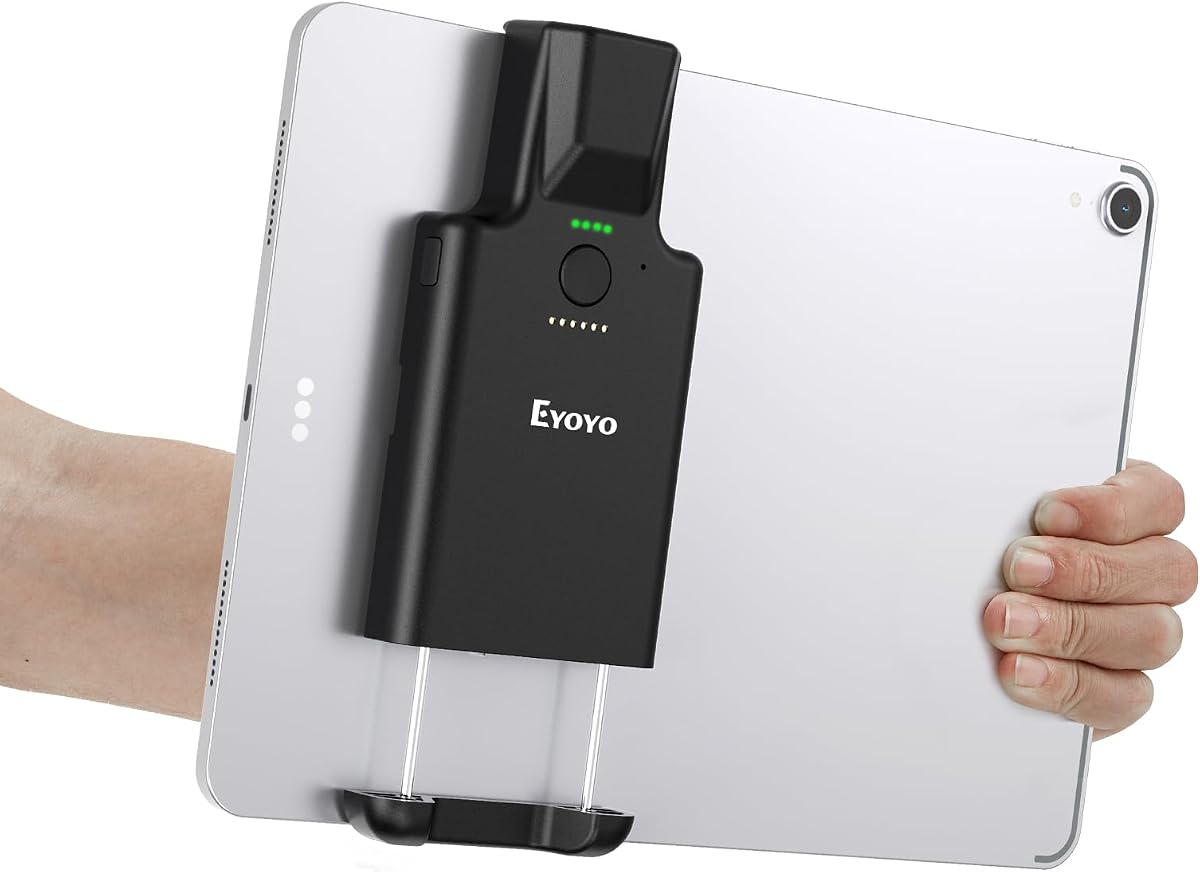
The Eyoyo 1D 2D Portable Bluetooth Barcode Scanner stands out with its innovative clip design and powerful 3000mAh battery. It scores a high 4.9 rating for reliability and ease of use with iPads.
We may earn a commission when you buy through this link, at no additional cost to you.
Its advanced 2D CMOS imaging technology handles paper and screen codes effortlessly. The retractable clip provides a secure grip for your iPad, ensuring steady scans even in busy retail environments.
While it lacks 2.4G wireless, the Bluetooth and USB options offer solid flexibility. The battery life supports up to 30 days of lighter use, reducing downtime for charging.
Retailers and warehouse managers needing a stable tablet companion will find this model excellent. Its ergonomic design and durable build make it a top choice for daily professional use.
The vertical retractable clip fits devices ranging from 5.7 to 7.1 inches, securing your iPad while you scan items quickly.
With a 3000mAh battery and smart LED indicators, you can work up to 30 hours continuously or 30 days with moderate daily scans.
We may earn a commission when you buy through this link, at no additional cost to you.
This Bluetooth 1D&2D Barcode Scanner offers exceptional value for users needing 2D QR and Data Matrix support on a budget. It supports up to 70m wireless range in 2.4G mode.
We may earn a commission when you buy through this link, at no additional cost to you.
The 2600mAh battery provides over 9 hours of continuous scanning, suitable for shifts. It handles damaged or low-contrast codes well thanks to its CMOS imaging sensor.
Offline storage capacity reaches 130,000 codes, ideal for remote work areas. The price point makes it accessible for small businesses starting their inventory management journey.
For startups or occasional users, this model delivers strong performance. Ensure your workflow matches its connectivity options before purchasing to maximize its benefits.
Switch between 2.4G wireless and Bluetooth to cover distances up to 70 meters without signal dropouts.
Store up to 130,000 barcodes locally to maintain productivity even when device connectivity is temporarily lost.
We may earn a commission when you buy through this link, at no additional cost to you.
The Inateck 1D Bluetooth Barcode Scanner excels with an impressive 115ft wireless range and robust build quality. Its 2600mAh battery offers 180 days of standby time.
We may earn a commission when you buy through this link, at no additional cost to you.
Designed for durability, it includes a TPU protective case and withstands 6ft drops onto concrete. The editable prefix feature supports up to 32 digits for data customization.
While it lacks 2D scanning, its 1D performance is reliable in dim or bright light. This model suits enterprise needs where long-range connectivity and durability are priorities.
Consider this scanner for large warehouses or outdoor operations. The premium price reflects its industrial-grade resilience and extended range capabilities.
Connect effortlessly up to 115 feet away from your iPad or PC for flexible remote inventory management.
Protective TPU casing and internal core consolidation ensure survival of repeated 6ft concrete drops.
We may earn a commission when you buy through this link, at no additional cost to you.
The NETUM Bluetooth Barcode Scanner offers a balanced mix of 2.4G wireless, Bluetooth, and wired connectivity. Its CCD sensor handles damaged and tightly spaced 1D codes effectively.
We may earn a commission when you buy through this link, at no additional cost to you.
With a 2600mAh battery and up to 200,000 scans per charge, it suits high-volume environments. Storage mode allows offline data collection for later uploads.
Programmable features let you add custom prefixes or suffixes to scanned data. However, lack of 2D support limits its utility for modern QR code tasks.
Ideal for traditional retail or library systems focusing on 1D codes. Check compatibility with your specific POS system before purchasing.
Seamlessly switch between 2.4G wireless, Bluetooth, and USB wired modes for diverse operational needs.
Save up to 100,000 barcodes internally when out of range to maintain data integrity during offline operations.
We may earn a commission when you buy through this link, at no additional cost to you.
Weighing only 35 grams, the Eyoyo Mini 1D Bluetooth Barcode Scanner is perfect for portable tasks. It features a vibration mode for quiet operations in libraries.
We may earn a commission when you buy through this link, at no additional cost to you.
The 650mAh battery supports up to 8 hours of continuous use, while auto-off extends standby to 10 days. It excels in lightweight, on-the-go scanning scenarios.
Its advanced 1D decoding handles distorted and colorful codes well. However, the small battery requires frequent recharging for heavy shifts.
Best suited for bookstores or occasional inventory checks. Prioritize portability over extended runtime when choosing this compact model.
Weighing just 35 grams, this scanner fits easily in pockets for discreet mobile inventory checks.
Switch to vibration mode to maintain silence during library or quiet retail scanning tasks.
We may earn a commission when you buy through this link, at no additional cost to you.
The NetumScan Desktop Barcode Scanner offers handsfree convenience for high-volume checkout stations. Its omnidirectional scanning captures codes from any angle automatically.
We may earn a commission when you buy through this link, at no additional cost to you.
Equipped with an anti-slip base and anti-shock design, it withstands drops up to 4.92 feet. It supports USB connection to iPads via OTG adapters.
Smart sensing activates scans when items move, reducing manual effort. Ideal for retail counters where speed and hygiene are priorities.
Consider this model for point-of-sale setups. Ensure your iPad supports USB OTG before integrating this fixed-position scanner.
Automatically scans items moved under its window, freeing hands for packaging or customer service.
Anti-slip and anti-shock features ensure stability during heavy use on checkout counters.
We may earn a commission when you buy through this link, at no additional cost to you.
The NetumScan Bluetooth Scanner with Charging Dock simplifies workflow with its integrated base. The dock acts as both charging station and data receiver.
We may earn a commission when you buy through this link, at no additional cost to you.
Its pocket-sized ABS shell offers fatigue-free grip for long shifts. Silent vibration mode ensures quiet operation in shared environments.
With 1200mAh capacity, it supports extended shifts but may need charging daily. Optimized for iPhone and iPad, it ensures reliable iOS connectivity.
Small retail or library managers will appreciate the dock setup. It reduces clutter and ensures the scanner is always ready for use.
The base provides fast charging and stable data reception without extra cables or accessories.
Switch to vibration feedback for silent scanning in libraries or offices.
We may earn a commission when you buy through this link, at no additional cost to you.
Designed for durability, this NetumScan model withstands drops up to 2 meters. Its dual-button control prevents accidental power-offs during active scanning.
We may earn a commission when you buy through this link, at no additional cost to you.
The integrated dock serves as a receiver and charger. Global shutter CMOS sensor ensures instant capture of 1D and 2D codes on paper or screens.
With 1200mAh battery, it supports high-frequency daily use. The vibration mode aids silent operations in offices or libraries.
Ideal for rough warehouse environments where drop resistance is critical. Pair it with your iPad for reliable inventory management.
Withstands 2-meter concrete drops ensuring longevity in demanding field or warehouse conditions.
Separate power and scan buttons prevent accidental shutdowns during intense work.
We may earn a commission when you buy through this link, at no additional cost to you.
This handheld scanner offers both 2.4G and Bluetooth connections for flexible use. It supports 1D and 2D codes including PDF417 and Data Matrix.
We may earn a commission when you buy through this link, at no additional cost to you.
Built-in 16MB memory stores up to 50,000 QR codes offline. Its lightweight design reduces fatigue during extended handheld scanning sessions.
While compatibility is broad across iOS and Android, some users report mixed performance. Ensure your POS software accepts barcode input via virtual keyboard.
Suitable for general inventory tasks across multiple devices. Verify connection stability before full deployment in critical workflows.
Switch between 2.4G and Bluetooth to maintain connection reliability across different environments.
Keep up to 50,000 offline codes locally if connectivity drops during inventory rounds.
We may earn a commission when you buy through this link, at no additional cost to you.
The KUIIYER Bluetooth Barcode Scanner features an advanced 800×600 pixel CMOS sensor for better image capture. IP54 rating provides dust and water protection for outdoor use.
We may earn a commission when you buy through this link, at no additional cost to you.
Its built-in auxiliary light aids scanning in dark or poorly lit areas. The 2000mAh battery supports long shifts across various applications.
Multi-language support makes it suitable for international teams. While affordable, it delivers reliable performance for general 1D and 2D needs.
Consider this model for budget-conscious businesses requiring durability. Always check POS compatibility before finalizing your purchase decision.
800×600 pixel CMOS captures clear images of barcodes for faster and more accurate scans.
IP54 rating shields the scanner from dust and water splashes in demanding environments.
We may earn a commission when you buy through this link, at no additional cost to you.
Selecting the right barcode scanner requires understanding connectivity options, scan types, and battery needs specific to your workflow.
Modern scanners offer Bluetooth, 2.4G wireless, and USB wired modes. Bluetooth provides direct pairing to iPad without dongles while 2.4G ensures stable connections in crowded environments. USB wired is ideal when battery independence is not a priority.
Choose a model supporting at least two connection types for flexibility in changing operational needs.
1D scanners read traditional linear barcodes found on retail products. 2D scanners handle QR codes and Data Matrix codes common on digital screens and shipping labels. If you need to scan digital coupons or receipts, ensure 2D support.
Verify your inventory software supports the barcode types you use daily before purchasing.
Continuous scanning demands vary by industry. Heavy warehouse shifts require 8+ hours of operation, whereas occasional users may prefer longer standby times. Check battery capacity in mAh and rated scan counts per charge.
Look for models with indicators or hot-swappable batteries to maintain workflow efficiency.
Rugged scanners withstand drops up to 2 meters and feature protective casings. If your device will face harsh warehouse or outdoor conditions, prioritize drop protection and IP ratings.
Invest in durability to reduce replacement costs over time.
Lightweight designs reduce fatigue during long scanning sessions. Models with ergonomic grips or clip designs secure your iPad better for two-handed use.
Test the device weight and grip before committing to bulk orders.
Not all scanners work with every POS system. Ensure your device supports iOS and your specific software platform to avoid integration issues.
Check compatibility lists on manufacturer websites before purchase.
Offline storage allows collecting data when out of connection range. Look for models that store thousands of codes locally for later upload.
This feature is vital for remote or mobile inventory audits.
Advanced scanners allow custom prefixes or suffixes and keyboard layouts. This helps format data for specific database or POS requirements.
Programmable settings save time on data entry tasks.
Pair your scanner via Bluetooth by entering the corresponding barcode from the manual first to enable the correct mode before connecting to your iPad.
For handheld use, position the scanner perpendicular to the barcode and trigger manually. For hands-free setups, place items under the sensor window automatically.
Clean the lens with a soft dry cloth and avoid exposure to extreme moisture unless rated IP54 or higher. Recharge batteries fully if storing the device long term to maintain health.
Most scanners listed explicitly state they are not compatible with Square POS systems. You will need a Square-certified peripheral device to ensure seamless transaction processing on their platform.
Many models support scanning 2D codes from screens but some older or basic 1D scanners cannot. Always verify 2D CMOS imaging support in the product specs before purchase.
You must scan specific setup barcodes from the user manual to enable iOS mode. Follow the manufacturer instructions precisely to ensure proper keyboard and Bluetooth pairing behavior.
Most models support 8 to 30 hours depending on usage intensity. Heavy use will drain the battery faster while occasional scans can extend runtime significantly without recharging.
No additional software is needed as they act like virtual keyboards. The scanner types data directly into active text fields on your iPad without installing apps.
Standard lithium batteries work best at moderate temperatures. If operating below freezing, consider models rated for cold storage or warm the device before use to maintain performance.
The Eyoyo 1D 2D Portable Bluetooth leads as our top pick due to its secure clip design and exceptional battery life. Budget-conscious users will prefer the versatile 1D&2D scanner offering great connectivity range.
Prioritize durability and connection stability based on your work environment. If you handle mostly retail codes, a basic 1D unit may suffice but warehouses often benefit from rugged 2D models.
Remember that prices and stock fluctuate frequently on Amazon. Verify current offers and warranty terms on the product pages before finalizing your purchase to ensure value.