
TECKNET Wired Keyboard
4.5Editor score
Quiet membrane typing keys
RGB color lighting modes
Spill-resistant durable design
Discover the top 10 best backlit illuminated keyboards for 2026. We compare features like large print, wireless options, and RGB lighting to help you choose.
Finding the right backlit illuminated keyboard can transform your typing experience significantly. Whether you work late at night or need better visibility for large print, these tools offer essential support. They combine functionality with style to meet diverse user needs effectively.
We evaluated ten top-rated models based on key factors like backlight quality, key size, and durability. Our analysis covers wired and wireless options suitable for seniors, professionals, and students alike. Each product was selected for its ability to enhance comfort and productivity.
Each pick highlights specific strengths such as ergonomic design, silent typing, or vibrant lighting modes. We explain who benefits most from every model to simplify your decision process. Remember that availability and stock levels can shift rapidly across online retailers.
4.5Editor score

4.9Editor score

4.1Editor score
This comparison table summarizes the key features of all ten selected backlit illuminated keyboards. Review the specifications side by side to determine which model fits your specific workspace requirements and accessibility needs.





This model stands out for its exceptional clarity and accessibility features. It boasts a rating of 4.9 stars from users who value visibility above all. The oversized keys make typing significantly easier for seniors or those with visual challenges.
We may earn a commission when you buy through this link, at no additional cost to you.
The versatility of having both USB and Type C connectors allows broad device compatibility. Users appreciate the dedicated multimedia keys and even distribution of backlighting. The silent membrane structure ensures that typing remains unobtrusive in shared spaces.
While it is a wired device, the stable connection eliminates latency issues common with wireless models. Some users might prefer more lighting customization options than the preset seven levels offer. However, these trade-offs are minor compared to the accessibility benefits provided.
Anyone needing a reliable tool for clear, quiet typing will find this model ideal. It is particularly suited for office environments where low noise and high visibility are required. We highly recommend it for seniors or visually impaired individuals seeking comfort.
The four times larger print ensures that characters are instantly recognizable without strain. This design significantly reduces eye fatigue during extended work sessions.
Support for both USB and Type C makes it adaptable to modern laptops and traditional desktops. This ensures you can use it with a wide range of computers immediately.
We may earn a commission when you buy through this link, at no additional cost to you.
This keyboard offers impressive features at an accessible price point for many users. It delivers a comfortable typing experience with quiet keystrokes ideal for libraries. The vibrant RGB lighting allows for personalization of your workspace atmosphere.
We may earn a commission when you buy through this link, at no additional cost to you.
Users benefit from dedicated multimedia shortcuts that streamline daily tasks effectively. The spill-resistant design adds a layer of durability that protects your investment. A lifetime warranty provides extra confidence for long-term use in home offices.
The main limitation is limited multimedia functionality on macOS systems which some users may find restrictive. Wireless functionality is also absent requiring a physical cable connection. Despite these factors the value remains excellent for budget-conscious buyers.
Perfect for students or home office workers needing reliable performance without high costs. The ergonomic layout supports long sessions without significant hand fatigue. Consider this option if you prioritize quiet typing and color customization.
Customize your desk with seven vibrant colors and two dynamic lighting modes. This feature allows you to set the perfect mood for work or play.
Built with a spill-resistant film, this keyboard can withstand accidental splashes. This resilience ensures longevity even in active work environments.
We may earn a commission when you buy through this link, at no additional cost to you.
Designed for mobility, this model combines professional aesthetics with functional utility. It features warm white LED keys that reduce eye strain effectively. The slim design makes it ideal for hybrid workers who travel frequently.
We may earn a commission when you buy through this link, at no additional cost to you.
Twelve programmable keys allow you to create custom shortcuts for your workflow. The sanitizable surface is particularly valuable for shared workspaces or public environments. Spill-resistant technology ensures resilience against accidental liquid exposure on the go.
While the warm white light is less customizable than RGB options it provides a focused work environment. The higher price reflects the build quality and portability features. Some users might find the brightness levels lower than expected for dark rooms.
Best suited for professionals needing a reliable, portable tool for various locations. The ergonomic layout supports comfort during extended typing sessions away from home. Invest in this if portability and hygiene are top priorities.
The slim form factor allows this keyboard to fit easily into laptop bags. It is perfect for commuters who need a full-size typing experience on the road.
Programmable keys let you automate repetitive tasks with single presses. This feature streamlines complex workflows for enhanced productivity.
We may earn a commission when you buy through this link, at no additional cost to you.
This keyboard prioritizes visibility with large, bold characters designed for ease of use. It offers a full-size layout including a numeric pad for data entry tasks. The seven-color backlight system adds a vibrant touch to your desk setup.
We may earn a commission when you buy through this link, at no additional cost to you.
Users appreciate the straightforward plug-and-play setup requiring no software installation. The reliable USB connection ensures consistent performance without signal interruptions. It is particularly useful for seniors who prefer standard key sizes and layouts.
The primary drawback is its bulkiness which makes it less portable for travel. Wireless connectivity is not an option meaning it requires a desk setup. However, the clarity and robust layout make it a strong choice for fixed workspaces.
Ideal for users who need a static, highly visible typing station at home. The ergonomic design supports comfortable use during long hours of typing. Choose this if you prioritize clear visibility over mobility.
The oversized font ensures that keys are legible even in low light. This reduces errors and increases typing speed for those with vision difficulties.
A full numeric pad allows for efficient data entry and spreadsheet work. This layout ensures you do not lose productivity due to missing keys.
We may earn a commission when you buy through this link, at no additional cost to you.
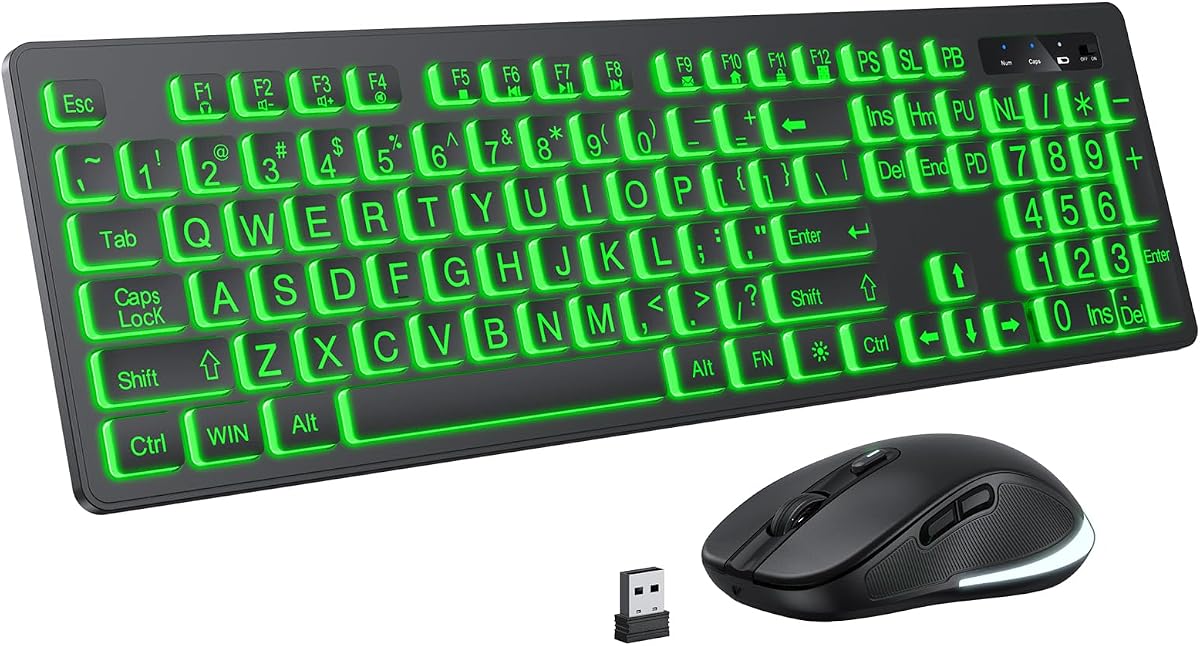
This combo provides wireless convenience with the added benefit of large, visible keys. The rechargeable battery system ensures long use without constant replacements. A shared USB receiver simplifies connectivity for both keyboard and mouse components.
We may earn a commission when you buy through this link, at no additional cost to you.
Users value the silent typing experience which is perfect for shared spaces. The seven color backlighting allows for aesthetic customization of your workspace. Compatibility with various operating systems makes it versatile for many households.
The wireless connection may occasionally face interference in crowded signal environments. Some users report the included mouse feels basic compared to dedicated models. However, the convenience of a single receiver is a significant advantage.
Best for households needing a tidy desk setup without visible cables. The rechargeable features reduce waste and maintenance over time. Consider this if you want mobility and large print in one package.
The 2.4GHz technology provides a stable link up to thirty three feet. This range allows for flexible placement around your room.
Smart energy-saving features extend standby time significantly. This ensures you can work for extended periods without frequent charging interruptions.
We may earn a commission when you buy through this link, at no additional cost to you.
This model delivers a clean, efficient design focused on readability and stability. The white LED backlight offers clear visibility without overwhelming color changes. It features a standard QWERTY layout that users can adapt to quickly.
We may earn a commission when you buy through this link, at no additional cost to you.
Users appreciate the spill-proof coating that protects against accidental coffee spills. The foldable feet allow you to adjust the typing angle for ergonomic comfort. It supports a wide range of Windows versions for broad compatibility.
The lack of customizable colors might not appeal to users seeking visual flair. Extra media keys are absent compared to some competitors in this category. However, the simplicity ensures fewer points of failure during daily use.
Perfect for users who prefer a straightforward, no-fuss keyboard for daily tasks. The ergonomic design supports long hours of typing without strain. Choose this if reliability and clear white light are your priority.
The uniform white backlight provides a professional look for any setup. It ensures keys are visible without the distraction of bright colors.
Foldable feet allow you to set the perfect typing angle. This feature helps reduce wrist strain during long work sessions.
We may earn a commission when you buy through this link, at no additional cost to you.
This keyboard stands out for its ultra-low profile design and quiet operation. The white LED backlight provides clear visibility for dark room typing. It features large print fonts that assist users with visual impairments significantly.
We may earn a commission when you buy through this link, at no additional cost to you.
Users value the responsiveness of the low-profile keys which offer a modern feel. The slim footprint saves desk space while maintaining full functionality. It connects instantly without driver installation for immediate productivity.
A known trade-off is the conflict between Scroll Lock and backlight settings. This limitation may be inconvenient for users who rely on that specific key. However, the overall typing comfort makes it a strong contender for office use.
Ideal for users seeking a minimalist, quiet typing experience at home. The ergonomic layout supports extended use with minimal finger movement. Choose this if you prefer sleek designs over colorful options.
The slim design allows for more room on your desk surface. This helps keep your workspace tidy and organized during work.
Low-profile keys offer a smooth, rapid typing experience. This reduces finger fatigue during long document drafting sessions.
We may earn a commission when you buy through this link, at no additional cost to you.
This model focuses on accessibility and protection with simple, effective features. The included cover helps prevent dust and liquid damage to the keys. It features a foldable wrist rest to support comfort during long sessions.
We may earn a commission when you buy through this link, at no additional cost to you.
Users appreciate the straightforward design that requires no complex setup. The large print ensures that typing is easy and accurate for seniors. A full-size layout supports all standard typing and data entry needs.
The cover may sometimes trap dust if not cleaned regularly. Light modes are limited compared to RGB options but remain functional. However, these minor issues do not outweigh the benefits of protection and clarity.
Best for users needing a simple, protective keyboard for daily home use. The wrist support helps maintain ergonomic posture effectively. Choose this if you value ease of use and extra protection.
The included cover shields keys from spills and debris effectively. This extends the lifespan of the keyboard in busy environments.
Foldable wrist rest allows for adjustable support. This feature reduces strain on your wrists during extended typing tasks.
We may earn a commission when you buy through this link, at no additional cost to you.
This keyboard is praised for its ultra-thin, lightweight construction. It includes media hotkeys for quick control of music and volume. The low-profile keys offer a quiet typing experience suitable for offices.
We may earn a commission when you buy through this link, at no additional cost to you.
Users value the simple setup and reliable USB connection for instant use. The slim design saves desk space while maintaining full functionality. A strong warranty provides confidence in the product's durability and support.
The cable length may be restrictive for some desk setups. Limited brightness levels mean less control for extreme lighting changes. However, the portability and quiet typing make it ideal for shared spaces.
Perfect for users who prioritize sleek design and portability. The ergonomic layout supports comfortable typing without bulk. Choose this if you need a quiet, compact keyboard.
The ultra-slim design makes it easy to store in bags. This is perfect for users who switch between multiple workstations.
Dedicated hotkeys simplify control of media playback and volume. This allows for quick adjustments without leaving your current app.
We may earn a commission when you buy through this link, at no additional cost to you.
This model combines clear print with ergonomic wrist support for comfort. The built-in wrist rest offers consistent support without needing separate accessories. It provides seven color options to match your aesthetic preferences.
We may earn a commission when you buy through this link, at no additional cost to you.
Users value the soft-touch keys that reduce noise and fatigue significantly. The plug-and-play setup ensures you can start typing immediately. Full compatibility across devices makes it a versatile choice for many.
The wrist rest is fixed in position which may not suit all users. Standard cables limit movement but provide stable connectivity. However, the balance of comfort and features remains excellent.
Best for users needing ergonomic support without extra clutter on the desk. The quiet operation makes it ideal for shared spaces. Choose this if wrist comfort is a top priority.
The built-in rest keeps hands aligned and reduces strain. This feature supports long typing sessions without needing external pads.
Seven colors allow you to match the keyboard to your room. This adds a personal touch to your workspace setup.
We may earn a commission when you buy through this link, at no additional cost to you.
Selecting the right backlit illuminated keyboard depends on your specific needs such as visibility, ergonomics, and connectivity. This guide outlines key factors to consider for an informed decision.
Evaluate the number of brightness levels available to ensure visibility in your environment. Some keyboards offer multiple color options while others stick to white for a focused look. Consider whether customizable colors add value or distract from your workflow.
Check if the keys are oversized for better visibility or standard for compactness. Ensure the layout includes necessary keys like a numeric pad for your tasks. Full-size layouts are better for data entry while compact ones save space.
Decide between wired and wireless options based on your workspace setup. Wired keyboards offer stable connections while wireless ones reduce cable clutter. Ensure compatibility with your system like USB or Type C.
Look for features like adjustable feet, wrist rests, and low-profile keys. These elements help prevent strain during long typing sessions. Proper ergonomics are crucial for maintaining health and comfort over time.
Silent membrane switches are ideal for shared spaces or late-night work. Clicky mechanical switches offer tactile feedback but can be disruptive. Assess your environment to determine the best noise profile.
Water-resistant designs protect against spills and extend the keyboard's lifespan. Materials should be durable enough to withstand daily wear. Check for warranties that cover defects and provide peace of mind.
Ensure the keyboard works seamlessly with your operating system like Windows or Mac. Some multimedia keys may have limited functionality on certain platforms. Verify driver requirements to avoid installation hassles.
Balance your budget with the features that matter most to you. Higher-priced models often offer better build quality or customization. Look for sales or bundles that include accessories like a mouse.
Connect your keyboard to your computer via USB or ensure the wireless receiver is properly seated. Adjust the backlight brightness to a level that reduces eye strain. familiar your keys are responsive by typing a few lines to test.
Clean the keyboard regularly using a soft cloth to wipe off dust and oils. Avoid using liquid cleaners directly on the keys to prevent damage. Use compressed air to remove debris from between the keycaps.
Store the keyboard in a cool, dry place when not in use for extended periods. For wireless models, recharge the battery before it completely drains. Follow any specific maintenance instructions provided by the manufacturer.
Check the connection to ensure the keyboard is properly plugged in. Some models require specific key combinations to toggle the backlight. Verify that your power source is active and the cable is undamaged.
Most models are compatible with Mac systems but multimedia keys might have limited functions. Check the specific product details for macOS support. You may need to remap keys using system preferences.
Many of the models listed feature spill-resistant designs to protect against liquid damage. However, this does not mean they are fully waterproof. Wipe up spills immediately to ensure longevity.
Wireless keyboards typically offer several months of use on a single charge. Usage patterns and backlight settings affect battery life. Turn off the backlight when not needed to extend time between charges.
Models with RGB lighting allow color changes using specific key combinations. Check the user manual for instructions on switching colors. Some models may have fixed colors without customization options.
Most of these keyboards use plug-and-play technology without needing drivers. They work immediately upon connection to compatible systems. Advanced features might require software but standard typing does not.
We highlighted ten excellent models ranging from budget-friendly options to premium portable choices. Each offers unique benefits such as large print, silent typing, or versatile connectivity.
Prioritize features like ergonomic comfort and visibility to ensure the keyboard supports your daily needs. Choosing the right type depends on whether you value portability or fixed setup performance.
Always check current stock and availability before making your final purchase decision. Prices and offers may change so compare options carefully to get the best deal today.